Strategy Creator
Build a strategy as plain-English rules or Python, watch it trade on a live preview, read in-sample against out-of-sample vitals, stress-test it, save it to your library and send it to The Forge.
The Strategy Creator (Strategy Creator in the sidebar, /strategy-creator) is where you make a strategy by hand. You write entry and exit rules — as sentences built from indicators, or as Python — and a live preview shows every trade they would have taken. When the out-of-sample numbers hold up, you save the strategy to your library and send it to The Forge, where the pipeline judges it.
Nothing on this page needs an AI provider except AI assist. For a guided first run, follow Build a strategy. If you'd rather the agents invent strategies for you, see Ideas & strategy creation.
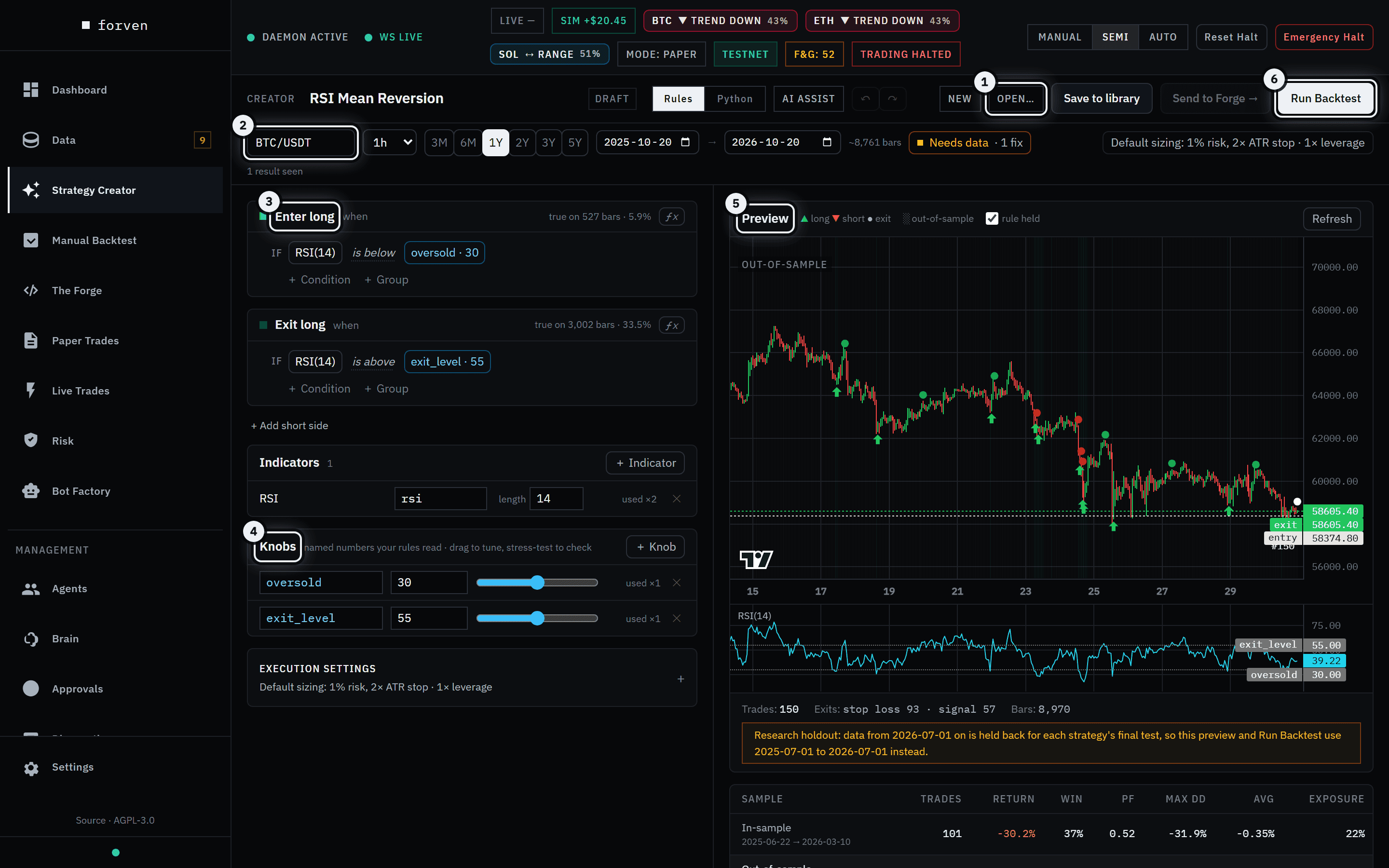 Rules on the left, the market and its live preview on the right.
- 1Open… opens the launcher: your library, templates and the built-in strategies.
- 2The market bar: symbol, timeframe, test window, data readiness and the execution summary.
- 3The rules. Each side reads as a sentence — Enter long when RSI(14) is below oversold (30).
- 4Knobs are the named numbers your rules read. Drag one and the preview re-runs.
- 5The live preview: every entry and exit on the chart, with the out-of-sample part shaded.
- 6Run Backtest scores the out-of-sample part of the window with your execution settings.
Forven is a research tool. A strategy built here has proven nothing until it survives the gauntlet. Backtest numbers describe the past; they are not predictive, and nothing here is financial advice.
The page never opens blank
On first load the Creator applies the RSI Mean Reversion template on BTC/USDT 1h with a one-year window, and the preview starts building straight away. The title bar shows the strategy's name (click it to rename) and a status chip:
| Chip | Meaning |
|---|---|
| Draft | Not saved to your library yet. |
| Saved · v1 · … | Saved to your library. The number is the version; the last part is its library status, in_forge once sent to The Forge. |
| Unsaved changes | You've edited a saved strategy since the last save. |
Start from something: the launcher
New and Open… (Ctrl+O) open the same launcher. It has a search box ("Search strategies, templates, markets…"), ✦ Blank canvas, Import…, and four tabs:
| Tab | What's in it |
|---|---|
| My Strategies | Your library. Each entry shows rules or python, market, version and status, with Open, Duplicate, → Forge (or In Forge → once sent) and Delete. |
| Templates | Eight starting points (below). |
| Prebuilt | The built-in strategies shipped with Forven. Rule-based ones open as an editable copy. |
| App-generated | Strategies the agents created. Tick Show strategies the app generated to list them. |
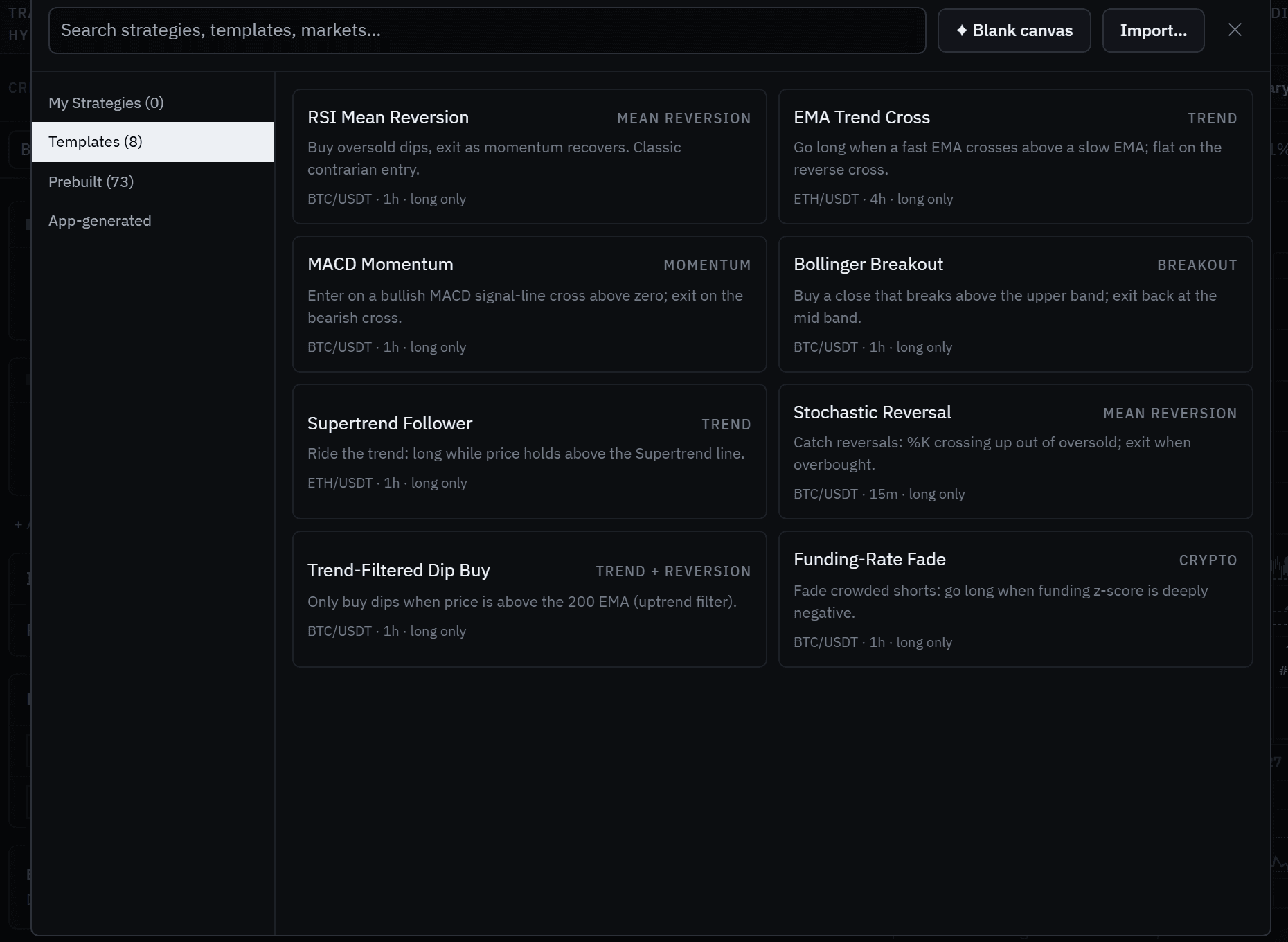 Every template is long-only and opens on its own market and timeframe.
| Template | Family | Market |
|---|---|---|
| RSI Mean Reversion | Mean Reversion | BTC/USDT 1h |
| EMA Trend Cross | Trend | ETH/USDT 4h |
| MACD Momentum | Momentum | BTC/USDT 1h |
| Bollinger Breakout | Breakout | BTC/USDT 1h |
| Supertrend Follower | Trend | ETH/USDT 1h |
| Stochastic Reversal | Mean Reversion | BTC/USDT 15m |
| Trend-Filtered Dip Buy | Trend + Reversion | BTC/USDT 1h |
| Funding-Rate Fade | Crypto | BTC/USDT 1h |
A built-in whose logic isn't a rule spec can't be edited here. The Creator says so and offers Open Manual Backtest → to run or tune it there instead. Import… takes a Forven strategy export and creates a new quick-screen container from it.
Rules or Python
The Rules / Python switch in the title bar picks the editor. AI assist opens a panel above either one.
Rules
Each side of the strategy is a card — Enter long and Exit long, plus Enter short and Exit short after + Add short side. A card reads "when ALL (or ANY) of these hold"; click the ALL/ANY word to flip it. The card header also shows how often the rule held over the window ("true on 474 bars · 5.3%").
- + Condition adds a comparison: an indicator, price or market series against another series, a number or a knob — is below, is above, crosses above and so on.
- + Group nests a set of conditions with its own ALL/ANY.
- ƒx edits the whole side as a formula — series by id, knobs as
$name,and/or, parentheses — for examplersi < $oversold and close > ema200. Ctrl+Enter applies it.
Indicators. + Indicator opens a searchable palette of 48 indicators. Each one you add gets an id your rules refer to, and its lengths are editable inline.
| Family | Indicators |
|---|---|
| Moving average | SMA, EMA, WMA, DEMA, TEMA, Hull MA, VWMA |
| Trend | MACD, PPO, ADX, Aroon, Vortex, TRIX, Supertrend, Parabolic SAR, Donchian, Ichimoku, Linear Regression |
| Momentum | RSI, Stochastic, Stochastic RSI, KDJ, CCI, Williams %R, Rate of Change, Momentum, Chande Momentum, TSI, Ultimate Oscillator, Awesome Oscillator, Connors RSI |
| Volatility | ATR, Normalized ATR, Bollinger Bands, Bollinger Width, Keltner Channel, Std Dev, Historical Volatility |
| Volume | VWAP, OBV, Accumulation/Distribution, Chaikin Money Flow, Money Flow Index, Volume SMA, Force Index, Ease of Movement |
| Crypto | Funding Z-Score, Open Interest ROC |
The crypto indicators read Forven's enrichment streams, so they need that data stored.
Knobs are named numbers your rules read ("named numbers your rules read · drag to tune, stress-test to check"). Click a number in a rule and choose Turn it into a knob, or use + Knob. Dragging a knob's slider re-runs the preview; the stress test and heatmap vary knobs to see whether the result survives.
Python
Switch to Python to write a BaseStrategy subclass whose generate_signals(df) returns entries and exits; the module must export STRATEGY_CLASS and TYPE_NAME. The editor starts from a template (Reset template restores it). Validate & load runs the security scan and a sandboxed load; on success it shows "Loaded name" and a Parameters editor. See Writing custom strategies for the contract.
The live preview, trade explanations, stress test, heatmap and market grid work on Rules strategies only. For Python, validate and load, then Run Backtest.
AI assist
AI assist needs a connected AI provider (Agents → Setup). Describe a strategy or a change in plain English — "Buy when RSI drops below 30 while price is above the 200 EMA; sell above 60." — then:
- Check data runs a read-only check, with no model call, of the inputs your description names against the data you have. It lists what it detected and flags gaps, with a link to review data collection. Inputs Forven has no feed for — coin days destroyed, HODL waves, ETF flows, VIX — can't be built from.
- Generate strategy drafts new rules into the builder.
- Change current rules (Rules mode) proposes an edit as a Proposed change diff; Apply change or Discard it. Ctrl+Z undoes an applied change.
The panel shows which provider answered ("via …"). With no provider connected you get "No AI provider is configured…", and everything else on the page keeps working. A draft is a validated spec, not a validated idea — read every condition before you trust it.
The market bar
| Control | What it does |
|---|---|
| Symbol and timeframe | The market the preview and the backtest run on (default BTC/USDT, 1h). Timeframes run from 1m to 1w. |
| 3M … 5Y | Window presets (default 1Y), or set start and end dates. "~N bars" estimates the size; the engine caps a run at 100,000 bars. |
| Data readiness chip | Data ready, Needs data (with the number of fixes) or Data blocked. Click it for the requirements behind it — the market, the window and any feeds the rules read — each with a fix link into Get data. |
| Execution summary | Shows the sizing in force, for example "Default sizing: 1% risk, 2× ATR stop · 1× leverage". Click it to open Execution Settings. |
| "N results seen" | How many results you've looked at this session (Rules mode). The deflated Sharpe charges for each one. |
The most recent 3–6 months — the last full quarter and the current one — are held back for each strategy's one-shot final test (the held-back test), which by default runs when the strategy applies for live. If your window reaches past that cutoff, the preview says so, and both the preview and Run Backtest use a window of the same length ending at the cutoff.
Execution Settings
Open Execution Settings (the collapsible card under the rules) to set how the strategy trades. These travel with the saved strategy; The Forge re-tests it with the pipeline's own data windows and cost assumptions.
| Field | Default | Notes |
|---|---|---|
| Initial Capital | 10,000 | |
| Fee (bps) | 10 | Per side. The pipeline's own runs use 4.5. |
| Slippage (bps) | 5 | Per side. The pipeline's own runs use 2. |
| Leverage | 1 | 1 to 125. |
| Trade Direction | Long only | Python mode only: Long only / Short only / Both. In Rules mode the sides you define decide it. |
| Sizing Mode | Full equity | Full equity, Fraction (risk), Fixed notional, ATR risk. Kelly (opens no trades) is disabled: Kelly sizes from the strategy's own closed trades, and a backtest starts with none. |
| Risk Per Trade | 0.02 | Fraction (risk) and ATR risk. |
| Fixed Size (quote) | 1,000 | Fixed notional. |
| ATR Stop Mult | 2 | ATR risk. |
| Stop Loss %, Take Profit %, Trailing Stop %, Time Stop (bars) | None | Leave blank for no exit of that kind. |
Two rules catch people out:
- Full equity needs an exit. With no stop, target, trailing stop or time stop, the engine doesn't size at full equity: it risks 1% of equity per trade against a 2× ATR stop it places itself, and the panel says so. Add an exit to trade full equity.
- Fraction (risk) needs a stop. "Fraction sizing needs a Stop Loss % or Trailing Stop %."
Preview and vitals
The Preview chart marks long entries ▲, short entries ▼ and exits ●, shades the out-of-sample part of the window, and can shade the bars where the entry rule held (rule held). Indicator panes stack below the price. Under the chart: trades, exits by reason (stop loss, signal and so on) and bars. Refresh re-runs it; editing the rules does too.
Below the preview, the vitals split the window the way Run Backtest does:
- In-sample — "Shapes the rule. Not scored."
- Out-of-sample — "What Run Backtest scores."
Each row shows trades, return, win rate, profit factor, max drawdown, average trade and exposure, with its dates. Under them, Deflated Sharpe gives the chance the out-of-sample edge is real, allowing for every result you've seen this session; it needs at least 5 out-of-sample trades. Plain-language warnings list the usual traps: too few trades, profitable in-sample but losing out-of-sample, fees eating the gross profit.
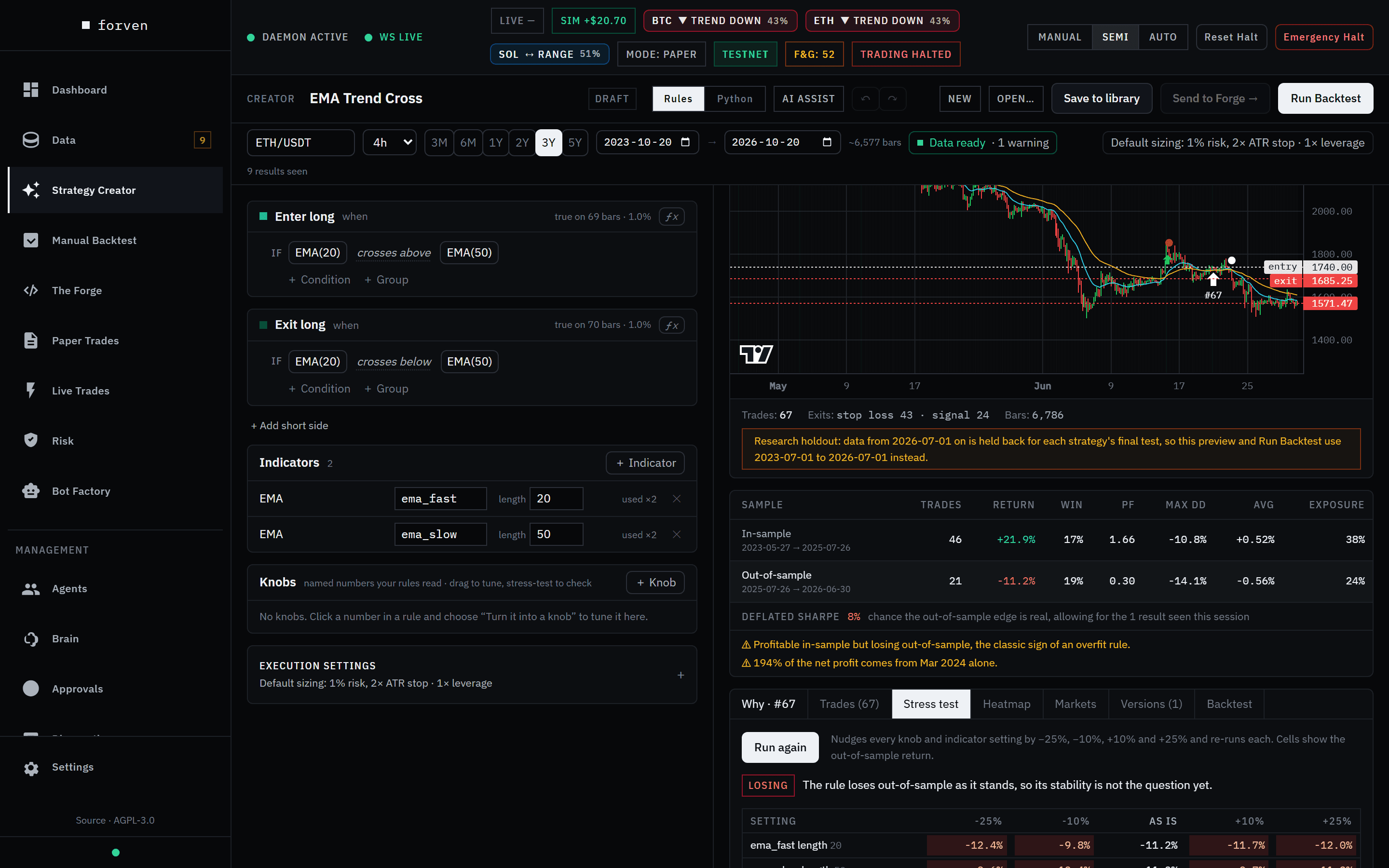 Made money in-sample, lost it out-of-sample — the classic overfit signature.
The detail tabs
| Tab | What it shows |
|---|---|
| Why | The selected trade (click one on the chart): entry and exit, result, fees and funding, size, why it exited, and whether it was in-sample or out-of-sample. ← → step through trades. |
| Trades | Every preview trade in a table. |
| Stress test | Run stress test nudges each knob and indicator setting by −25%, −10%, +10% and +25%. Green keeps at least half the out-of-sample result, amber keeps less, red loses money. |
| Heatmap | Sweep one knob across (x) and optionally another down (y), with ranges and steps, then Run heatmap. ★ marks the best out-of-sample cell; click a cell to adopt its settings. |
| Markets | Compare markets runs the same rules on other symbols and timeframes you have stored data for (it never downloads). Click a cell to switch market. |
| Versions | Every version of the rules you've previewed, with its in-sample and out-of-sample return and DSR. Diff shows what changed; Restore brings it back. |
| Backtest | The Run Backtest result: return, Sharpe, drawdown, win rate, profit factor and equity against buy-and-hold. Full report → opens the run on a strategy page. |
Every heatmap cell and market-grid cell is a full backtest, and every one counts toward the deflated Sharpe: picking the best cell is itself a selection.
Save and send to The Forge
Save to library (Ctrl+S) opens Save strategy: name it and click Save as new. Once it's saved the button reads Save, and saving an opened strategy asks whether to Overwrite it or Save as new. Each save is a new version.
Send to Forge → creates a pipeline strategy container at quick screen, keeping the market, timeframe, parameters and execution settings, and marks the library entry in_forge. The button is disabled until the strategy is saved with no unsaved changes; afterwards it becomes Open in Forge →. From there the pipeline takes over. In Manual mode nothing runs on its own, so open the strategy and drive it, or switch to Semi — see autonomy modes.
Keyboard shortcuts
| Keys | Action |
|---|---|
| Ctrl+Enter | Run Backtest (in the AI assist box: Generate strategy; in the ƒx editor: apply) |
| Ctrl+S | Save |
| Ctrl+O | Open the launcher |
| Ctrl+Z | Undo |
| Ctrl+Shift+Z or Ctrl+Y | Redo |
| ← / → | Previous / next trade, when one is selected |
| Esc | Close the launcher |
On macOS, Cmd works in place of Ctrl.
Caveats
- A good preview is not a good strategy. Markers landing where you expect says nothing about edge. Judge the out-of-sample row, then let the gauntlet decide.
- Looking costs something. Every variant, heatmap cell and market you try lowers the deflated Sharpe. Tuning until the numbers look good is how overfit strategies are made.
- The Creator's costs are conservative. 10 bps fees and 5 bps slippage by default, against 4.5 and 2 in the pipeline, so the same rules can score differently in The Forge.
- Data first. A strategy that needs data you don't have is blocked, not run on zeros. Check the readiness chip.
Related
Managing market data
Use the Data page to download, import, inspect and keep fresh the market data every backtest, gauntlet run and paper trade reads — Set up data presets, the Get data wizard, the Health, Catalog, Coverage, Jobs, Storage and Log tabs, freshness tiers, and safe deletes.
Backtesting a strategy
Run any built-in or pipeline strategy on any market with Manual Backtest — what each field does when you leave it blank, why windows end at the holdout cutoff, and how to read the out-of-sample result without fooling yourself.