Live trading
The Live Trades desk for strategies at the live stage — what going live takes, the seven account gates, the refusals at go-live, how live orders differ from paper, mainnet limits, and why live trading is unsupported.
Live Trades (/live-trades) is the trading desk for strategies at the live stage (live_graduated). Their orders go to Hyperliquid, on testnet unless you deliberately switch to mainnet. The desk works like Paper Trades, with the differences that come with real orders.
Live trading is unsupported
Paper trading is the supported mode. The live path exists in the code, but it is not a supported feature of the open-source build: if you wire up real keys and go live, you do so entirely at your own risk. Past results don't predict live results, and nothing here is financial advice.
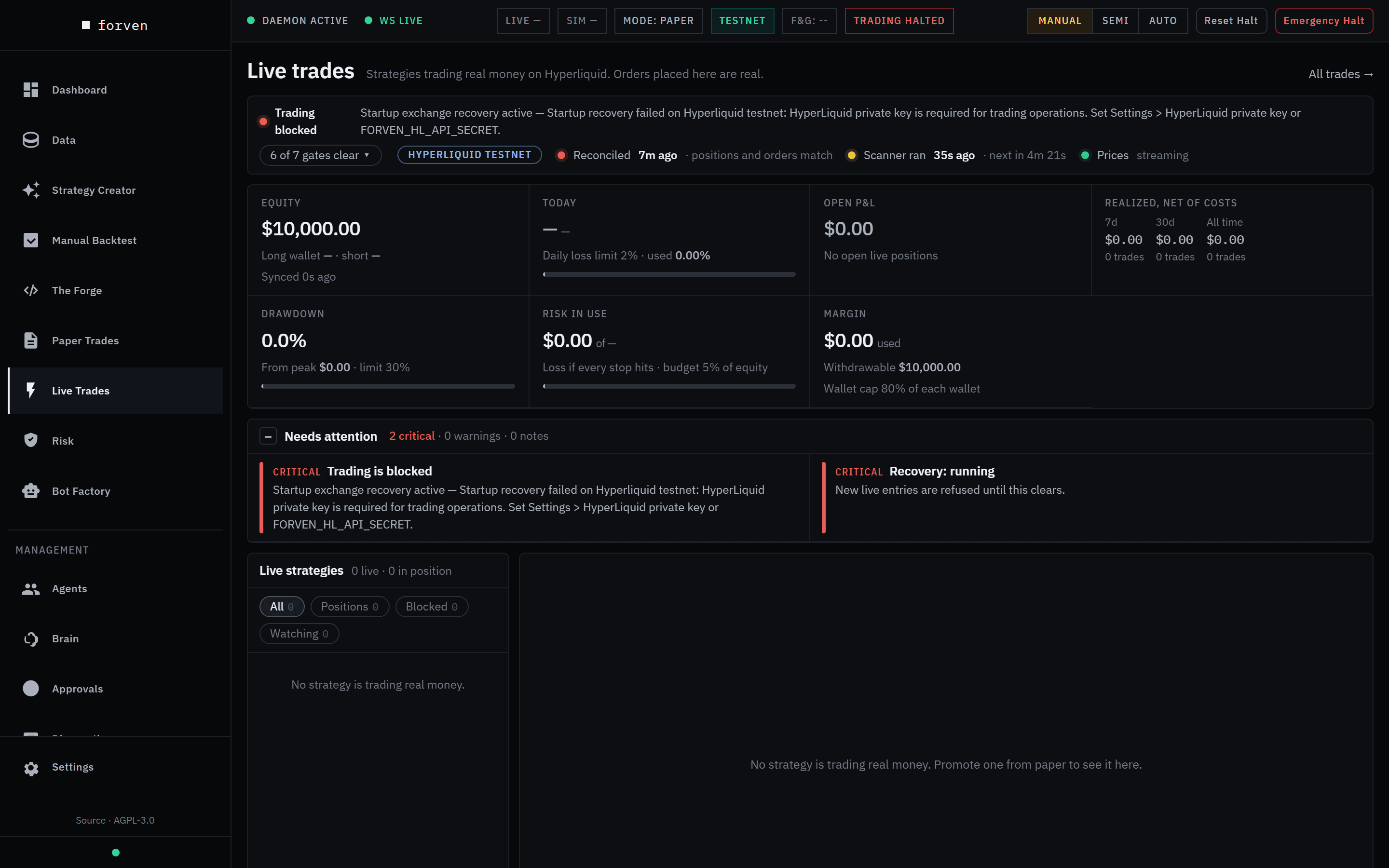 A fresh install with no exchange keys. Nothing is live, and trading is blocked until credentials exist.
How live is reached
There is no paper/live switch for the whole app. Setting Settings → Trading → Trading mode to Live is refused: This build supports paper trading and Hyperliquid testnet only.
Instead, each strategy goes live on its own, through a typed approval. A live-stage strategy places orders on Hyperliquid testnet, with test funds, unless you take the two extra mainnet steps below. The desk calls everything "real money" whichever network you're on.
What going live takes
Connect Hyperliquid
In Settings → HyperLiquid → Credentials & network, enter the Hyperliquid wallet address, Hyperliquid API address and Hyperliquid API secret. Hyperliquid testnet is on by default; leave it on. See HyperLiquid integration.
Prove a strategy in paper
A strategy has to clear the Paper to Live gates (Settings → Lab): by default at least 30 days and 20 closed forward trades in paper, then a sequential test showing its forward trades confirm its backtest, the breadth test, the robustness and deflated Sharpe checks recorded when it entered paper, and the one-shot held-back test. A multi-coin paper strategy can't go live yet. See Going live safely and promotion gates.
Approve the go-live
The request waits in Approvals as a Strategy Promotion to the live stage. If you turn on the Live-graduation recommender, which is off by default, it can arrive as a Live Graduation Recommendation instead. Click Approve (go live). The dialog Go live with …?, named for the strategy, shows the network and whether the mainnet switch is armed, and requires:
- a Per-asset notional ceiling (USD), the largest order value the strategy may open; and
- GO LIVE, typed to confirm.
Then Approve and go live. The setting Allow automatic go-live exists but is off by default, and turning it on asks you to type LIVE when you save.
Mainnet only: two deliberate switches
Turn Hyperliquid testnet off. Saving asks Save changes that affect real money? and you must type LIVE. Then set FORVEN_ALLOW_MAINNET=1 in the backend's environment; there is no control for it in the app. Without it, every mainnet order is refused, except closing orders and protective stops.
Refused at go-live, even when forced
Some go-lives are refused even when forced:
- One live strategy per coin per side. Hyperliquid holds one position per coin per wallet, so two live strategies that could hold the same coin in the same direction would refuse each other's entries. The refusal names the other strategy and tells you to demote it first: …One wallet holds one position per coin, so the two would refuse each other's entries.
- Wallet capacity. Each wallet must be able to hold the margin of every live strategy that could use it, all entered at once, within Live max per-wallet margin (default 80% of the wallet). The refusal says how much to add to the wallet, or suggests keeping fewer strategies live on that side.
Leaving live with open trades
A strategy that holds open live trades can't move to a stage that doesn't manage live positions, even when forced. That covers a demotion, an archive, a dethrone, or the decay kill switch. It stays live and keeps managing its positions, and you get a critical alert saying the strategy is still live: close its open trades to move it to the stage you asked for. Close its positions first. As a backstop, any open live trade whose strategy is no longer live raises a critical risk alert.
The live desk
The header reads Live trades — Strategies trading real money on Hyperliquid. Orders placed here are real. The layout is the same as the paper desk: a strategy rail, the chart with fills and refused signals, the funding and open-interest strip, the Position, Why, Performance and Details tabs, a manual order ticket and the blotter. See Paper trading for a tour.
The status line and the seven gates
The status line says Trading allowed or Trading blocked with the reason, then N of 7 gates clear ▾. Open it to see which gate is closed. While any is closed, new live entries are refused.
| Gate | Closed when | How it clears |
|---|---|---|
| System running | The system is paused, for example by Emergency Halt. | Reset Halt |
| Kill switch | Drawdown from the peak reached the max drawdown limit. | Reset Halt, after review. This also re-baselines the high-water mark. |
| Daily loss halt | Today's loss reached the daily loss limit. | The next UTC day, or Reset Halt. |
| Recovery | Forven is reconciling its records with the exchange, or needs you to. | The recovery banner on Risk. |
| Exchange prices API | Hyperliquid's price feed circuit breaker is open. | Closes on its own once calls succeed again. |
| Exchange trading API | The order-submission breaker is open. | Same. |
| Exchange account API | The account-read breaker is open. | Same. |
Gates never block closing or reducing a position, and they never block paper trading.
Next to the gates are the network (Hyperliquid testnet or mainnet), Reconciled X ago · positions and orders match (or the number of discrepancies), when the scanner last ran, and whether prices are streaming.
The account strip
Equity (the long and short wallets, and when they last synced), Today (against the daily loss limit), Open P&L, Realized, net of costs (7 days, 30 days, all time), Drawdown (from the peak, against the limit), Risk in use (the loss if every stop hits, against the open-risk budget, 5% of equity by default) and Margin (withdrawable, and the 80% per-wallet cap).
Manual orders
The Manual order ticket works as on paper, with these differences:
- The pill reads Live · real money.
- A Stop is required.
- Leverage is whole numbers only, because Hyperliquid only sets whole-number leverage.
- Size by risk means a percentage of account equity.
- Before you can submit, the ticket checks the per-trade cap, the open-risk budget, the destination wallet, the single-order cap, the go-live ceiling and any closed gate.
The confirmation, Open long BTC for example, warns Live on Hyperliquid testnet. This places a real market order with real money, then rests a reduce-only stop at … (it says mainnet when that's the network), names the wallet, and the button reads Place live long. The order fills at Hyperliquid's price, and spread and depth are checked again at submit.
On an open position, Close, Close 50%, Close 25%, Stop to entry, Flip and Pause auto place real orders. The stop rests on Hyperliquid as a reduce-only order: you can move it, but not clear it. The blotter's Open orders tab lists the resting stops and targets.
The go-live ceiling
Each live strategy has a notional ceiling, set at go-live and editable in the Details tab (Save ceiling) or on the Risk page. The strategy's own entries are sized down to fit under it. A manual order above it is refused. A live strategy without a ceiling shows up in Needs attention.
The ceiling caps position size, not risk: a $100 ceiling with a 3% stop risks about $3.
How a live position is opened
No AI agent places, sizes or closes positions. A live strategy runs on the same execution logic as its backtest and paper book, and the scanner drives it on each closed bar.
- Slice. The account is split equally across live strategies. Each position is risk-sized inside its slice, and the ceiling wins if it is smaller. If the wallets couldn't hold every live strategy at once, every slice is scaled down to fit. The dashboard then says Live sizes scaled to N% to fit the … wallet, naming the wallet.
- Leverage. Hyperliquid only takes whole-number leverage, so a strategy validated at 1.3× is set to 2×. It still trades its validated position size; only the margin held, and so the liquidation price, changes. The open is refused only if the stop would sit beyond a conservative estimate of the liquidation price.
- Gates. The kill switch, daily-loss halt, margin, the loss-at-stop cap, the portfolio budget and correlation caps, the liquidity guard, the regime gate when it is enforcing, and the ceiling. Every check fails closed: if a value can't be read, the open is refused.
- Order. A market order, then a protective stop resting on the exchange as a reduce-only order. No stop, no order.
- Record. The trade is recorded as live and reconciled against the exchange.
Refused entries and exits are not silent. They show on the rail (N entries refused in Xd), as Refused markers on the chart, in the Why tab and in the Decisions tab of the blotter.
Mainnet limits
When the network is mainnet, the limits tighten and some guards lock on:
- Leverage is capped at 3×. Max leverage (mainnet) (1–3, default 3) can only lower it.
- The mainnet risk profile is a ceiling: 1% portfolio budget, 5% max drawdown, 3% daily loss and 1% risk per trade. Saved settings can tighten these but not loosen them. Settings shows an In force line under each affected field with the value the engine actually uses.
- The kill switch, the portfolio budget and the liquidity guard can't be switched off.
- At most 10 concurrent positions.
- Protective stops always pass the mainnet guard, so a stop is never refused.
- On any network, risk per trade is capped at 10% and daily loss at 50%.
Phantom recovery
Forven keeps reconciling the Hyperliquid account against its own records. If the exchange holds a position Forven has no record of, recovery creates a trade so it is tracked, and puts an emergency stop on it if it has none. Such a trade isn't linked to a strategy and needs your review. If an unfamiliar position appears after a restart, check the recovery banner on Risk first. A single empty exchange read never counts as "everything closed"; Forven waits for confirmation.
Live is not the end of the pipeline
- The decay kill switch compares each live strategy's recent live Sharpe (the last 72 hours, once it has at least 5 trades) with its baseline. If it has fallen by more than Live decay kill switch (default 30%), the strategy is retired to
archived. If it still holds positions, it stays live until they close, as above. - Execution check. If a live strategy's settings drift from what was validated, its Why tab shows an Execution check with Restore validated settings or Accept a backtest as the live baseline.
- Bot Factory bots are separate. They have their own paper/live switch and their own wallets.
Caveats
- Unsupported. Paper is the supported mode. Going live is at your own risk.
- Paper P&L is not live P&L. Paper fills are simulated at the live mid; live fills are the exchange's, inside a shared and divided account.
- Drawdown is measured on the whole account. Slices bound each strategy's share, but the kill switch watches the account.
- Resetting the kill switch re-baselines the high-water mark to current equity, so the next trip is measured from there. Reset deliberately.
- A recovered trade may be unlinked. Review it.
Related
- Going live safely: the checklist before any real capital
- Risk & safety: the gauges, halts, budget and liquidity guard
- Risk controls: every limit and its default
- HyperLiquid integration: credentials, wallets, testnet and mainnet
Paper trading
How paper trading works in Forven — strategies trading simulated $10,000 books on the live market feed — and every part of the Paper Trades desk.
Risk & safety
Read the Risk Command page — halt banners, circuit breakers, the gauges, Trading Status and Risk Limits, the Live Portfolio Budget, the Liquidity Guard, the Regime Gate, the Live/Paper scope toggle and Emergency Halt — and know when to step in.