Risk controls
The hard risk limits — drawdown, daily loss, per-trade risk, position caps, live capital slices, the portfolio budget, per-wallet margin, the liquidity guard, and the mainnet locks — and the kill-switch that enforces them before a strategy can lose real capital.
Risk controls are the fixed limits that decide whether a trade is allowed to open and when all trading must stop. They are checked in code at order time and in the portfolio-risk loop, not left to a strategy's discretion. This page is the operator reference for what each limit is, its default, and — most importantly — how the limits interact so a single bad run cannot become a catastrophic one.
Risk Command shows these controls as panels; this page documents the controls themselves. For a guided tour of the screens, see the risk controls walkthrough. Most of these limits only bite in live trading. The supported mode is paper, and real-capital halts never block paper strategies.
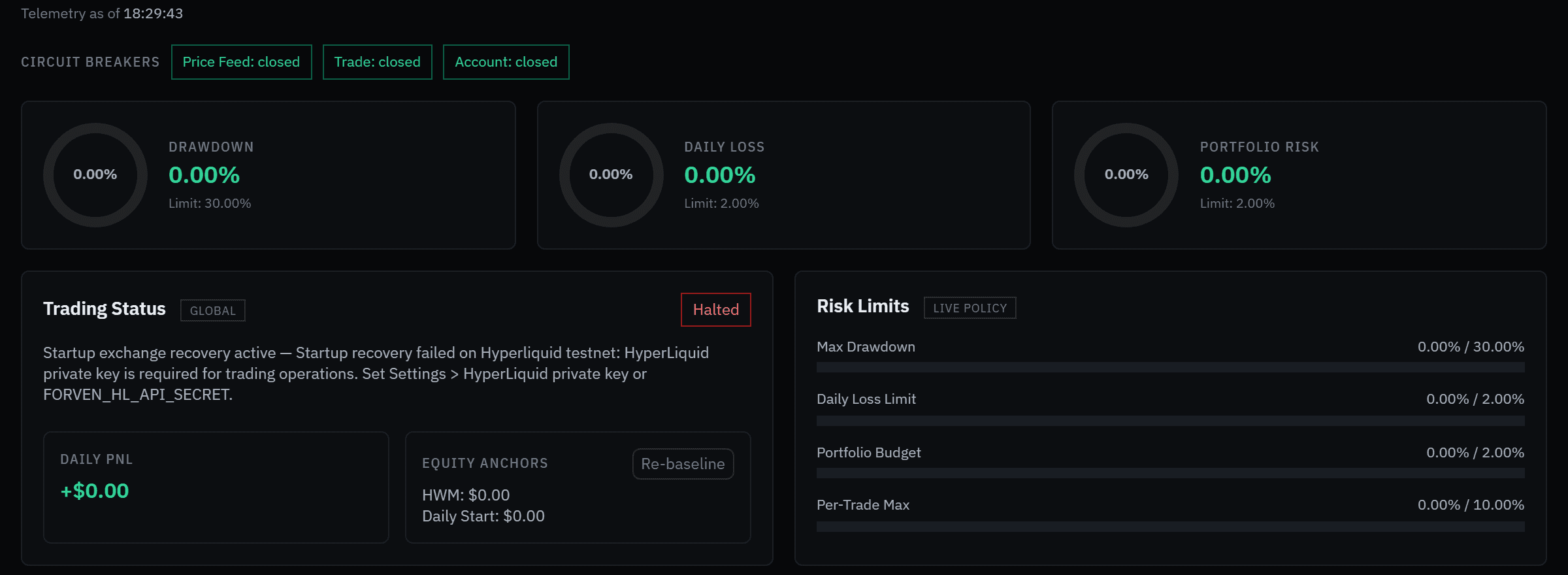 Risk Command on a keyless fresh install. The halt is the startup exchange check, which can't run without keys; it does not stop paper trading.
Forven is a research tool. Nothing here is a prediction, a recommendation, or financial advice. Risk controls cap downside; they do not create an edge, and no setting guarantees against loss. Every number below is an illustrative default, not a suggested value — tune it to your own risk budget.
The enforcement points
Every risk control runs at one of three moments:
- At admission —
can_open()is the gate each new trade must pass. It checks the halts, per-trade risk, the position cap, the per-strategy cooldown, and — for live orders — the portfolio budget, correlation-adjusted exposure, and the destination wallet's capacity. It fails closed: if a limit is breached or cannot be evaluated, the order is refused with a reason naming the limit. - At order entry (live only) — immediately before the exchange call, every real-capital open re-asserts that its loss-at-stop fits within
max_risk_per_tradeof real equity, the liquidity guard checks the market, and a protective stop must exist. Anything unresolvable refuses the order. - In the portfolio-risk loop — each daemon tick compares real-capital drawdown against
max_drawdown_pctand same-day loss againstmax_daily_loss_pct, tripping the kill-switch or the daily-loss halt when a threshold is crossed.
The first two stop a bad trade. The third stops all live trading once the account as a whole has fallen too far.
The hard limits
Set these in Settings → Trading (the Position sizing and Loss limits sections). They persist in the settings store (forven:settings) and apply on the next check — no restart needed.
| Control | Config key | Default | Enforced |
|---|---|---|---|
| Max drawdown | max_drawdown_pct | 30 (also the maximum; minimum 1) | Portfolio loop → kill-switch |
| Max daily loss | max_daily_loss_pct | 2 | Portfolio loop → daily-loss halt |
| Max risk per trade | max_risk_per_trade_pct | 10 | can_open(), and the live order-entry clamp |
| Max concurrent positions (live) | max_concurrent_positions | 5 | can_open() against the live pool |
| Max concurrent positions (paper) | paper_max_concurrent_positions | 0 (unlimited) | can_open() per paper session |
| Max leverage (mainnet) | live_max_leverage | 3 (range 1–3) | Live opens on mainnet |
| Min risk/reward | min_risk_reward_ratio | 0 (off) | Signal evaluation |
| Cooldown after loss | cooldown_after_loss_hours | 0 (off) | can_open() per strategy |
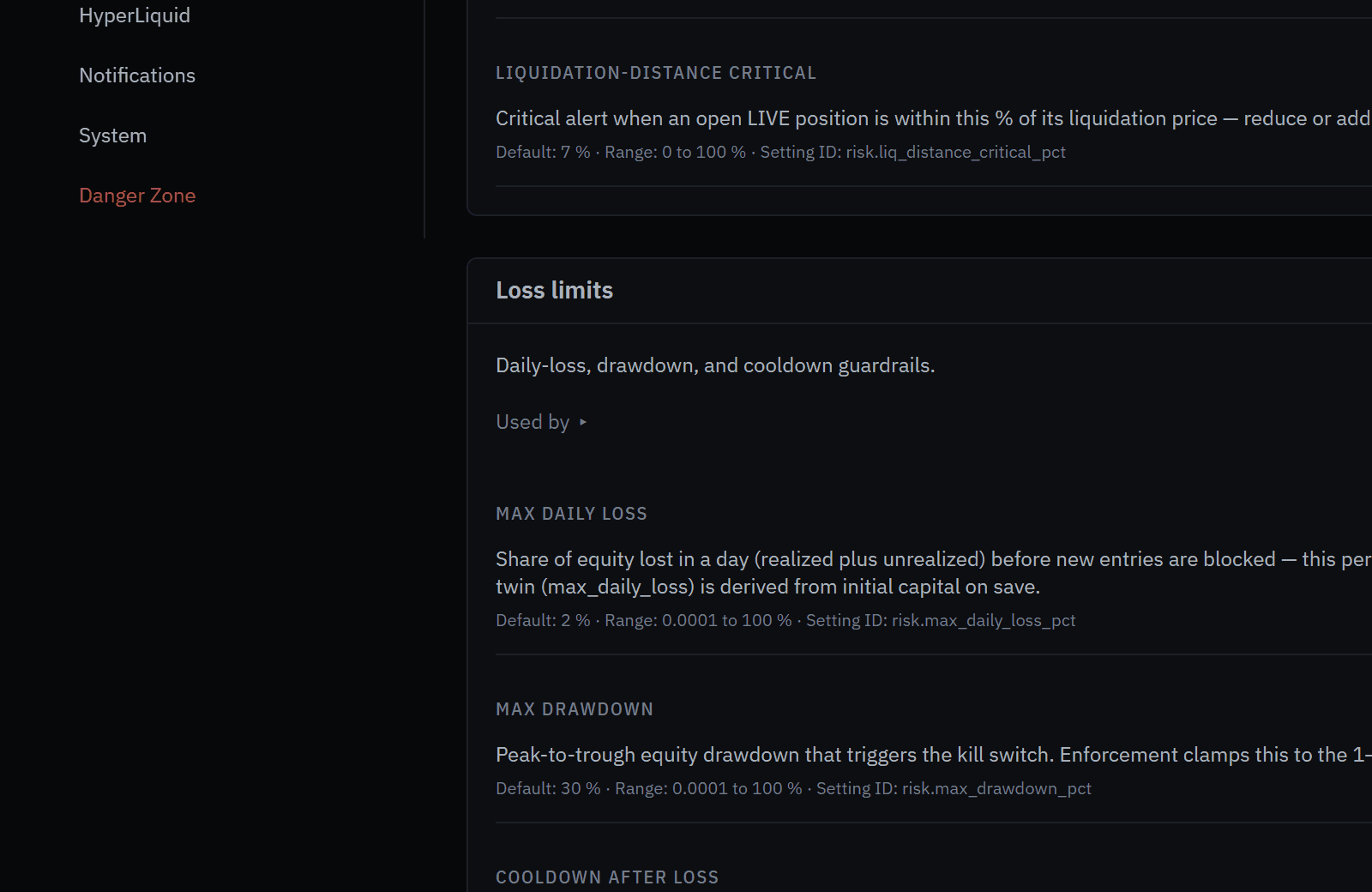 Settings → Trading → Loss limits.
The built-in profiles
Before any settings have ever been saved, the engine uses a stricter built-in profile for the network your live orders resolve to:
| Profile | Portfolio budget | Max drawdown | Daily loss | Per trade |
|---|---|---|---|---|
| Testnet | 2% | 10% | 5% | 2% |
| Mainnet | 1% | 5% | 3% | 1% |
Once settings are saved, the saved values apply on testnet (the defaults are 30% drawdown, 2% daily loss and 10% per trade). On mainnet the profile is a ceiling: saved values can tighten it but never loosen it. See mainnet locks.
Max drawdown — the kill-switch threshold
max_drawdown_pct is the deepest real-capital drawdown allowed before the kill-switch fires and closes every live position. Drawdown is measured against the high-water mark (HWM):
drawdown = 1 - current_equity / high_water_markValues above 30% are clamped to 30%, and values below 1% are clamped to 1%. Only real-capital equity readings count, and the switch latches only after three consecutive breaching readings, so a single glitched balance read cannot halt the account.
The high-water mark is just as careful going up. A rise is held as pending and committed only when a later, healthy reading still shows it, at the lowest level seen while it was pending. Equity reads that straddle a fill are retaken. Without this, one read that counted released margin twice could set a peak the account never reached, and the next drawdown would be measured against it.
Max daily loss — the daily halt
max_daily_loss_pct caps same-day loss as a percentage of equity. When the day's loss passes the cap, daily_loss_halt is set and new live trades are blocked for the rest of the UTC day. Existing positions are not force-closed — this is a brake on opening more, not an emergency exit. It clears at UTC midnight, or on a manual trading-halt reset. A legacy USD form, max_daily_loss, is still honoured but is overridden by max_daily_loss_pct when both are set.
Max risk per trade
max_risk_per_trade_pct caps the risk any single order may carry: the loss if its stop is hit, as a percentage of the account. can_open() enforces it at admission. For live orders there are two more layers:
- the order-entry clamp re-checks loss-at-stop against real account equity right before the exchange call, and scales the order down to fit;
- a hard live ceiling,
live_hard_max_per_trade_risk_pct(default 2), refuses any single live order whose risk-to-stop exceeds it, whatever the per-trade setting says.
If the per-trade cap is somehow missing, live orders fall back to a conservative 2% cap rather than skipping the check.
Position caps — and why live and paper differ
max_concurrent_positions(default 5) applies to the live pool — every live strategy together, per account the order routes to.paper_max_concurrent_positionsapplies per paper session. Paper sessions are isolated sandboxes; different strategies may even hold the same asset in opposite directions.
Optional entry gates
min_risk_reward_ratio— rejects an entry whose risk/reward is below the threshold (for example1.5requires at least 1:1.5).0disables it.cooldown_after_loss_hours— blocks a strategy from reopening for N hours after a loss. Per strategy; others keep trading.0disables it.
Two more keys feed assumed costs into the risk math: risk_fee_bps (default 4.5) and risk_slippage_bps (default 2.0), the same costs backtests assume.
Live capital: slices, budget, and liquidity
Live strategies share one real account, so live admission adds controls that paper never needs.
Equal capital slices
The account is divided first. Each live strategy gets an equal slice — equity / N, where N is the number of live strategies, pooling the long and short direction books — and risk-sizes inside it. Two properties follow:
- Worst-case portfolio risk stays at
max_risk_per_tradeof the account however many strategies are live. N strategies each risking r of equity/N sum to r of equity, so promoting another strategy divides risk instead of adding to it. - No single position can exceed its slice times leverage.
An optional per-strategy notional ceiling can only make a position smaller — the lower of the two wins. Manage both on the risk page (System vs Manual sizing). If the live cohort or equity cannot be read, live opens are refused rather than guessing N. Paper and backtests keep sizing off full equity so their track records stay comparable.
Slices shrink to fit the wallets. If every live strategy that can route to one wallet entered at once and needed more margin than that wallet may hold, every live slice is scaled down until the worst case fits, instead of refusing entries. Percent returns are unchanged; only the dollar size shrinks, and only while a wallet is over-committed. The dashboard says so: "Live sizes scaled to N% to fit the … wallet".
Portfolio budget
For the live book, can_open() also enforces:
| Budget | Key | Default |
|---|---|---|
| Total open risk to stops | live_max_total_open_risk_pct | 5% of equity |
| Exposure per asset | live_max_asset_exposure_pct | 150% |
| Exposure per correlated group | live_max_group_exposure_pct | 200% |
| Correlation-weighted (effective) exposure | live_max_effective_exposure_pct | 200% |
| One order's notional | live_hard_max_order_notional_pct | 100% |
| Margin per wallet (Live max per-wallet margin) | live_max_book_margin_pct | 80% of that wallet's equity |
The effective-exposure cap uses measured correlations, so it catches drifting correlations and cross-group pairs the static group cap cannot: three highly correlated longs count much closer to one large bet than three independent ones. These caps block rather than resize, so an order either fits or is refused, and the refusal alerts you.
The per-wallet cap measures margin — notional ÷ exchange leverage, this order included — because that is what the venue holds against the wallet. It replaces the older live_max_book_notional_pct, which capped gross notional at 1× and refused valid entries while a wallet still had margin free. The 80% default matches the exchange-margin check, and going live is refused when the live strategies could need more than this at once.
Liquidity guard
Before a live order is placed, the liquidity guard checks spread, 24-hour volume, order-book depth share, and expected price impact against configurable ceilings, and refuses orders into a market too thin to exit cleanly.
Retry brake
A live open that keeps failing is not retried forever. Failed opens back off with a durable cooldown, and repeated failures stop after live_failed_open_max_attempts, so a rejected order cannot turn into a retry storm.
Mainnet locks
When live orders resolve to the HyperLiquid mainnet, some limits become fixed ceilings that Settings cannot loosen. Live trading is unsupported; these locks exist so a stale testnet-era setting can't quietly widen real-money risk.
| Lock | On mainnet |
|---|---|
| Leverage | Capped at 3×. Max leverage (mainnet) (live_max_leverage, 1–3) can only lower it. Testnet is not capped. |
| Risk profile | The mainnet profile (1% portfolio budget, 5% drawdown, 3% daily loss, 1% per trade) is a ceiling: saved values may tighten it, never loosen it. |
| Account guards | The kill switch, the live portfolio budget, and the liquidity guard cannot be switched off, and the budget caps cannot be raised above their defaults. |
| Concurrent positions | At most 10 live positions, whatever max_concurrent_positions says. |
On any network, risk per trade is capped at 10% and the daily-loss limit at 50%; a zero, negative or non-numeric override is ignored. Protective stops and reduce-only exits always pass the mainnet guard, so a position can always be closed.
Leverage on HyperLiquid is whole numbers only. A validated fractional leverage (say 1.3×) is set at the next whole number (2×) on the exchange; position size still comes from the validated leverage, and a live open is refused only if its stop sits beyond the conservative liquidation distance.
When orders resolve to mainnet, Settings → Trading shows a banner ("Live orders go to Hyperliquid mainnet (real money)…"), and fields marked In force show the value the engine actually uses in place of your saved one.
The kill-switch
The kill-switch converts "the account is down too far" into "stop everything now." It is governed by kill_switch_enabled (default true); when false, drawdown is still computed but the switch will not trigger. There is no toggle for it in the app, and on mainnet it is always on regardless of the setting.
When real-capital drawdown reaches max_drawdown_pct on three consecutive readings, the switch fires:
- The portfolio-risk loop sets
kill_switch_active = true. - An emergency-close loop submits a market close for every open live position.
- Each close attempt uses an escalating slippage cap so it still fills in a fast market — 300 bps, then 600 bps, then 1000 bps on retries.
- A position that fails to close after three attempts is marked pending-close-reconcile, with the error recorded, and left open for human review.
is_trading_allowed()returns false and no new live positions open. Paper keeps running.- Trading stays halted until an operator resets the switch.
A 429 rate-limit during the emergency close does not trip the trade circuit breaker; signed submits retry with bounded backoff so the close path keeps working through rate-limit bursts.
Resetting the kill-switch
Reset is an explicit operator action — there is no auto-reset. Use Reset Halt in the top bar, or the API:
# Reset the kill-switch (operator-only; the request must confirm the action)
Invoke-RestMethod -Method Post -Uri "http://127.0.0.1:8003/api/kill-switch/reset" `
  -ContentType "application/json" -Body '{"confirm": true}'
Resetting is destructive to drawdown tracking. The reset re-baselines the HWM to current equity. The next threshold is then measured from the reset point, not the original peak. Reset after a 20% drawdown and a further 10% fall from there is roughly a 28% fall from the original peak before the switch fires again. Reset only once you have addressed the cause.
If the HWM is unset or zero, drawdown cannot be computed and the kill-switch will not fire. The HWM is synced from the account at startup; if it is missing, investigate before you rely on the switch.
The decay kill-switch (per-strategy)
Separate from the portfolio kill-switch, the decay tracker watches each live strategy's recent performance. If its Sharpe degrades past decay_kill_switch_pct (default 30%) against its baseline, that one strategy is retired to archived and stops trading — the rest of the portfolio is untouched.
How the limits interact
The controls are layered, narrowest first, so a problem is caught at the smallest scope that can contain it:
- Per order — admission rejects an oversized, low-quality, or illiquid order; the order-entry clamp and hard ceiling bound its real-equity risk.
- Per strategy — the capital slice bounds its share of the account; cooldown-after-loss and the decay kill-switch pause or retire one misbehaving strategy.
- Per book — the portfolio budget and correlation cap bound what all live strategies can hold together.
- Per day — the daily-loss halt stops new live trades once the day's loss budget is spent, then clears at UTC midnight.
- Whole account — the kill-switch closes every live position when drawdown breaches the cap, and stays latched until you reset it.
Configure the limits
Steps
- Open Settings → Trading. The current values are shown, each with its allowed range.
- In Loss limits, set Max drawdown (1–30), Max daily loss, and the optional cooldown. The live portfolio budget, the per-wallet margin cap, and the liquidity guard are in the same section.
- In Position sizing, set Max risk per trade, the live and paper position caps, and Max leverage (mainnet).
- Optionally set a minimum risk/reward.
- Click Save all in the save bar. The next risk check applies the new values.
What you'll see
Risk Command reflects the new caps immediately: the trading-status panel measures against the new drawdown and daily-loss limits, and the sizing and budget panels recompute. On mainnet, a value looser than the mainnet locks is replaced, and the field shows In force.
Caveats
- Paper is the supported mode. Live-only controls populate but never place a real order until a strategy is promoted to Live; live is unsupported and at your own risk. See execution modes.
- Paper P&L is not a proxy for live P&L. Paper drawdown is informative, not predictive, and it never trips a halt.
- The kill-switch reset re-baselines the HWM and is destructive to drawdown tracking.
- A failed emergency close leaves a position open and needs manual intervention — it is not silently retried forever.
- Stale pending-open trades have their risk slot freed after 180s so the position cap cannot deadlock on a never-filled order; if such a trade is genuinely open, reconciliation picks it up.
Related
- Risk & safety — read these controls as live panels and know when to escalate.
- Circuit breakers — the exchange-health state machine that protects the order path.
- Going live safely — the full checklist before any real capital.
- Execution modes — paper versus live, and why live is unsupported.
Execution modes: paper vs live
How paper (local simulated fills on real market data) and live (real HyperLiquid orders, unsupported) differ, the execution kernel they share, and what actually decides whether an order is real.
Circuit breakers
How Forven's exchange-health circuit breakers (hl_price, hl_trade, hl_account) trip, recover, and tell rate-limits apart from real outages.