Agents
Six optional AI co-researchers that write ideas, build and validate strategies, and diagnose failures — managed on the Agents page, running on your own model key, with no way to place a trade.
Agents are Forven's optional AI co-researchers. They write ideas and the strategies that test them, run validation work, and write post-mortems on what failed. They run on your own model key, every result goes back to the Brain, and no agent can place, size or close a position — trading is driven only by the execution engine, its risk gates and your own controls.
You manage them on the Agents page (/agents), which has four sections: Overview, Runs, Schedules and Setup.
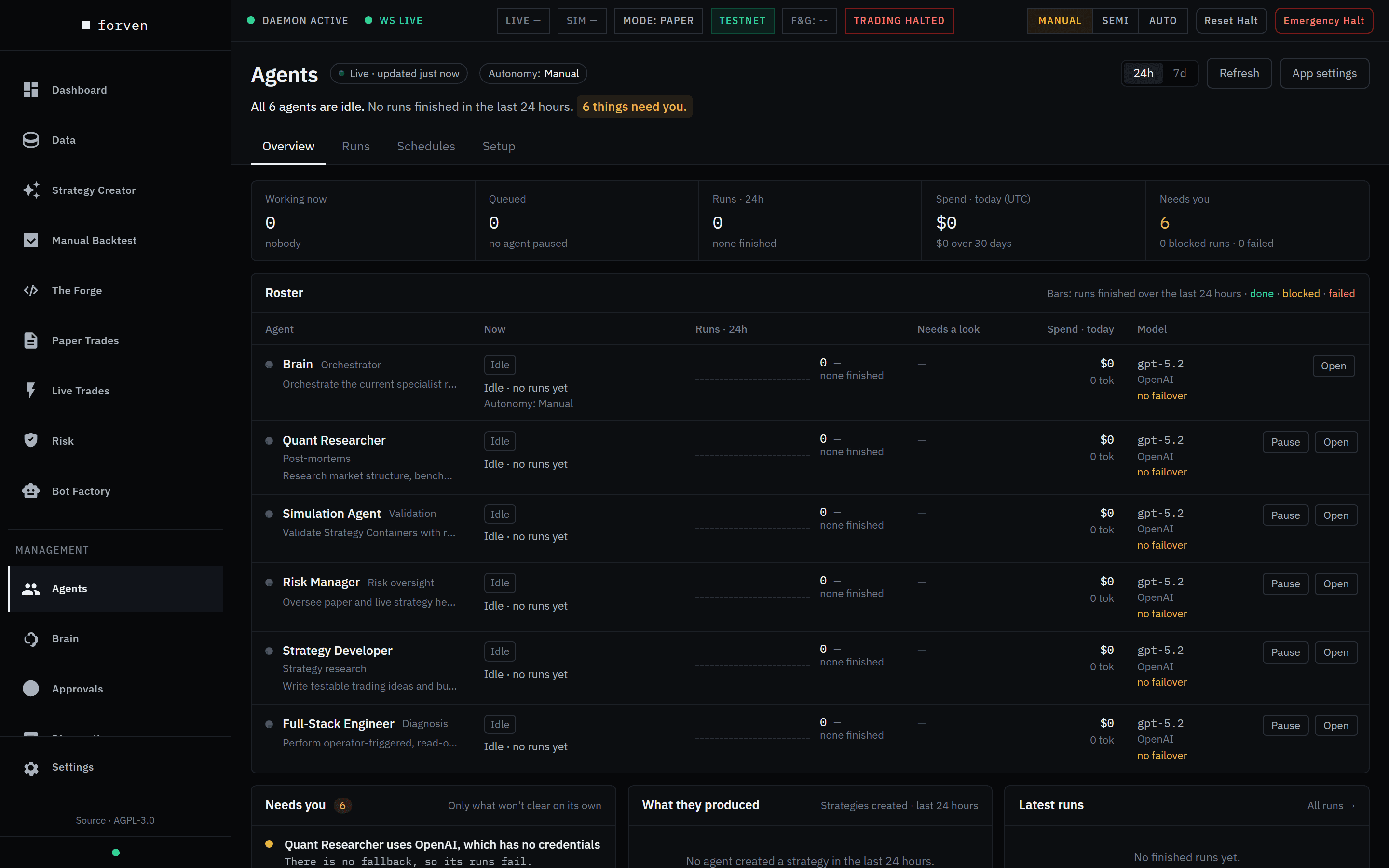 Agents → Overview on a fresh install: no provider is connected yet, so every agent sits idle.
First time here?
The Put the agents to work walkthrough connects a provider, gives every agent a model and hands them an idea, step by step.
The six agents
| Agent | Roster label | What it does | Owns stage |
|---|---|---|---|
| Brain | Orchestrator | Routes work, dispatches runs to the others and records its decisions. Follows the system mode and can't be paused. | — |
| Strategy Developer | Strategy research | Writes an idea — thesis, mechanism, what would disprove it — then writes, registers and backtests strategies linked to it. | — |
| Simulation Agent | Validation | Backtests, optimizations and the gauntlet; inspects runs that fail. | quick_screen, gauntlet |
| Risk Manager | Risk oversight | Reviews promotions and watches paper and live strategies. | paper, live_graduated |
| Quant Researcher | Post-mortems | Works out why a strategy failed and folds the lesson into quant skills. | — |
| Full-Stack Engineer | Diagnosis | Operator-triggered triage, such as Troubleshoot on an approval. | — |
The six are protected and can't be deleted. The Execution Trader was retired, so there is no AI path to an order; Sentiment Analyst and Data Scientist were removed earlier. Old runs keep their original attribution.
What agents can't do
The guardrails are enforced in code, not by convention.
- They can't trade. Positions open and close only through the execution engine or your own manual controls. Pausing the Risk Manager doesn't stop trading: the scanner places and manages orders on its own.
- They never task each other. Every result returns to the Brain, and only the Brain dispatches new work.
- They can't skip the gauntlet. A strategy an agent wrote goes through the same safety scan, tests and gates as yours.
- Code and config changes wait for you. Code edits, config changes and archives go through the approval queue unless you turn on auto-approval.
- They only spend on models you chose — see the spend rule below.
How work reaches them
- Ideas you submit. The Forge → + Submit idea hands an idea to the Strategy Developer. Submitted ideas run in every system mode and don't count against the daily budget.
- Ideas they write themselves — only in Auto mode, within the daily strategy-creation budget (Settings → System → Throughput). Semi builds only what you submit; Manual, the fresh-install default, runs nothing on its own. See autonomy modes.
- Follow-up work the Brain queues: validation runs, post-mortems on failures, risk reviews.
Limits on agent work
- A daily registration cap. Agents may register at most 120 strategies per UTC day across all their tasks (Settings → System → Throughput → Daily agent registration cap, an advanced setting;
0= no cap). Once it's reached, an agent that tries to register is told to stop and write up what it found, and no new creation tasks start until 00:00 UTC. Your own, MCP and Brain registrations don't count, and neither do candidates archived as untestable. - A reminder to register. A creation task that hasn't registered a strategy is told to register its best candidate as it nears its tool-call limit, so the run doesn't end with nothing to test.
- Low CPU priority. The live scanner and paper trading keep normal priority; gauntlet steps and research backtests run below normal, and the agent task loop lower still, so research work yields to the bar-close scan. It's best effort — if the OS refuses, the work stays at normal priority —
FORVEN_CPU_PRIORITY=off(see environment variables) puts everything back at normal priority. - A weekly funnel report. Every Monday the
forven-weekly-funnel-reportjob posts a digest of the last seven days: strategies registered (and how many by agents), archived before any merit test, and reaching the gauntlet, paper and live. See scheduler & jobs.
Every run keeps a full transcript — the prompt, each model turn, every tool call with its arguments and result — on its Run Detail page.
Overview
The header shows whether the page is live, the current autonomy mode, a one-line summary and a 24h / 7d window toggle.
- Tiles: Working now, Queued, Runs · 24h, Spend · today (UTC) with the 30-day total, and Needs you (blocked and failed runs).
- Roster: each agent's state (Working, Queued, Paused, Idle), runs, runs that need a look, today's spend and model. Pause stops an agent taking new runs; a run already in progress finishes. Open opens its drawer.
- Needs you: blocked and failed runs, failing jobs and unhealthy providers.
- What they produced: how many strategies the agents created, and how many reached the gauntlet, reached paper and went live.
- Latest runs: the most recent finished runs.
The agent drawer
| Tab | What's there |
|---|---|
| Overview | Success rate, median run time, spend. |
| Runs | This agent's recent runs, with a link to all of them. |
| Memory | Its long-term memory and log lines. |
| Instructions | Three editable documents: Mandate (ROLE.md), Identity (SOUL.md) and Operating guide (AGENTS.md). |
| Tools | Open the tool matrix →, and the MCP servers this agent may call — grant or revoke each one here. |
| Settings | Display name, model (Change model & fallbacks →), pause or resume, and an optional Discord bot token. |
Runs
Every agent run, filtered by bucket — Needs a look, Blocked, Failed, Running, Queued, Done, Cancelled, All — by agent, or by searching title, strategy, model or error. Select a run to see what it was asked to do and why it stopped, then Resume it, Dismiss it, or Open transcript. Details on Runs.
Schedules
Forven's built-in background jobs, grouped as Trading, Strategy pipeline, Agents & learning, Market data and Maintenance, with each one's cadence, last result and next run. Click a cadence to change it (every N minutes, or a cron expression), or switch a job off. Filter to Failing or Off to find problems. See scheduler & jobs.
Setup
Setup has three parts — Agent models, Providers and Shortlist — plus links to Tool permissions ↗ and MCP servers ↗.
Providers
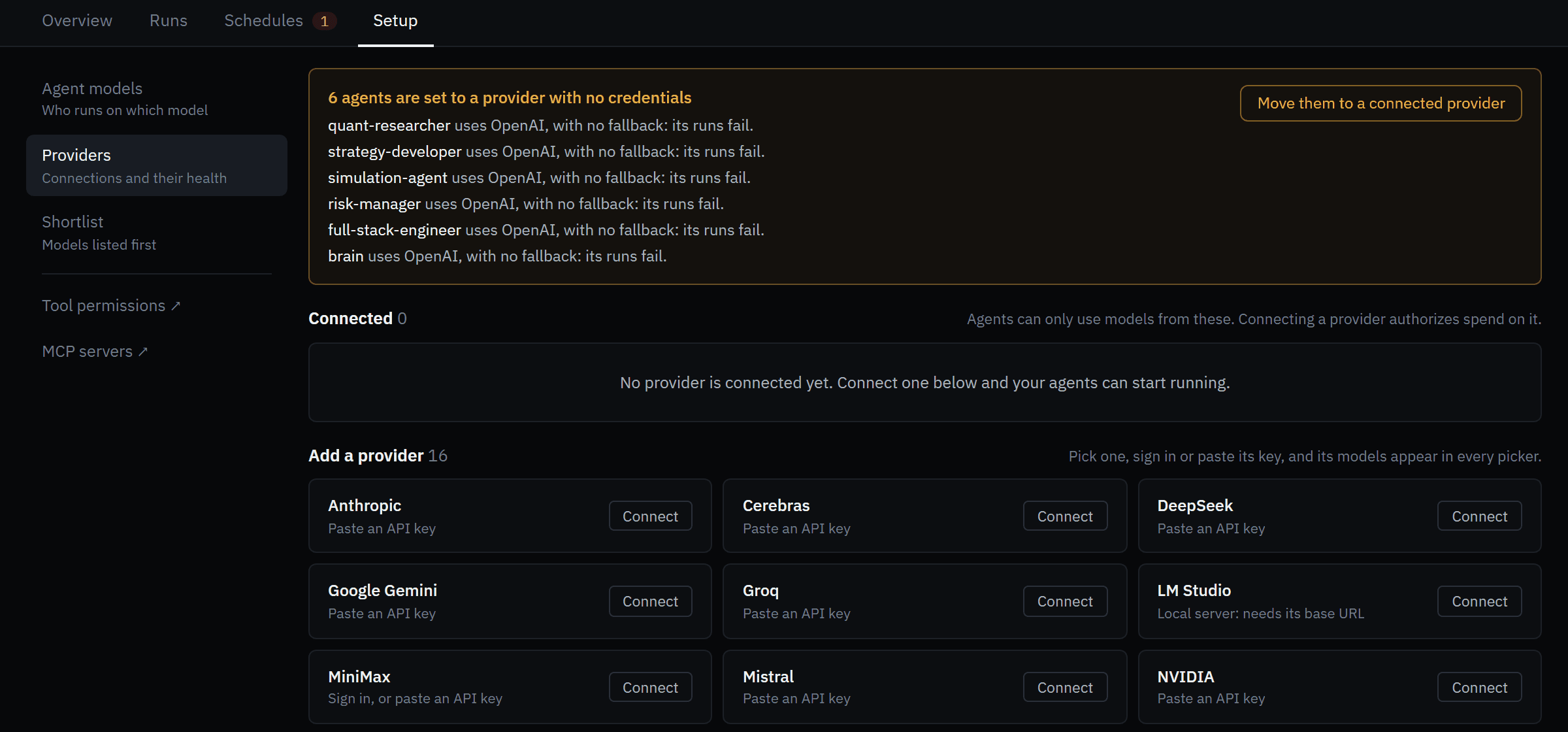 Before any provider is connected. Connecting one authorizes spend on it — nothing else can.
Sixteen providers are available: OpenAI, Anthropic, MiniMax, Z.AI, OpenRouter, DeepSeek, Groq, Google Gemini, Cerebras, Mistral, xAI, Together AI, OpenCode Zen, OpenCode GO, LM Studio and NVIDIA.
Pick a provider
Under Add a provider, click Connect on its tile. Each tile says how it connects: Paste an API key, Sign in, or paste an API key, or Local server: needs its base URL.
Paste a key, sign in, or give a URL
- API key: paste it into API key and click Connect. The key is checked with the provider before it's saved.
- Sign in: only OpenAI (your ChatGPT subscription) and MiniMax offer Sign in instead. Your browser opens; finish there, or paste the callback URL or code and click Use this code. Anthropic is API key only.
- LM Studio: enter your local server's base URL, for example
http://localhost:1234/v1.
Check it
The provider moves to Connected, showing which agents use it and how many models it offers. Test checks the credentials. If agents still point at an unconnected provider, a yellow box lists them — click Move them to a connected provider.
A connected card also has Replace key (or Sign in again), Clear status after failures, and Disconnect, which removes the saved credentials. An expired sign-in stays under Connected, marked Sign in again — click it to renew. A key that only exists as an environment variable shows on its tile as a key exists in the environment, but it is not connected here; it isn't usable until you connect it. Credentials are stored in your Forven home folder and never leave your machine.
Agent models
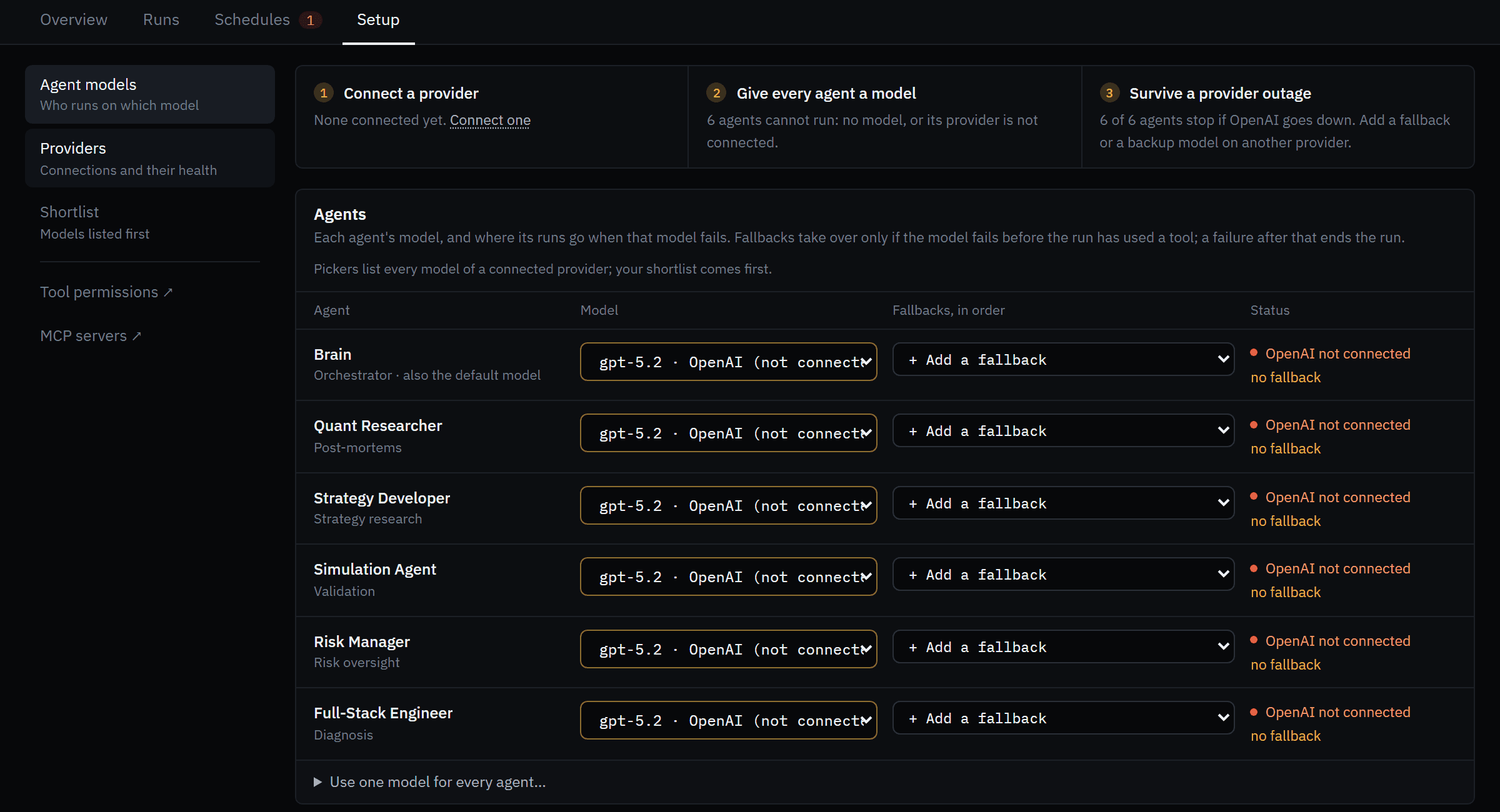 Each agent's model and fallbacks. Shown before a provider is connected, so every row reads OpenAI not connected.
- The checklist tracks three things: Connect a provider, Give every agent a model, and Survive a provider outage.
- Agents: pick a model and Fallbacks, in order for each one. Fallbacks take over only if the model fails before the run has used a tool; a failure after that ends the run, so tool side effects are never repeated. To set all six at once, open Use one model for every agent… and click Apply to all.
- Background tasks: three small jobs the Brain hands off — Memory recall, Skill extraction and Approval classifier. Left on Built-in default they use OpenRouter models; if OpenRouter isn't connected the call moves to a connected model, or fails.
- Safety net: one Backup model, tried last when a run's own model and fallbacks fail. It's skipped by runs already using its provider, so pick one on a different provider. Off, those runs fail and show up in Needs you.
Click Save (or Discard). Changes apply to the next call.
Shortlist
Optional. The models you shortlist are listed first in every model picker, here and in the Bot Factory editor; any model of a connected provider can still be picked. Use Find a model or provider… to search, Refresh model lists to re-ask your providers, and Save shortlist.
Tool permissions and MCP servers
Tool permissions ↗ opens the Toolset matrix (/agents/toolsets): every tool an agent may call, per context. Click a tool's override chip to cycle default → enable → disable, then Save changes.
MCP servers ↗ opens Integrations → Agent Tool Servers, where you register external MCP servers. Then grant each server to the agents that need it on the drawer's Tools tab. See MCP server.
The spend rule
Forven only calls a model that is connected (Setup → Providers) and selected — on your Shortlist, or picked for an agent, a fallback, a background task or the backup model. The check sits below every caller (agents, the Brain, the assistant, deep-dive), so nothing bypasses it. Details on models & providers.
Agents are seeded on openai, but you don't need an OpenAI key. If an agent's provider has no credentials, its run is moved to a provider you did connect and the switch is logged; the setup wizard re-points agents when you finish it; and Move them to a connected provider does it on demand. Calls only fail closed when nothing is connected at all.
Cost
- Throughput preset — Settings → System → Throughput sets how many strategy-creation runs a day the agents may start in Auto mode. The daily registration cap (above) is a separate setting in the same section.
- Model choice — cheap models on busy roles, your best model where reasoning matters.
- Visibility — spend today and over 30 days on Overview, per run on Run Detail, and the last 24 hours on Diagnostics.
Costs are estimates from token counts and list prices; your provider's dashboard is the bill. See cost controls.
Forven is research software. Agent-written strategies and every number shown are illustrative, not predictive, and nothing here is financial advice.
Related
- The Brain — how work is coordinated
- Runs — reading a run's transcript and tool calls
- Models & providers — the spend rule, fallbacks and background tasks
- Cost controls — throughput presets and caps
- Ideas — what the Strategy Developer works from
Bot Factory
Create and operate autonomous LLM trading bots — each a persona plus risk config that reasons over live candles and trades a paper ledger by default, with an explicitly armed, fully gated live mode.
The brain
The Brain is Forven's sole orchestrator — it routes strategies through the pipeline, dispatches agents, respects the gates, records its decisions, and keeps a short working note. Here's what it does and what the Brain page shows.