Scheduled routines
Give the Brain a prompt and a schedule, and it runs that prompt on its own cadence — optionally posting the result to Discord. Create, run, pause and edit routines on the Routines page.
A routine is a scheduled instruction for the Brain: a prompt, a schedule, a tools context, and optionally a Discord channel to post the result to. Use one for recurring agent work — a morning research summary, an hourly status report, a weekly check — without starting it by hand. Each time it fires, it becomes a run.
You manage them on Routines (/routines). Routines need a connected model provider, and they spend on it like any agent run.
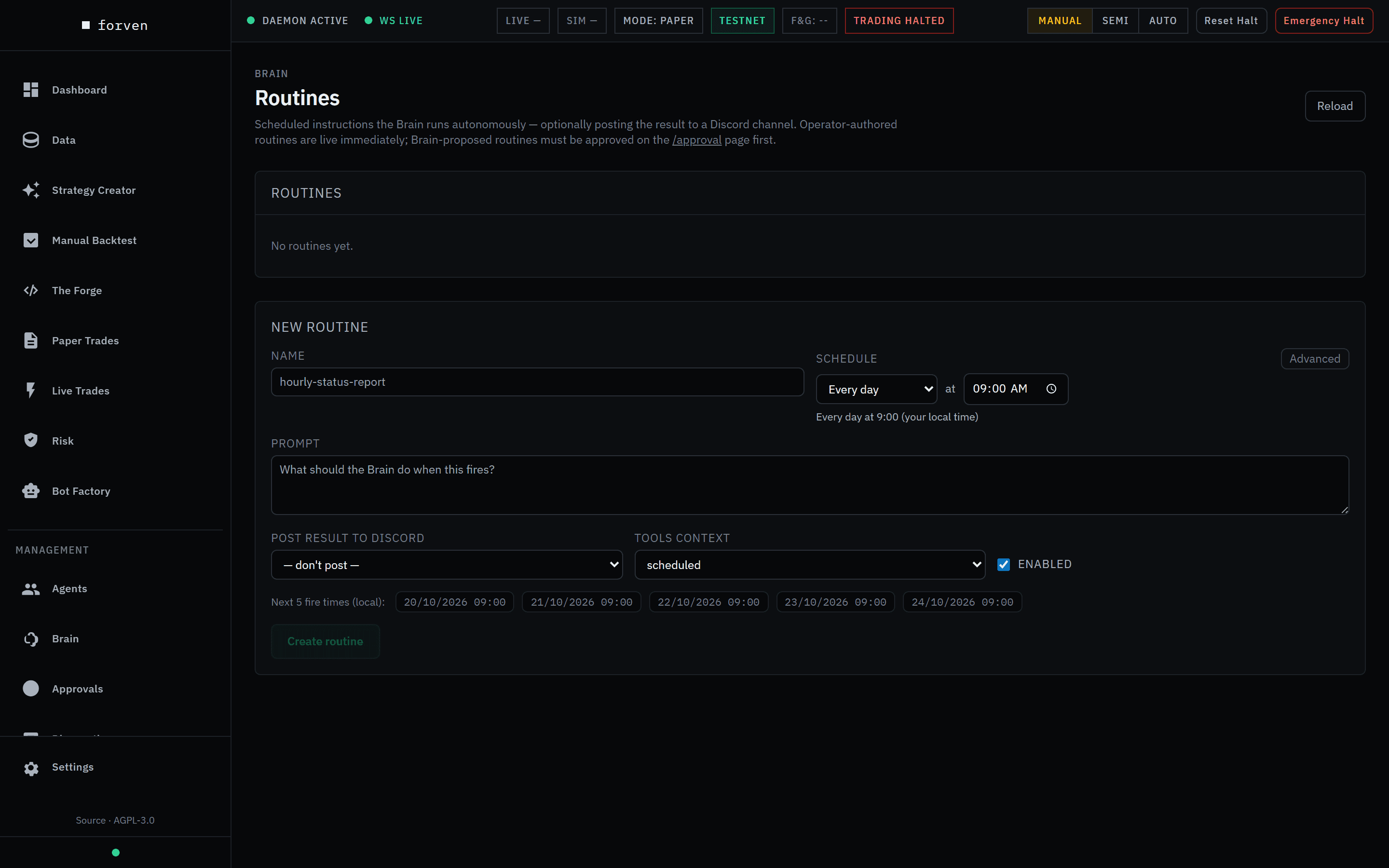 With no routines yet, the New routine form opens on its own. Fresh install, Manual mode.
Routines vs built-in jobs
Forven ships no routines — the list starts empty. Don't confuse them with Forven's own background jobs (the scanner, data collection, strategy creation, maintenance), which live on Agents → Schedules.
- Want to change how often Forven collects data or creates strategies? That's a built-in job.
- Want a summary of overnight research posted to Discord every weekday at 8am? That's a routine.
Create a routine
Open the form
On Routines, click + New routine (it's already open when the list is empty).
Name it and write the prompt
Give it a Name, such as hourly-status-report, and a Prompt — what the Brain should do each time it fires.
Set the schedule
Pick Every N minutes, Every N hours, Every day, Every week or Every month, with the day and time. These run in your local time. For anything else, click Advanced and enter a raw five-field cron expression, which is evaluated in UTC (for example 0 14 * * 1). Check Next 5 fire times (local) before you save.
Choose the context and delivery
Tools context tells the Brain what kind of run this is and which tools suit it: scheduled (the default, for unattended work), interactive, recovery or research. To post the result, pick a channel under Post result to Discord, or type a channel alias or ID; leave it on — don't post — otherwise. Discord has to be set up first — see notifications.
Create it
Leave Enabled ticked and click Create routine. Routines you create run straight away on their schedule; no approval needed.
Manage routines
Each routine in the list shows its name, where it came from (operator or brain · approval #N), its schedule, its Discord channel, whether it's enabled or paused, its last result, and its next run — in local time, with how long until it fires, or paused. A last error and the prompt are shown too.
| Button | What it does |
|---|---|
| Run now | Fires it once immediately — handy for checking the output. Disabled while the routine is paused. |
| Edit | Opens the same form, with the fire-time preview updating as you change the schedule. |
| Pause / Resume | Stops or restarts its schedule without deleting it. |
| Delete | Removes it after a confirmation. This can't be undone. |
Routines the Brain proposes
The Brain can suggest a routine too. A proposed routine doesn't run: it lands on Approvals as a New Routine Proposal showing the prompt, schedule and channel, and starts only once you approve it.
Watching a routine run
Every fire creates a run on Agents → Runs. Open it with Open transcript to read what the Brain did — its tool calls, output and any error. See Runs.
Good to know
- Manual mode holds scheduled fires. In Manual, the scheduler skips every due job, routines included, until you switch to Semi or Auto.
- A routine is a prompt, not a guarantee. It instructs the Brain; the outcome is a run like any other.
- Routines can't trade. No agent has an order path.
- Pausing a routine doesn't touch the built-in jobs, and vice versa.
Forven is research software. Anything a routine produces is part of a research process; it isn't predictive, and nothing here is financial advice.
Related
- Scheduler & jobs — Forven's built-in background jobs
- Runs — where each fire is recorded
- Notifications — setting up Discord
Diagnostics
The Diagnostics page: the notifications inbox, an overall health verdict from nine checks, the last 24 hours of model cost, MCP server status, and interrupted runs you can resume.
AI Drop Zone
Integrations → AI Clients: connect Claude Code, Cursor, Codex or any MCP or HTTP client so it can drive the lab, then watch its work live — grouped into automatic sessions (ADZ-####) you can review afterwards.