Risk & safety
Read the Risk Command page — halt banners, circuit breakers, the gauges, Trading Status and Risk Limits, the Live Portfolio Budget, the Liquidity Guard, the Regime Gate, the Live/Paper scope toggle and Emergency Halt — and know when to step in.
Risk Command (/risk) is the page to open when something looks wrong. It shows whether trading is allowed and why not, the exchange circuit breakers, how close the account is to its limits, how each live strategy is sized, and the guards every new live order passes through.
Most of these controls only bite in live trading. The supported mode is paper, and no halt blocks paper trading. It is still worth knowing this page before any of it matters.
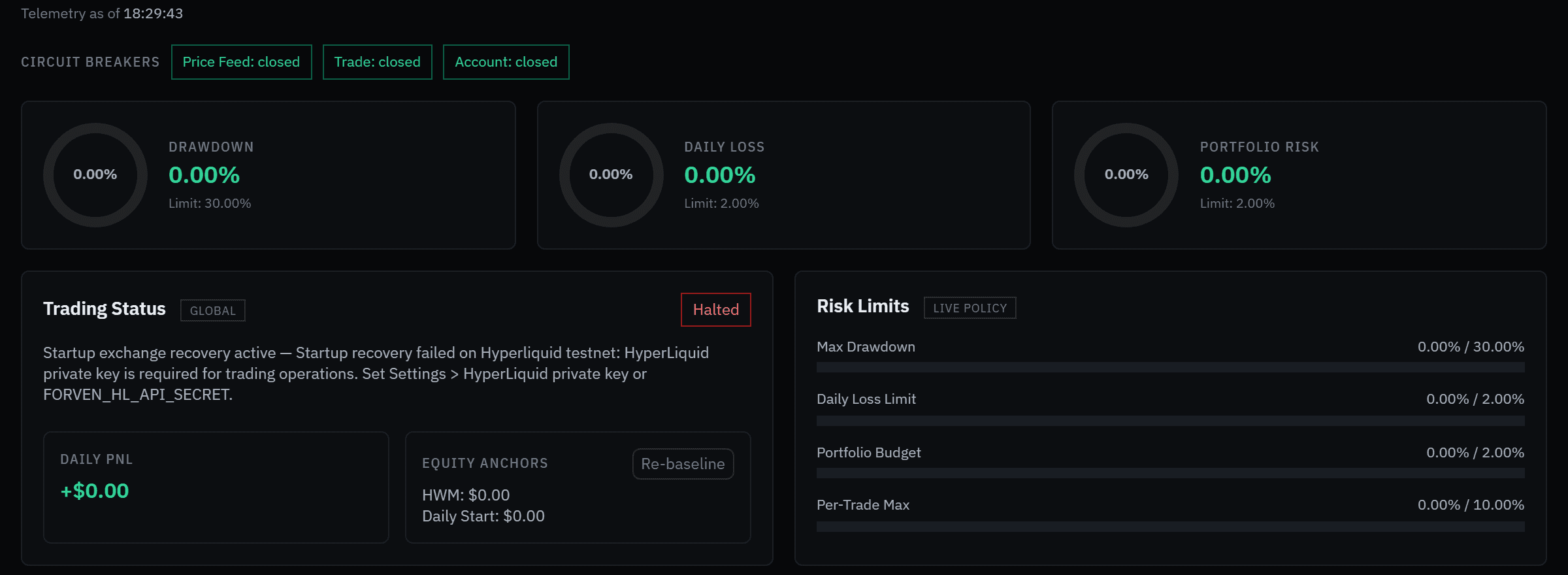 With no exchange keys, Trading Status reads Halted: the startup exchange check can't run. It doesn't affect backtests or paper trading.
Learn it on a quiet day
Set limits & stop buttons walks through the system mode, your loss limits and Emergency Halt, opening each confirmation and cancelling it.
Forven is research software. Risk controls limit downside; they don't create an edge, no setting guarantees against loss, and nothing here is financial advice.
The header
- Live / Paper switches the scope. Live shows real-wallet exposure; Paper shows the paper books, each a separate $10,000 sandbox with no shared budget. This browser remembers your choice.
- Emergency Halt: see below.
- Open Settings opens Settings. The limits are under Settings → Trading.
Halt and recovery banners
When trading isn't allowed, a banner at the top says why: Kill Switch Active, Daily Loss Halt Active, System Paused or Trading Halted, with the reason and when it fired. Reset Trading Halt asks you to confirm, then reports either Trading reset complete. New entries are allowed again. or what is still blocking entries.
When Forven's records and the exchange disagree, a second banner, Position Recovery — Operator Intervention Required (or In Progress), shows the position, discrepancy and open-order counts and when it last checked. Recovery reads Hyperliquid's orders and positions, compares them with Forven's trades and repairs mismatches. If the exchange holds a position Forven has no record of, recovery creates a record for it. If a discrepancy count doesn't clear on the next check, look closer.
"Trading halted" on a fresh install
With no Hyperliquid credentials, both banners appear: Trading halted: startup exchange recovery active — … HyperLiquid private key is required…. Forven can't check the exchange without a key, so it reports live trading as halted. Reset Trading Halt won't clear it; adding credentials (testnet ones are fine) will.
It only concerns orders on the exchange. Backtests, the gauntlet, the paper scanner and manual paper orders all keep working.
Telemetry and circuit breakers
Telemetry as of … says when the figures were read. If a source failed on the last refresh, the page says STALE and shows the last known values. If the data is incomplete, the gauges and limits are hidden on purpose rather than drawn as 0%.
Circuit Breakers shows Hyperliquid's three: Price Feed, Trade and Account. Closed is healthy.
| Breaker | Watches | Opens after | Retries after |
|---|---|---|---|
Price Feed (hl_price) | price reads | 5 failures | 20 s |
Trade (hl_trade) | order submission | 3 failures | 30 s |
Account (hl_account) | account and wallet reads | 4 failures | 25 s |
A breaker that stays open well past its retry time means the exchange link is unhealthy. See circuit breakers.
Gauges
Drawdown, Daily Loss and Portfolio Risk, each against its limit (Limit: X%). Portfolio risk is the loss if every live position hit its stop, as a share of equity.
Trading Status
Allowed or Halted, today's Daily PnL, and the Equity Anchors the halts are measured from: the high-water mark (HWM) and the start-of-day equity.
Re-baseline re-anchors both to a fresh reading of the live wallets. Use it after a bad reading poisoned the anchors, or to confirm a large deposit or withdrawal, not to silence an alarm.
How the halts work
- Kill switch. Trips when drawdown from the high-water mark reaches Max drawdown (default 30%). It closes every open live position at market, blocks new live entries and waits for you. Drawdown is
1 − equity ÷ HWM. - Daily-loss halt. Set when today's loss passes Max daily loss (default 2%). It blocks new live entries for the rest of the UTC day and clears at UTC midnight.
Rules that keep them from firing on noise:
- Real capital only. Only real wallet readings can arm a halt.
- Confirmed, not reflexive. A halt latches only after three breaching readings in a row, spaced apart, so one bad tick can't halt the account. A new live order is still refused from the very first breaching reading.
- Paper keeps running. No halt blocks a paper order, and Emergency Halt closes live positions only. The GLOBAL badge's tooltip says halts stop paper too; the engine doesn't do that.
There's no switch on this page to turn the kill switch off. On mainnet it can't be turned off at all.
Risk Limits
The LIVE POLICY card shows the limits in force for the live book, with how much of each is used: Max Drawdown, Daily Loss Limit, Portfolio Budget and Per-Trade Max. On a fresh install these read 30%, 2%, 2% and 10%. Change them under Settings → Trading → Loss limits and Position sizing.
On mainnet a stricter profile is a ceiling your settings can't loosen: 5% drawdown, 3% daily loss, 1% portfolio budget and 1% per trade. See live trading.
Live Portfolio Budget
Shown in Live scope. Marked Enforcing or Disabled, with Edit caps.
Position sizing says how the account is split, for example account split 4 ways · $2,500 each, and lists each live strategy with its stage, its largest live position and who sets it:
- System, the default: an equal share of the account. The strategy risk-sizes inside that share.
- Manual: your own cap on position size. Set my own or Edit asks for the largest live position in USD; enter 0 to go back to system sizing. Use system removes your cap. A cap only ever makes a position smaller, and it caps size, not risk.
Below it:
- Total open risk (to stops) against the budget. Live max total open risk is 5% of equity by default. A position without a stop counts as 3% at risk.
- Per-wallet capacity (direction books): each wallet's headroom when longs and shorts trade from separate sub-accounts.
- Correlated-group net exposure and Per-asset: exposure grouped by correlation, so three closely correlated longs count as one big bet. An open that would push exposure past its cap is refused.
If the account equity can't be read, the budget fails closed: new live opens are refused until it can. With nothing open the card says No open live positions — full budget available.
Liquidity Guard
Shown in Live scope. Marked Enforcing, Disabled or Unavailable, with Edit limits. Before a live order is placed, it checks the market against these limits and refuses orders into a market too thin to exit cleanly:
| Limit | Default |
|---|---|
| Min 24h volume | $5,000,000 |
| Max spread | 50 bps |
| Depth window (around the mid) | 100 bps |
| Max depth share | 25% |
| Max price impact | 50 bps |
Recent order checks lists each live order's Pass or Block.
Regime Gate
The direction × regime gate vetoes entries that fight the current market regime. By default it targets longs while an asset reads TREND DOWN or HIGH VOL with at least 60% confidence. Forven's own audit of archived strategies found that pattern was where most of the losses came from.
The panel has three buttons. A click changes the mode at once, with no confirmation:
- off: gate disabled — no blocking, no logging.
- observe, the default: shadow mode — logging would-have-blocked signals, execution untouched.
- enforce: blocking … longs · disarm any time.
For each tracked asset it shows the current regime and what it restricts (would block longs, block longs or no restriction). Below that is the evidence. Forven marks what each blocked entry would have made about 48 hours later. Would block · Nd (or Blocked), Their MTM and a Gate verdict, earning its keep, blocking winners — review rules or collecting evidence, tell you whether the gate is helping before you switch it to enforce. A green MTM means the blocked entries would have lost money.
The panel follows the scope toggle (LIVE LEDGER or PAPER LEDGER). Edit rules opens Settings → Trading → Regime gating, where Direction×regime gate mode and the blocked regimes are set. That section also has the older Strict regime gating with its own Regime minimum confidence, a different control.
Correlation Groups
Open positions grouped by correlation. Empty: No active position groups.
Paper scope
In Paper scope the position-based panels show the paper books. The Live Portfolio Budget and Liquidity Guard are hidden, because paper books are isolated $10,000 sandboxes that never share a budget. The gauges and Risk Limits always grade the live book.
Operator actions
Reset a halt
Once you know why a halt fired and have dealt with the cause, clear it with Reset Trading Halt here or Reset Halt in the top strip. Either one clears the system pause, the kill switch and the daily-loss halt.
# The same reset from a script (operator-only)
Invoke-RestMethod -Method Post -Uri "http://127.0.0.1:8003/api/system/trading/reset" `
  -ContentType "application/json" -Body '{"confirm": true}'
Resetting the kill switch moves the goalposts. It re-baselines the high-water mark to current equity, so the next trip is measured from the reset point, not the original peak. After a 20% drawdown, a further 10% fall from the reset is a 28% fall from the old peak before the switch fires again.
Emergency halt
Emergency Halt, here and in the top strip on every page, pauses the system and closes every open live position at market. Paper positions are not closed. It asks you to confirm and then reports how many positions it closed. Trading then stays halted until you reset it. Pull it when something is wrong and you want everything flat while you look.
When to step in
- Kill switch active: trading is already halted. Find the cause before you reset, because the reset re-baselines the high-water mark.
- A close failed during a kill-switch sweep: a position stayed open after retries. Close it yourself.
- A circuit breaker stays open: the exchange link is unhealthy, not just slow. Check HyperLiquid connectivity.
- Recovery discrepancies don't clear: a position Forven didn't expect. Review it; a recovered trade may not belong to any strategy.
- The budget is failing closed: equity can't be read, so live opens are refused until it can.
- The daily-loss halt keeps firing: not an emergency, but a live strategy is leaking. Review it rather than raising the limit.
Caveats
- Paper is the supported mode. On a paper-only install the live figures are empty or zero.
- Paper P&L is not live P&L. Paper fills are simulated and never reconciled with an exchange.
- The kill switch needs a known high-water mark. It is synced from the account at startup; with none, drawdown can't be measured.
- The defaults here (30% drawdown, 2% daily loss, the regime rules) are starting points, not recommendations. Set them to your own budget.
Related
- Set limits & stop buttons: a hands-on tour of this page
- Risk controls: every limit behind these panels, and how they interact
- Circuit breakers: the exchange-health breakers in depth
- Market regimes: the classifier the regime gate reads
- Going live safely: the checklist before any real capital
Live trading
The Live Trades desk for strategies at the live stage — what going live takes, the seven account gates, the refusals at go-live, how live orders differ from paper, mainnet limits, and why live trading is unsupported.
Universe books
An experimental, paper-only part of the portfolio layer — one pre-registered trend rule held across 15 coins at once. How to turn it on, the two books, the forward paper book versus the sealed research report, Tick now and Reset.