Backtesting a strategy
Run any built-in or pipeline strategy on any market with Manual Backtest — what each field does when you leave it blank, why windows end at the holdout cutoff, and how to read the out-of-sample result without fooling yourself.
A backtest runs one strategy against historical data and reports how it would have behaved. Manual Backtest (Manual Backtest in the sidebar, /backtest/new) lets you run a built-in template, or one of your live, paper or Forge strategies, on any market and window. It saves the result to the strategy, but it never creates a strategy or moves one through the pipeline.
To build a strategy, use the Strategy Creator. For a guided first run, follow Run and read a backtest.
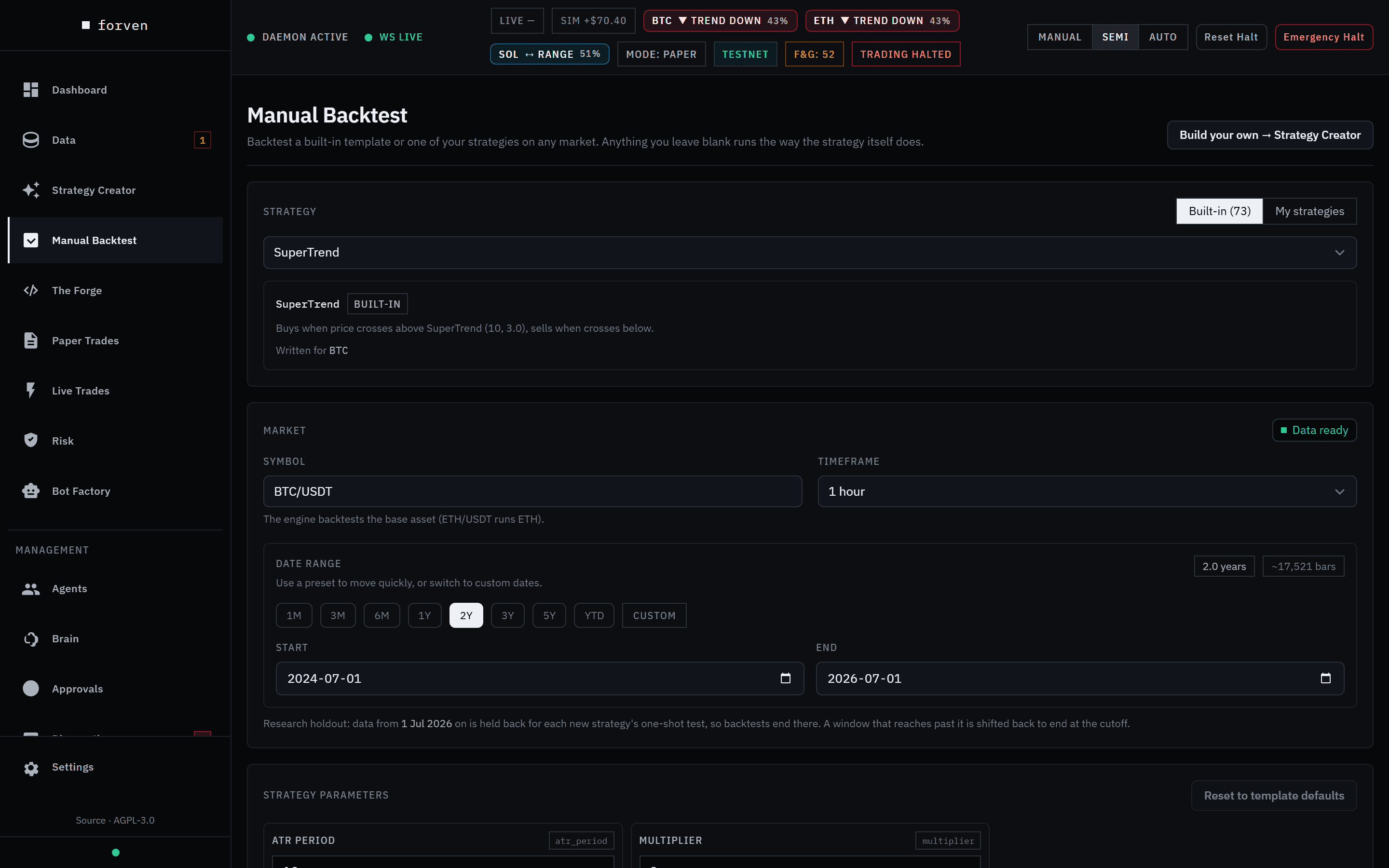 Leave a field blank and it runs the way the strategy itself does.
Forven is a research tool. A backtest describes past behaviour on historical data. The numbers are illustrative, not predictive, and nothing here is financial advice.
What a backtest is
The engine loads candles for the market, merges any enrichment streams the strategy reads, and walks its signals through the execution kernel — the same code that runs the strategy in paper and live. It charges fees, slippage and funding, and computes the metrics from the trade ledger. Every run is stored with its ledger and stamped with the engine version, code identity, parameters, market, execution assumptions and a fingerprint of the data, so results stay auditable.
The window is split in two:
- In-sample — the first 70%. Optimistic by construction.
- Out-of-sample — the last 30%. Every headline metric on the result is out-of-sample only, and it's what the promotion gates read.
The form, section by section
Strategy
Choose Built-in (the strategies shipped with Forven) or My strategies (your Live, Paper, Gauntlet and Quick screen strategies; archived ones aren't listed), then pick one from Select a strategy…. An info card shows its stage or a built-in badge and the market it was Written for or Runs on; the market fields fill in from it.
A link of the form /backtest/new?strategy=<id or type> opens the page with that strategy preselected.
Market
Symbol and Timeframe — the engine backtests the base asset, so ETH/USDT runs ETH. The data readiness chip (Data ready, Needs data, Data blocked) checks the series is stored and complete, with fix links into Get data.
If you pick a market other than the strategy's own, an amber note says the run "describes a variant, not the strategy as it trades", with a Use … button to switch back. A what-if run never re-homes the strategy.
Date range — presets 1M 3M 6M 1Y 2Y 3Y 5Y YTD, or Start and End dates. The default is two years ending at the research holdout cutoff.
Why backtests end months ago
The most recent 3–6 months — the last full quarter and the current one — are held back from all research so each new strategy can get one honest final test on data nobody tuned against — the held-back test, which by default runs when the strategy applies for live. The note under the dates says where today's cutoff is. A window that reaches past it is shifted back to end at the cutoff, keeping its length, and the result tells you it did.
Strategy parameters
Shown once a strategy is picked. Edit any parameter; a badge counts how many you changed, and Reset to template defaults (built-ins) or Reset to stored values (your strategies) undoes them. Market, leverage, trade mode and the execution profile aren't listed here — they're set in Market and Execution.
Execution
Collapsed by default; its header summarizes the sizing that will apply. Leave a field blank to use the strategy's own setting or the engine default — the placeholder shows which.
| Field | Blank means |
|---|---|
| Initial capital | 10,000 |
| Fees (bps) | The pipeline default, 4.5 per side |
| Slippage (bps) | The pipeline default, 2 per side |
| Leverage | The strategy's own leverage, else 1× |
| Trade direction | Strategy default (…). Built-ins offer only the directions they support ("This template can trade: …"). Forcing another side: "The run fails if the strategy can't trade that side." |
Tick Override the execution profile (sizing and exits) to replace the strategy's own sizing and exits for this run. An override replaces the profile; it is not merged with it.
| Sizing | Fields |
|---|---|
| ATR risk (risk % against an ATR stop) | Risk per trade (%), ATR stop (× ATR) |
| Risk % against your stop | Risk per trade (%) — needs a stop loss or trailing stop |
| Fixed notional | Position size (quote) |
| Full equity | Needs a stop, take-profit, trailing stop or time stop |
| Kelly (opens no trades in a backtest) | Disabled: Kelly sizes from closed trades, and a backtest starts with none |
Plus Stop loss %, Take profit %, Trailing stop % and Time stop (bars). A strategy with no execution profile runs on the engine default: 1% of equity at risk per trade against a 2× ATR stop (a 3% stop when ATR isn't available). Reset execution clears everything back to blank.
Signal preview
Preview signals counts entry and exit signals over the window before any sizing or stops, and saves nothing: bars, entries, exits, bars between entries, a density word and the first few entry times. Use it to check a strategy actually fires on this market before paying for a full run. Change a setting and it asks you to Refresh preview.
Run
The run bar summarizes the market, window, bar estimate and anything you overrode ("strategy's own settings" if nothing). Run backtest sends it to a background job and shows Running… with the elapsed time. You can keep editing or leave the page; the run keeps going and is saved to the strategy. After a minute, Stop waiting appears.
Reading the result
Runs this session lists up to 12 runs from this browser session — strategy, market, window, what you changed, return, Sharpe, max drawdown and trades — so you can compare them. Click one to view it; Clear empties the list.
The Result header states the window actually tested and the out-of-sample dates ("the last 30% of the window"), with Adjust & re-run and Open full report → (the strategy page, with monthly returns, every trade and drawdown periods). Banners flag a window shifted for the holdout and incomplete funding history.
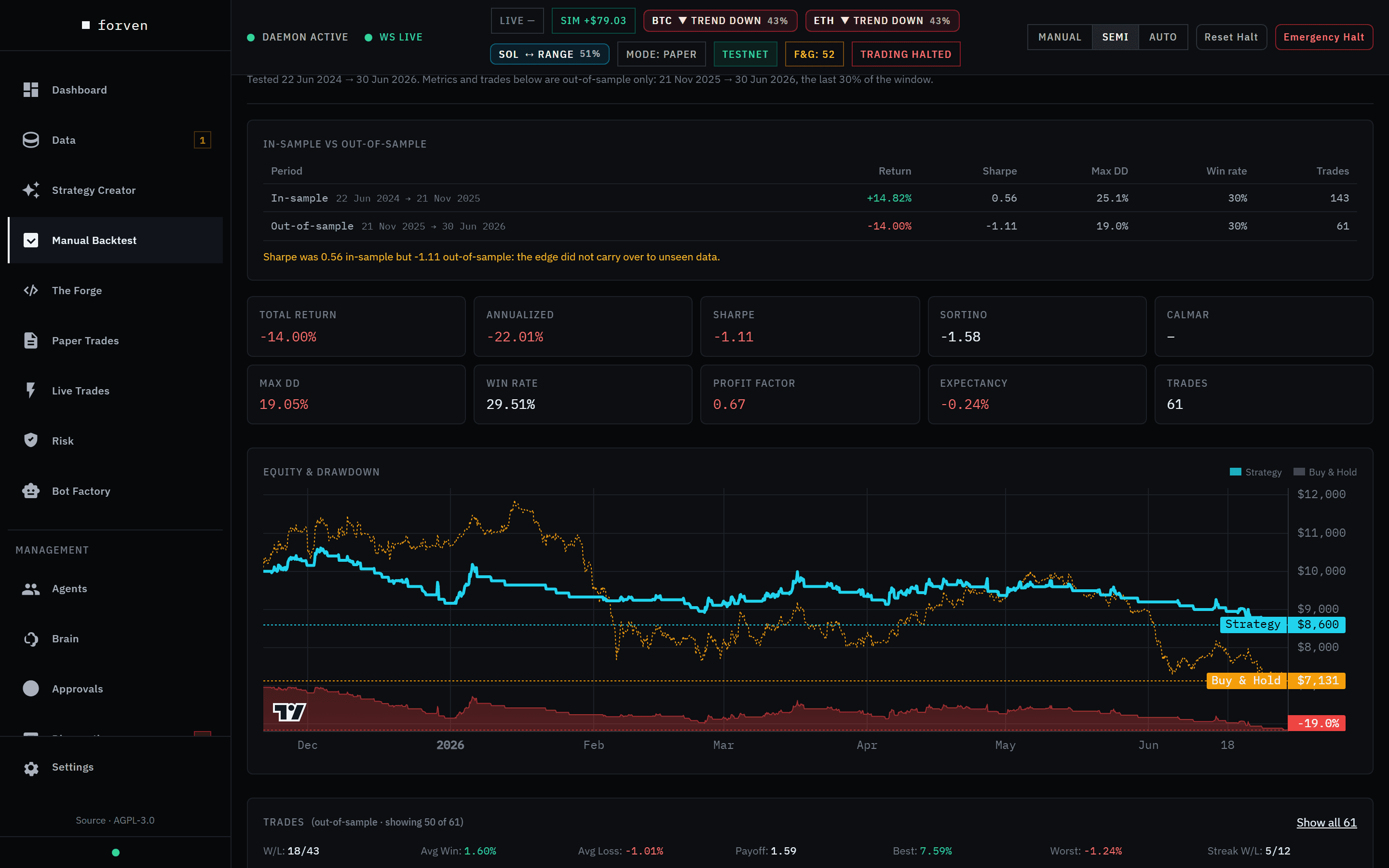 In-sample +6.65%, out-of-sample −8.87%. Read the second row first.
Then, in order:
- In-sample vs out-of-sample — return, Sharpe, max drawdown, win rate and trades for each part. If the out-of-sample Sharpe is less than half the in-sample one, the page warns that it's "a common sign of overfitting". Strategies that trade both sides also get an out-of-sample split by side.
- Metric tiles — Total Return, Annualized, Sharpe, Sortino, Calmar, Max DD, Win Rate, Profit Factor, Expectancy and Trades. Sharpe shows as Sharpe* when there are too few trades to trust it.
- Equity & Drawdown — the strategy against buy-and-hold over the same months.
- Trades — direction, entry, prices, P&L, size, exit reason and bars held, with a win/loss summary.
Every run also appears in All Backtests (All backtests in The Forge, /lab/backtests): a sortable, searchable list of every stored result across strategies, filterable by symbol and type.
Habits that keep you honest
- Read out-of-sample, not in-sample. The promotion gates only read out-of-sample; so should you.
- Count the trades. A great Sharpe on ten trades is noise. Forven suppresses figures it can't support (
sharpe_is_reliableis false under 20 trades;annualized_return_reliableunder three months). - Distrust perfection. An infinite profit factor (wins, no losses) almost always means too few trades.
Sharpe and Sortino come from per-bar returns of the marked-to-market equity curve, flat bars included, so a strategy that sits out most of the market isn't flattered. See Metrics.
Costs
Metrics are reported after costs. A blank field in Manual Backtest uses the same defaults as the pipeline's own runs:
| Cost | Setting | Default |
|---|---|---|
| Fee | backtest_fee_bps | 4.5 bps per side |
| Slippage | backtest_slippage_bps | 2 bps per side |
| Leverage | default_leverage (a strategy's own leverage wins) | 1× |
| Funding | backtest_include_funding | on |
A round trip pays fees and slippage twice. Funding is normalized per hour from each print's own interval and accrued once inside the kernel. Two flags record what happened — funding_applied and funding_complete — and the capital gates refuse a run whose funding data is incomplete. In risk-based sizing, leverage never changes the loss at the stop: size scales down as leverage rises.
The pipeline's automatic stages each use their own window (quick screen, timeframe sweep, optimization, confirmation, walk-forward, cost stress); set them in Settings → Lab → Per-stage backtest windows. A stage left at 0 uses backtest_duration_days (730 days).
Execution settings are not parameters
Stops, take-profits, trailing stops and sizing are execution settings, passed to the engine separately from the strategy's parameters. A stop_loss_pct sitting in a strategy's params is ignored by the backtest — deliberately, so a risk field can't change backtest behaviour while meaning something else in paper or live. The settings a strategy was validated with travel with it into paper and live.
Strategies can also declare compatible_regimes. The backtest then classifies the market regime on every bar, blocks entries outside the compatible set and exits if the regime shifts mid-trade. Regime classification needs a couple of hundred bars of warmup, another reason to give a backtest enough history.
Validation messages
| Message | Fix |
|---|---|
| "This window is ~N bars; the engine caps a run at 100,000." | Shorten the window or use a longer timeframe. |
| "The end date cannot be in the future." | Move the end date back. |
| "Risk-based sizing needs a stop loss or trailing stop to size against." | Add one, or pick another sizing mode. |
| "Full-equity sizing needs a stop, take-profit, trailing stop or time stop." | Add an exit, or the engine default sizing applies. |
| "A backtest is already running. Wait for it to finish." | One run at a time from this page. |
| "The backtest queue is full…" | Wait for a running backtest to finish. |
| "Strategy “X” is not in the built-in, live, paper or Forge lists." | The deep link names a strategy that doesn't exist or is archived. |
Running a backtest through the API
The local API listens on 127.0.0.1:8003.
# What a blank field resolves to, and today's holdout cutoff
curl.exe http://127.0.0.1:8003/api/backtests/defaults

# Submit a backtest
curl.exe -X POST http://127.0.0.1:8003/api/backtesting/run `
  -H "content-type: application/json" `
  -d '{ "strategy_type": "rsi_momentum", "asset": "BTC", "timeframe": "1h" }'

# The full result (metrics + ledger)
curl.exe http://127.0.0.1:8003/api/results/<result_id>
Related endpoints: POST /api/backtests/preview (signal preview), POST /api/backtests (the page's own submit), GET /api/results (paged results). If you've set FORVEN_API_KEY, send it as x-api-key. AI clients can do the same through the MCP tools.
Backtests run in spawned subprocesses with a timeout that scales with the data, so a misbehaving strategy can't freeze the app (FORVEN_BACKTEST_PROCESS_ISOLATION, on by default). The throughput preset caps how many run at once. Imported strategies always generate signals in a locked-down worker with no database, network or secrets access.
Caveats
- One backtest is not robustness. It says a strategy is worth testing further; the gauntlet says whether it survives.
- A what-if is not the strategy. Results on another market or with overrides describe a variant.
- Costs are baked in. Fees, slippage and funding are already in the numbers.
- Past is not prologue. Every figure describes historical behaviour.
Related
Strategy Creator
Build a strategy as plain-English rules or Python, watch it trade on a live preview, read in-sample against out-of-sample vitals, stress-test it, save it to your library and send it to The Forge.
The Forge
The Forge is the pipeline at a glance — every strategy, where it is, why it's there and what moved — plus each strategy's page, where you run its tests, read its verdict and change its stage.