AI Drop Zone
Integrations → AI Clients: connect Claude Code, Cursor, Codex or any MCP or HTTP client so it can drive the lab, then watch its work live — grouped into automatic sessions (ADZ-####) you can review afterwards.
The AI Drop Zone is where an AI client you already use — Claude Code, Claude Desktop, Cursor, Codex CLI, or any MCP or HTTP client — drives Forven: writing strategy files, registering them, backtesting, validating, and promoting them through the real gates. You find it at Integrations → AI Clients.
The client's work is grouped into sessions, written ADZ-0007, so after an hour of iterating you can answer the question that matters: what did it actually test, and what came out?
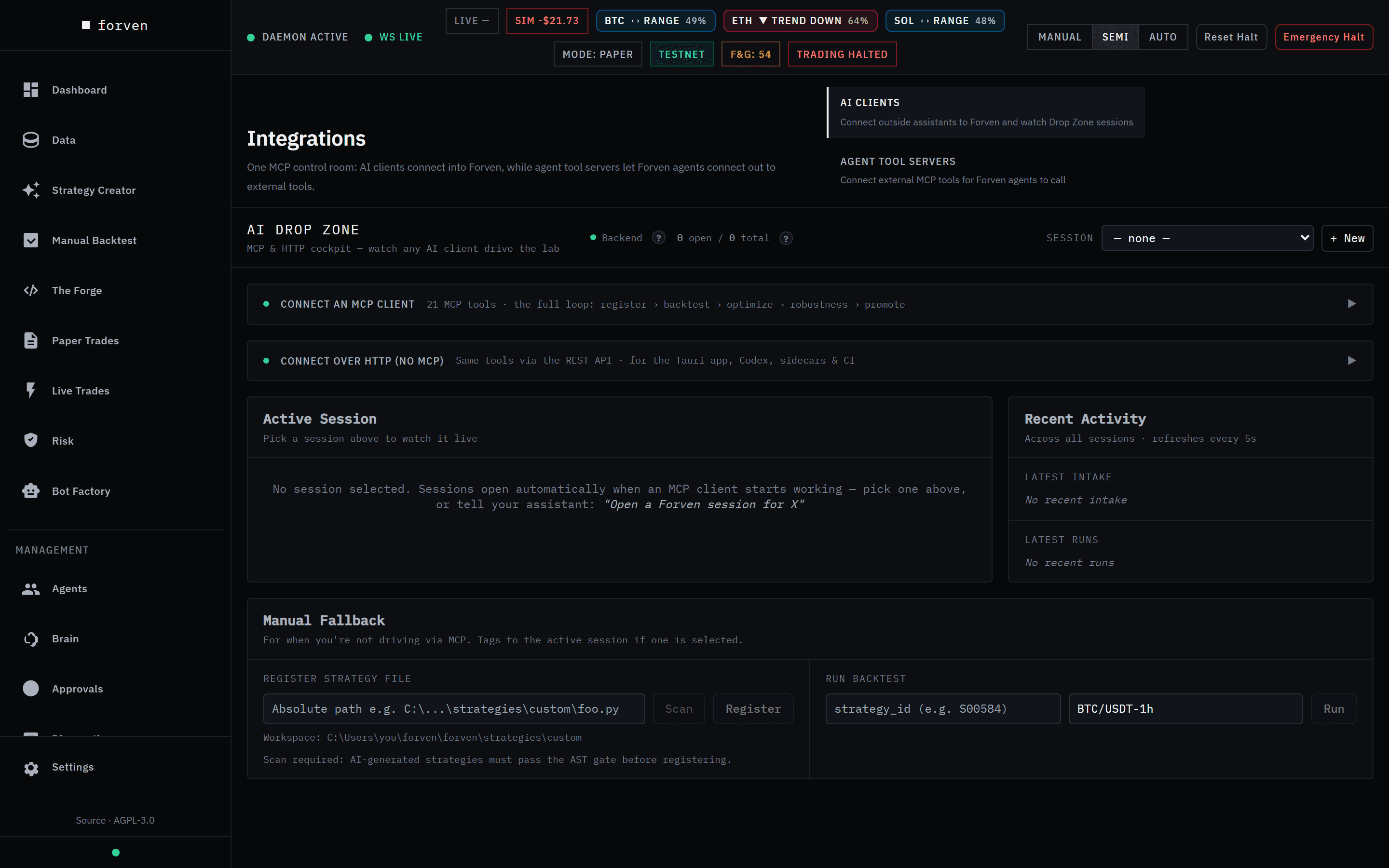 The AI Drop Zone before any client has connected. Sessions and activity fill in once one starts working.
Step by step
The Connect Claude Code or Cursor walkthrough takes you from an empty client config to a live session in about ten minutes.
The page
Integrations has two tabs: AI Clients (outside assistants connecting into Forven — this page) and Agent Tool Servers (Forven's own agents connecting out to external tools — below).
The AI Drop Zone header shows a Backend status dot — if it's red, MCP tool calls fail too, because the MCP server talks to Forven through that API — and how many sessions are open. Pick one in Session to watch it, start one with + New (an optional label and objective), or Close it.
Connect an MCP client
21 MCP tools · the full loop: register → backtest → optimize → robustness → promote.
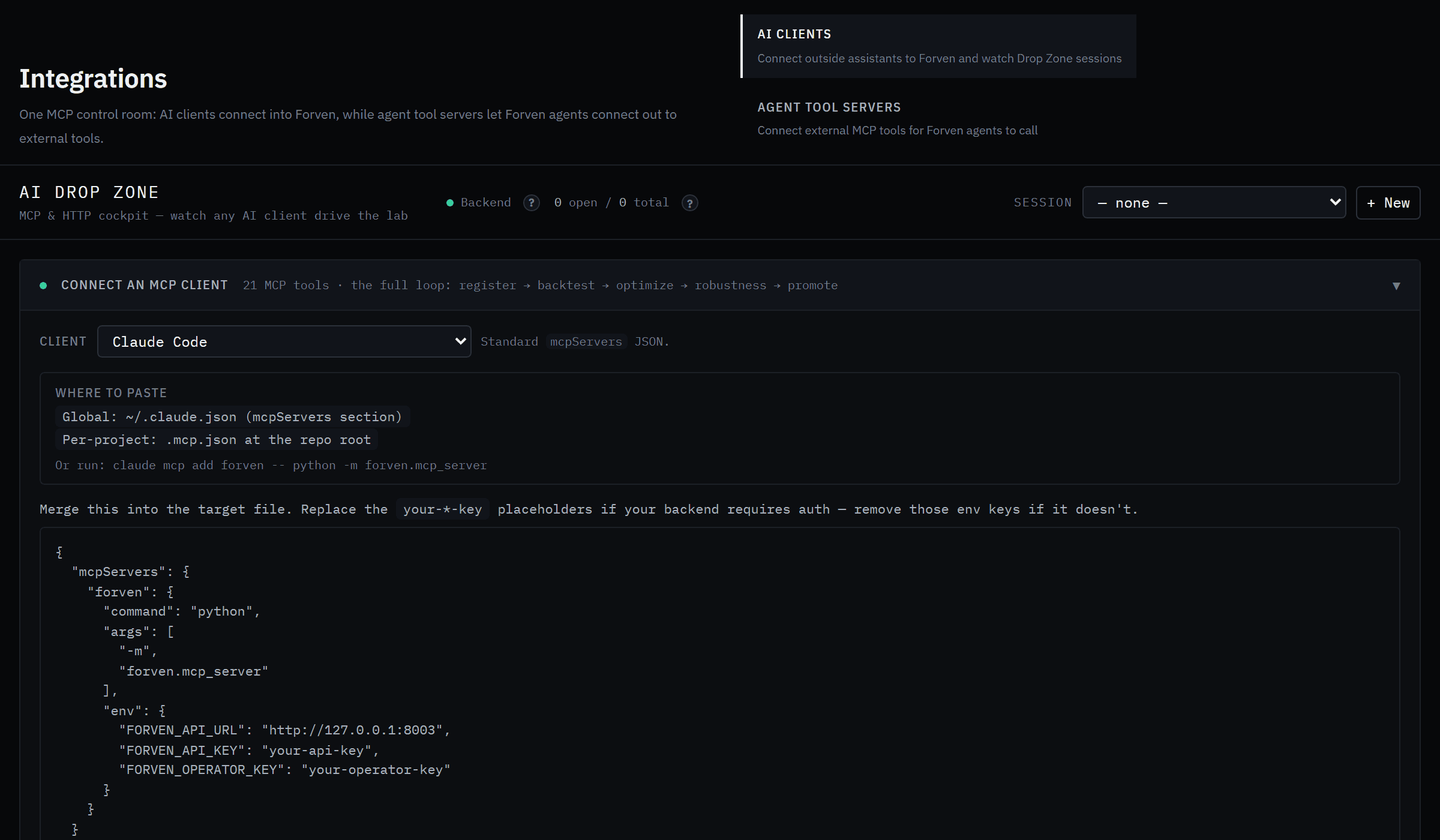 Each client gets its own snippet and the file it belongs in.
Choose your client
Pick it in Client. The list covers desktop chat apps (Claude Desktop, ChatGPT Desktop, Jan, LibreChat, Minimax Agent), editors (Claude Code, Cursor, Windsurf, VS Code, Cline, Roo Code, Continue.dev, Zed), terminals (Codex CLI, Gemini CLI, Warp), and Other / custom.
Find where it goes
Where to paste names the config file — for Claude Desktop, %APPDATA%\Claude\claude_desktop_config.json on Windows; for Claude Code, ~/.claude.json or a per-project .mcp.json; for Cursor, .cursor/mcp.json; for Codex, ~/.codex/config.toml.
Copy the snippet
Copy JSON (or Copy TOML for Codex) and merge it into that file. Each client gets its own shape. For Claude Code, Copy CLI command gives a one-line claude mcp add forven … instead. The snippet points FORVEN_API_URL at http://127.0.0.1:8003. Its your-*-key placeholders are only needed if your backend requires auth; on a normal local install, remove those env keys.
Restart the client
Tools appear only after the client re-reads its config. The python in the snippet must be one that can import forven — your Forven virtual environment's.
Full guide opens the MCP setup guide that ships with Forven. Per-client details and troubleshooting are on MCP server.
Connect over HTTP (no MCP)
Same tools via the REST API. For clients that don't speak MCP, scripts and CI: a small CLI (python -m forven.agent health | list | backtest | enqueue | wait-paper, Copy CLI), Python and TypeScript snippets, and an Endpoints (any language) table. Auth is only needed if the backend is exposed beyond localhost — send x-api-key / x-operator-key, or set FORVEN_API_KEY / FORVEN_OPERATOR_KEY.
Active Session and Recent Activity
- Active Session — for the session you picked: Strategies tagged to this session and Gauntlet runs in this session.
- Recent Activity — across all sessions, refreshed every 5 seconds: Latest intake (newly registered strategies and their stage) and Latest runs.
Strategies that came in this way also carry an AI Drop Zone chip in The Forge.
Manual Fallback
Do it by hand. Register strategy file: enter an absolute path, click Scan — AI-generated strategies must pass the AST safety gate first — then Register. Run backtest: a strategy ID and a dataset such as BTC/USDT-1h, then Run.
Sessions
A session is a grouping tag, not an account or a permission:
- IDs run in order:
ADZ-0001,ADZ-0002, … - Over MCP they're automatic. A session opens on the client's first register or backtest call, tags everything after it, and closes when the client disconnects. A server-side sweep also closes sessions idle for about 6 hours (
FORVEN_DROPZONE_IDLE_TTL_HOURS), so open means genuinely in use. - You can still open one yourself with a label and objective, or pass a
session_idto resume one. - A session is active or closed. Closing is one-way: a closed session is kept for review but can't be reopened or tagged again.
Sessions scope queries; they don't control access. Who can do what is decided by the backend's auth, not the session.
Where strategies land
A registered .py file is checked by the registration validator and the AST safety gate, and its code only ever runs inside the locked-down strategy worker. Then it lands in one of two places:
quick_screen— the start of the normal pipeline:quick_screen → gauntlet → paper → live_graduated.- The graveyard, archived as untestable — if it crashes, leaks look-ahead, or fails certification. The response gives the reason; fix the file and register it again.
Registering never promotes. A strategy reaches paper only by passing the gauntlet and the door into paper (then a free slot in the paper pool), and live only through the stricter paper → live gate and your typed GO LIVE.
The loop an AI client runs
The MCP server's own instructions give the client this loop:
forven_get_context— overview first, then thetemplateandgotchassections.forven_get_quant_skillsfor priors; and before using any input beyond candles,forven_get_data_readinessfor the market.- Write a strategy
.pyinto the workspace, thenforven_register_strategy_filewith its absolute path. forven_run_backtestand iterate on the design.forven_run_optimization, then bake the winning parameters into the file'sdefault_params.forven_run_robustness— the persisted validation suite the paper gate reads — and pollforven_get_robustness_result.forven_get_gate_report, thenforven_promote_strategywhen every gate is green — or when the only failed gate isholdout_pending, because that attempt submits the one-shot held-back test. By default the held-back test runs at paper → live, so on the way into paper you'll only seeholdout_pendingunder Strict paper or with Held-back test runs at set to Gauntlet to paper.forven_get_sessionto review everything the session tagged.
Never with force=true: a genuine rejection is the system working. Every tool is in the MCP tools reference.
With the default settings, promotion to paper goes through the research door: a strategy that isn't broken or clearly losing reaches paper, and the deflated Sharpe, walk-forward, jitter, regime-split and held-back checks are recorded there and enforced at paper → live. So holdout_pending shows on the paper hop only when the held-back test runs before paper (Strict paper, or Held-back test runs at → Gauntlet to paper). If the paper pool is full, a passing strategy waits for a slot (paper_queue_full) and is admitted automatically.
Agent tool servers
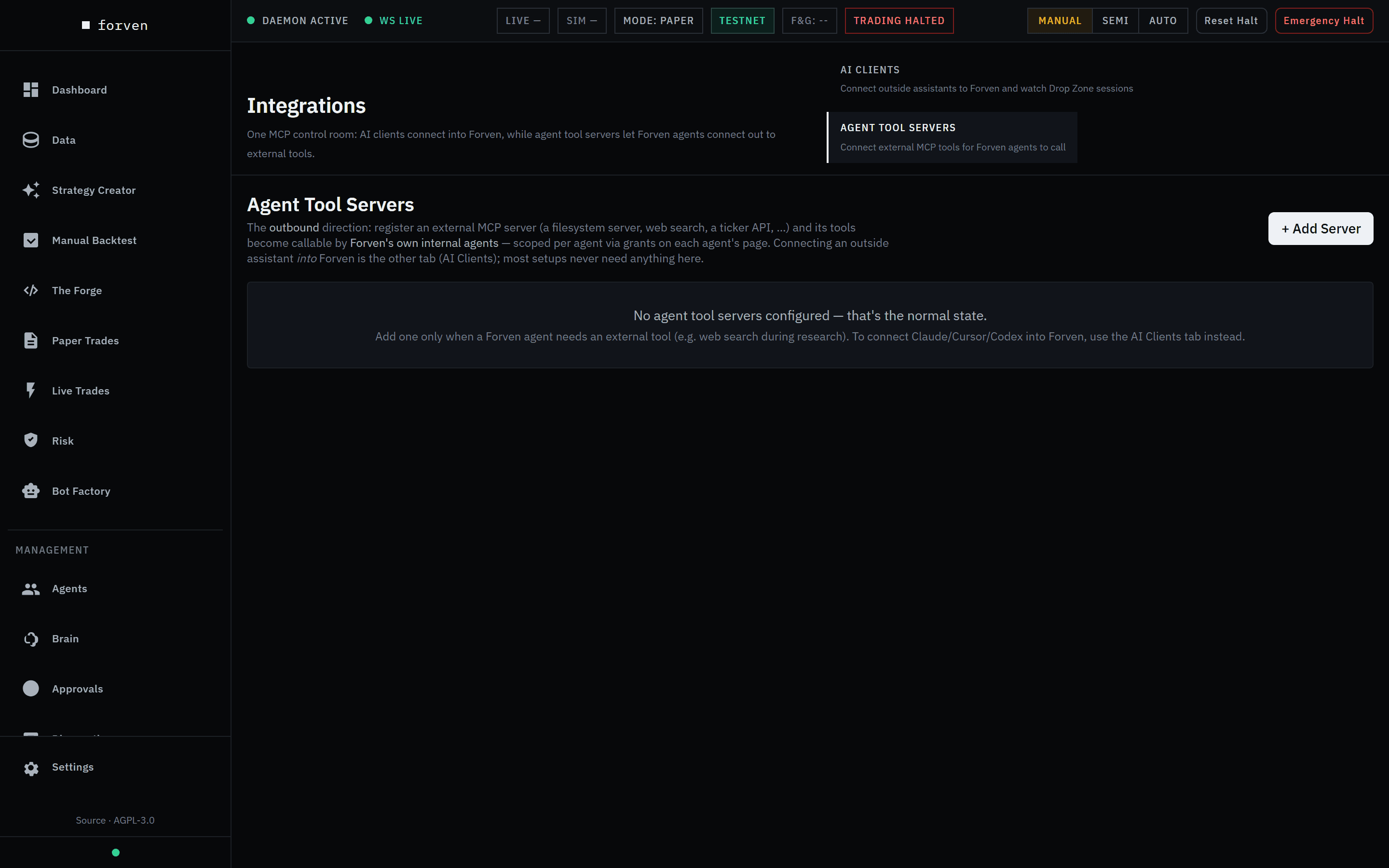 The other direction. Most installs never need anything here.
The Agent Tool Servers tab is the reverse: you register an external MCP server (a web search, a filesystem, a ticker API) and its tools become callable by Forven's own agents. Having none is the normal state. Setup is on MCP server; grant a server to an agent on its drawer's Tools tab under Agents.
The underlying API
Each MCP tool is a thin wrapper over the local backend (http://127.0.0.1:8003 by default), so you can drive the Drop Zone directly:
| Action | Endpoint |
|---|---|
| Drop Zone context | GET /api/ai-dropzone/context |
| Open a session | POST /api/ai-dropzone/sessions — body {label, actor, objective} |
| List sessions | GET /api/ai-dropzone/sessions — query limit, include_closed |
| Session detail | GET /api/ai-dropzone/sessions/<session_id> |
| Close a session | POST /api/ai-dropzone/sessions/<session_id>/close |
| Safety scan a file | POST /api/strategy-guard/scan |
Register a .py file | POST /api/strategies/intake/register-file — body {file_path, session_id?} |
| Run a backtest | POST /api/backtesting/run — body {strategy_id, dataset_id, session_id?, …} |
| Submit a robustness test | POST /api/robustness/<test>/submit — walk-forward, cost-stress, param-jitter, monte-carlo, regime-split |
| Poll a robustness result | GET /api/robustness/results/<result_id> |
| Gate readiness | GET /api/lifecycle/strategies/<id>/readiness (paper strategies: /paper-live-readiness) |
If the backend has FORVEN_AUTH_REQUIRED=true, send the x-api-key and x-operator-key headers.
Good to know
- Overrides are per run. Parameters passed to one backtest never change the strategy's saved defaults; bake winners into the file.
- Closed is closed. New work gets a new session.
- Registration isn't promotion. Nothing reaches paper without surviving the gauntlet and the gates.
Forven is research software. Backtests and session results describe past behaviour on historical data; they're illustrative, not predictive, and nothing here is financial advice.
Related
- MCP server — client configs, auth and troubleshooting
- MCP tools reference — all 21 tools
- Connect Claude Code or Cursor — the walkthrough
- Deep-dive strategy chat — refine one strategy interactively
Scheduled routines
Give the Brain a prompt and a schedule, and it runs that prompt on its own cadence — optionally posting the result to Discord. Create, run, pause and edit routines on the Routines page.
Settings
The Settings hub at /settings — Home, Data, Lab, Trading, Portfolio, HyperLiquid, Notifications, System and Danger Zone — plus the save bar, the typed LIVE confirmation, range captions, the setup wizard, factory reset, approval modes and the operator profile.