Approvals
The queue where you sign off on what the system wants to do — strategy promotions, code edits, skill and routine proposals — plus who approves what by default, approval modes, and the typed GO LIVE dialog.
Approvals (/approval) is where you sign off on changes the system wants to make: moving a strategy toward real risk, editing code, rewriting a quant skill, adding a routine. Agents and the Brain file an approval and wait; you decide.
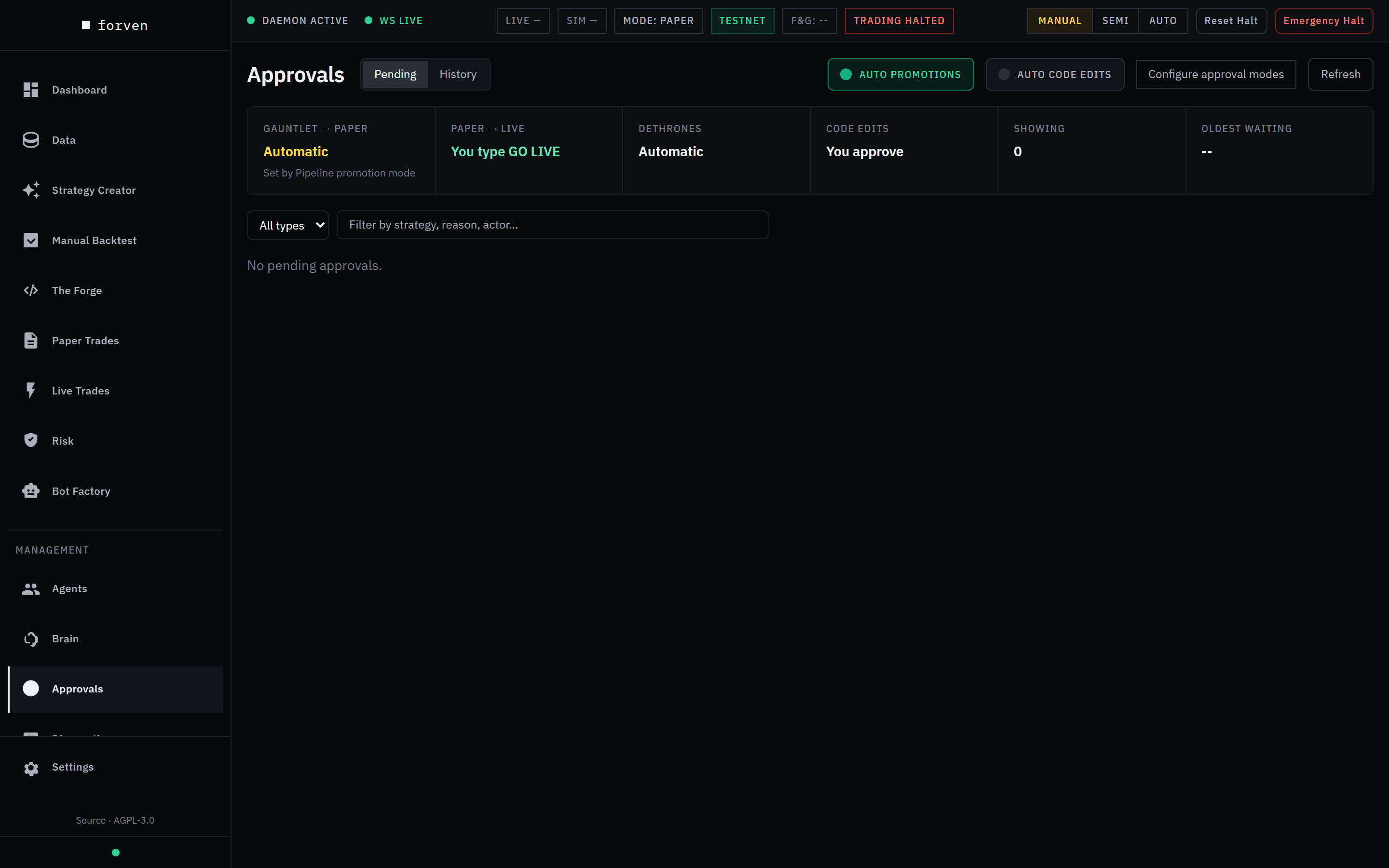 Approvals on a fresh install: nothing pending, and the strip shows the defaults.
Approving a promotion records your decision to advance a strategy. It doesn't predict that the strategy will make money, and nothing here is financial advice.
Who approves what
The strip at the top shows, at a glance, which decisions are yours and which happen on their own:
| Box | Default | What changes it |
|---|---|---|
| Gauntlet → paper | Automatic — Set by Pipeline promotion mode | The Auto promotions toggle. Off, it reads You approve. |
| Paper → live | You type GO LIVE | Only Allow automatic go-live (dangerous) in Settings → Trading, off by default. On, the box turns red and reads Automatic. |
| Dethrones | Automatic | Dethrone auto-approval, on by default. Reads You approve only when it and promotion auto-approval are both off. A dethrone replaces an incumbent strategy with a better challenger on the same market. |
| Code edits | You approve | The Auto code edits toggle. |
| Showing / Oldest waiting | — | How many approvals are listed, and how long the oldest has waited. |
So on a default install, a strategy that passes the door into paper goes to paper by itself, or waits in the paper queue while the pool is full. Nothing goes live without your typed GO LIVE, and only after the paper→live gate, which is where the held-back test and the deflated Sharpe gate are enforced by default.
The two toggles
- Auto promotions is lit when gauntlet → paper promotions approve themselves, whether that comes from this toggle or from the pipeline's promotion mode. Turning it off asks Review promotions yourself? and Switch to manual review sets both to manual. Turning it on asks Approve promotions automatically? — going live still needs GO LIVE, unless Allow automatic go-live is on (see the Paper → live row).
- Auto code edits is off by default. Turning it on lets agent code changes go ahead without your review until you turn it back off.
Approval modes
Configure approval modes opens Approval Modes (/settings/approvals), the per-category policy:
- manual — always needs your review.
- smart — the Approval classifier (a background task on your own model, set under Agents → Setup → Agent models) auto-approves an item only when it returns
auto_approvewith high confidence; everything else waits. - off — auto-approves immediately. Allowed only for low-stakes categories; the server refuses off for anything not on the Off allowlist (server-enforced) shown at the bottom.
Set a Default mode, Default deadline (hours) and Escalation owner under Defaults, add Per-category overrides for exceptions, then Save changes.
What lands in the queue
| Type | When it appears |
|---|---|
| Strategy Promotion | A strategy is ready for its next stage and promotions aren't automatic — or it's going live. |
| Dethrone Recommendation | A challenger beats the incumbent on its market and dethrones aren't automatic. |
| Live Graduation Recommendation | The Live-graduation recommender (Settings → Lab, off by default) finds a paper strategy that looks live-ready. |
| Code Change / Agent Task Approval | An agent wants to run a code edit, code fix, config change or strategy archive. |
| Skill Update Proposal | The Brain proposes rewriting a quant skill. The file changes only after you approve. |
| New Routine Proposal | The Brain proposes a routine. It runs only after you approve; routines you create yourself don't need this. |
| Regime Champion Promotion | A strategy is proposed as the champion for a market regime. |
Work you start yourself, from the UI or the API, doesn't create an approval — you already said what you wanted. The queue is for what agents and the Brain propose.
Reading and deciding
Each card shows the type, the reason, the requesting actor, any deadline, the agent run behind it, and what matters for that type: gate results and metrics for a promotion, the challenger against the incumbent for a dethrone, the prompt and schedule for a routine. Two badges show the classifier's recommendation (Classify runs it if it hasn't) and the approval mode for that type.
| Button | What it does |
|---|---|
| Approve | Lets the change go ahead. Reads Approve (go live) when it puts a strategy live. |
| Deny | Rejects it. For strategy promotions and dethrones you pick a reason — Performing fine, Insufficient evidence, Wrong target stage, or your own words — then Confirm deny. Denying pauses dethrone re-asks for that strategy: 24 hours, then 3 days, then 7 days. |
| Revise | Sends it back with the feedback you type in Revision feedback.... |
| I Did This | Records that you made the change yourself. |
| Troubleshoot | Starts a diagnosis run on the Full-Stack Engineer for a failed task. |
| Details / Watch Run | Opens the Approval Inspector: Diagnosis (root cause, recommended fix) and Execution (the linked run's timeline as it works). |
Decided items move to History. When several pending items are classified auto_approve, Bulk approve (N) clears them in one go.
Going live: the GO LIVE dialog
Live trading is unsupported
Paper is the supported mode. Live trading on Hyperliquid is possible but unsupported and entirely at your own risk — read live-trading safety first.
Open the dialog
On a Strategy Promotion to live, click Approve (go live). The dialog Go live with …? shows the strategy, market, current stage and Sharpe, the Network (Testnet (no real money) or Mainnet (real money)), and the Mainnet switch — Armed: orders will be placed or Not armed: mainnet orders are refused.
Set the ceiling
Enter a Per-asset notional ceiling (USD). It's required: the largest order value the strategy may open live. Opens above it are refused, not downsized.
Type GO LIVE
Type GO LIVE and click Approve and go live. A mistyped or failed attempt leaves the approval pending, so you can try again.
Going live can still be refused after you approve — for example when another live strategy already trades the same coin and side. See promotion gates.
A Live Graduation Recommendation is different: approving it only records that you agree. Nothing trades yet. The card shows the proposed cap and the paper record, and Open strategy to go live takes you to the strategy, where going live still needs the typed GO LIVE.
Over the API
All approval actions are operator-gated endpoints (see the API):
GET   /api/approvals                       List approvals
GET   /api/approvals/{id}/context          What the card and inspector show
POST  /api/approvals/{id}/approve          Approve (going live: confirm "GO LIVE" + live_notional_ceiling_usd)
POST  /api/approvals/{id}/deny             Deny
POST  /api/approvals/{id}/revise           Send back with feedback
POST  /api/approvals/{id}/user-complete    "I Did This"
POST  /api/approvals/{id}/handoff          Hand off to the escalation owner
POST  /api/approvals/{id}/troubleshoot     Start a troubleshoot run
POST  /api/approvals/{id}/classify         Run the classifier
POST  /api/approvals/bulk-approve          Approve every auto_approve-classified item
GET   /api/approvals/modes                 Read modes, deadlines and escalation owner
PUT   /api/approvals/modes                 Update them
Approvals and system modes
The system mode decides how much work gets generated; approvals decide what of it goes ahead. In Manual, background work is frozen, so little reaches the queue; in Auto, the pipeline runs end to end and this queue is where you stay in the loop.
Related
- Promotion gates — the automatic checks an approval sits on top of
- Live-trading safety — what going live involves
- Agents — who files approvals
- Autonomy modes
The brain
The Brain is Forven's sole orchestrator — it routes strategies through the pipeline, dispatches agents, respects the gates, records its decisions, and keeps a short working note. Here's what it does and what the Brain page shows.
Diagnostics
The Diagnostics page: the notifications inbox, an overall health verdict from nine checks, the last 24 hours of model cost, MCP server status, and interrupted runs you can resume.