Scheduler & jobs
The Forven scheduler — the 47 built-in background jobs that drive strategy creation, testing, trading, data and maintenance; where to see them on Agents → Schedules, what each system mode lets run, and how to pause or re-time them.
The scheduler is the heartbeat of the Forven lab. It runs the background jobs that turn the pipeline from a set of stages into a moving process: queuing strategy creation, advancing the gauntlet, scanning for signals, keeping data fresh, reconciling positions, learning and keeping the database healthy. Every autonomous thing Forven does, it does because a scheduler job ran on a tick.
You see and manage the jobs on Agents → Schedules. Most cadences are set for you by the throughput preset; individual jobs can still be switched off or re-timed.
Forven is a research tool. The scheduler automates a research process — it doesn't create an edge, and no cadence guarantees against loss. Nothing here is a prediction or financial advice.
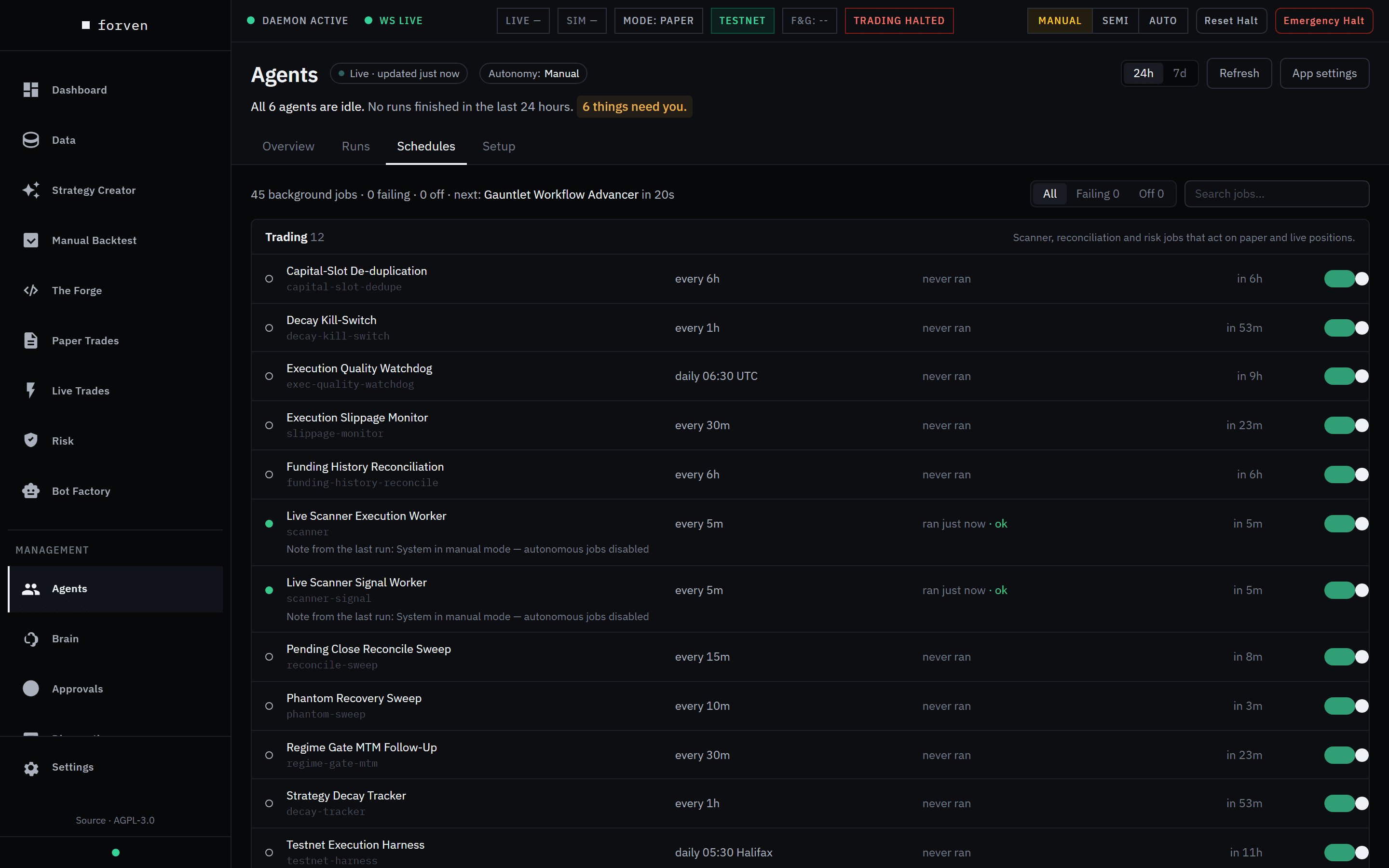 In Manual mode the scanners still tick, but each run notes that autonomous jobs are disabled. This build had 45 jobs; the October 2026 gate plan added two.
The Schedules tab
Open Agents in the sidebar, then the Schedules tab (/agents?tab=schedules).
- Summary — "N background jobs · N failing · N off · next: job in time".
- Filters — All, Failing and Off, plus Search jobs….
- Groups — Trading, Strategy pipeline, Agents & learning, Market data and Maintenance, each with its job count.
- Each job — its name and command, cadence ("every 5m", "daily 06:30 UTC"), last run with its outcome (or "never ran"), next run, any note from the last run, and an on/off switch.
- Re-time a job — click its cadence, choose every N min or cron, enter the value and Save.
The Pipeline page's Processes tab no longer lists jobs; it links here.
How the scheduler works
A job is a named task — interval (every N minutes) or cron (at clock times, UTC unless the job says otherwise) — stored in the scheduler_jobs table with its command, schedule, enabled flag, last run, last error and next run.
On each tick the scheduler finds due jobs, claims them and runs them, oldest-due first. What may run is decided by the system mode:
| Mode | What the scheduler does |
|---|---|
| Manual | Skips every due job — scanners, data collection and maintenance included — and records it as paused ("System in manual mode — autonomous jobs disabled"), still computing its next run. |
| Semi | Skips the three generation jobs — forven-strategy-creation, forven-testing-cycle and forven-auto-intake ("Strategy generation paused by operator"). Everything else runs, including the gauntlet step loop, scanners, graduation and data. |
| Auto | Runs everything. |
The generation pause in the API is the same switch as Semi versus Auto, not a separate lever. The trading halt is different again: it stops new live trades at the risk gate and doesn't pause any job. See operations.
Startup catch-up
When the app restarts, jobs that came due while it was off are stale. Rather than fire a backlog of overdue runs, the scheduler collapses any job more than one cycle overdue into a single immediate run — one fresh run, not a thundering herd.
The built-in jobs
Forven seeds 47 jobs on first run, grouped here as Agents → Schedules groups them. The names are the real job IDs. Cadences marked preset follow the throughput preset; the values shown are Balanced.
| Group | Jobs | What they do |
|---|---|---|
| Trading (12) | forven-scanner-hourly, forven-scanner-signal, forven-reconcile-sweep, forven-phantom-sweep, forven-capital-slot-dedupe, forven-decay-tracker, forven-decay-kill-switch, forven-slippage-monitor, forven-exec-quality-watchdog, forven-funding-history-reconcile, forven-regime-gate-mtm, forven-testnet-harness | The scanner that evaluates signals and manages paper (and live) positions; reconciliation with the exchange; decay tracking and the decay kill switch; fill-quality monitoring; and a daily testnet proof of the live order lifecycle. |
| Strategy pipeline (11) | forven-strategy-creation (every 30 min, preset), forven-testing-cycle (60 min, preset), forven-gauntlet-step-loop, forven-paper-pool-tick (hourly), forven-paper-graduation (120 min, preset), forven-live-graduation-scan, forven-stale-triage, forven-auto-intake, forven-param-optimization, forven-weekly-review, forven-orphan-type-scan | The creation loop; the testing cycle and gauntlet workflow; the paper pool pass; the paper → live gate check and the optional graduation recommender (does nothing unless you enable it); stale quick-screen triage; ingesting dropped strategy files; weekly re-optimization and review. |
| Agents & learning (4) | forven-risk-audit, forven-daily-learning, forven-quant-skills-consolidation, forven-overnight-summary | Scheduled agent work: risk audits, post-mortems, quant skill consolidation and the overnight summary. |
| Market data (15) | forven-data-sla-collector, forven-market-data-collect, forven-data-oi-collect, forven-data-funding-collect, forven-data-lsr-collect, forven-data-taker-collect, forven-data-liquidation-collect, forven-data-fng-collect, forven-data-macro-collect, forven-data-btcdom-collect, forven-data-basis-collect, forven-data-hl-venue-collect, forven-data-bv-backfill, forven-regime-update, forven-recalibration | The freshness-SLA collector, the enrichment-stream collectors, Hyperliquid venue data, bulk backfill, regime refresh and recalibration. |
| Maintenance (5) | forven-db-maintenance, forven-db-backup, forven-wal-checkpoint, forven-source-reconciliation, forven-weekly-funnel-report | Retention pruning, the daily database backup, WAL checkpoints, cross-venue divergence checks and the weekly funnel report. See maintenance. |
Turning on the experimental portfolio layer (Settings → System → Experimental features) adds three more: forven-portfolio-allocation, forven-basket-funding-carry and forven-universe-books (see Universe). They're removed again when you turn it off.
The paper pool and the weekly funnel report
forven-paper-pool-tick runs every hour. It retires paper strategies whose forward record is clearly losing, in a 15% drawdown, idle for 60 days (the default limits), or contradicting their backtest — archived as paper_retired:<why>; live strategies are never touched. Then it admits strategies waiting for a paper slot, best recorded evidence first, and starts at most one breadth test. The limits are in Settings → Lab → Paper pool; see configuration.
forven-weekly-funnel-report runs on Mondays at 08:00, in the America/Halifax time zone out of the box (re-time it like any job). It posts a weekly digest for the last seven days: strategies registered (and how many by agents), archived before any merit test, and reaching the gauntlet, paper and live; the paper and live pools now; forward trades closed in paper; and the paper strategies with enough forward evidence (20+ trades, 30+ days) for the live gate to judge. It goes to the morning-brief channel and follows the Daily summaries switch in notifications.
Data jobs and the freshness SLA
forven-data-sla-collector keeps every stored series inside its freshness SLA — tighter for markets behind live and paper strategies, looser for the research universe — running every 120 seconds by default (set under Settings → Data). It replaced three older jobs: the OHLCV keep-alive (forven-data-ohlcv-keepalive), the Data Engine catch-up (forven-data-engine-catchup) and the implied-volatility collect (forven-data-iv-collect). On an updated install those are disabled on first boot. See Data for the SLA tiers.
Retired jobs
The crucible and hypothesis jobs are gone: forven-crucible-planner, forven-crucible-discovery, forven-ideation-daily, forven-hypothesis-verdict-loop, forven-hypothesis-promotion-loop, forven-hypothesis-revisit-pass and forven-hypothesis-unstarted-ageout. forven-strategy-creation replaced them.
A single workflow can span several jobs. The gauntlet, for instance, is a workflow whose steps are claimed and completed across scheduler ticks rather than in one blocking run — which is why a strategy can sit in the gauntlet for a while.
Throughput: tuning many jobs at once
Rather than tune jobs by hand, pick a throughput preset in Settings → System → Throughput — Trickle, Conserve, Balanced (the default) or Max. A preset sets the strategy-creation check interval, coding, testing and graduation intervals, the agent task claim limit, the backtest subprocess budget, the gauntlet drain workers and the daily strategy-creation budget together; see Ideas & strategy creation and cost controls. With throughput_auto_scheduler_control on (the default), the affected jobs' cadences are recomputed from those settings on the next tick. Edit any one knob and the dial reads Custom.
Interval settings have a one-minute floor, so a misconfigured value can't hammer the lab.
Enabling, disabling and re-timing from the shell
# Turn off a single job (operator-gated; needs FORVEN_OPERATOR_KEY if you've set one)
Invoke-RestMethod -Method Patch `
  -Uri "http://127.0.0.1:8003/api/scheduler/forven-scanner-hourly" `
  -ContentType "application/json" `
  -Body '{"enabled": false}'
Or with the CLI:
python -m forven scheduler list
python -m forven scheduler disable forven-scanner-hourly
python -m forven scheduler enable forven-scanner-hourly
python -m forven scheduler run forven-daily-learning     # run once now
Changes persist in scheduler_jobs, and the next tick recomputes the next run. Jobs that check the mode themselves still do when run by hand: forven-strategy-creation queues nothing outside Auto.
Stale locks and zombie threads
When a job runs, the scheduler stamps a running lock so the same job can't start twice. If a job hangs, the scheduler self-heals: on each tick (and at startup) it checks held locks, but it won't force-recover one while the job's task or worker thread is still alive. Only when nothing is alive and the lock is older than the stale threshold (capped at 3,900 seconds) is it cleared, and the next tick re-runs the job. Orphaned "running" jobs from a previous process are swept at startup, and a watchdog restarts a scheduler that has provably stalled.
A long-running job isn't always stuck. It usually means a slow external call — a sluggish model provider or exchange — not a hang. If a lock genuinely never clears, see troubleshooting.
Steps: check and tune a job
- Open Agents → Schedules.
- Find the job — use Search jobs…, or Failing to see only jobs whose last run errored.
- Read its cadence, last run and next run, and any note from the last run.
- To stop just that job, flip its switch off. To change when it runs, click its cadence and save a new interval or cron expression.
- To change many loops at once, change the throughput preset instead.
- Confirm it took: the next run should move to a sensible time, and the job shouldn't show as failing.
What you'll see
A healthy job has a future next run, a recent last run and no error. Switched off, it moves under Off and its next run stops advancing. In Manual or Semi, jobs the mode is holding still tick, with a note from the last run saying why they were skipped. Your first sign of a stuck loop is a job under Failing, or one whose next run never moves.
Caveats
- The mode comes first. No cadence matters while Manual holds every job, or Semi holds the generation jobs.
- Cadence floors are real. You can't drive loops arbitrarily fast.
- Held locks can be legitimate. A long-running job may be waiting on a slow model or exchange.
- Startup collapses overdue runs. After a restart, an overdue job fires once, not once per missed interval.
- Job names, counts and cadences are defaults from the current build and may change between releases.
Related
Quant skills (the learning loop)
How Forven turns backtest results into versioned, confidence-scored quant skills, closes the loop on real outcomes, and feeds the lessons back into strategy creation.
Runs
Every piece of agent work is a run. Find runs on Agents → Runs, read exactly what one did on its Run Detail page, and resume or dismiss the ones that stopped.