Diagnostics
The Diagnostics page: the notifications inbox, an overall health verdict from nine checks, the last 24 hours of model cost, MCP server status, and interrupted runs you can resume.
Diagnostics (/diagnostics) is the page to open when something feels off. It answers is my install healthy? in one place: the notifications Forven has raised, a set of health checks with an overall verdict, what the agents spent in the last day, and any runs a restart interrupted. The dashboard tells you that something needs attention; Diagnostics tells you what.
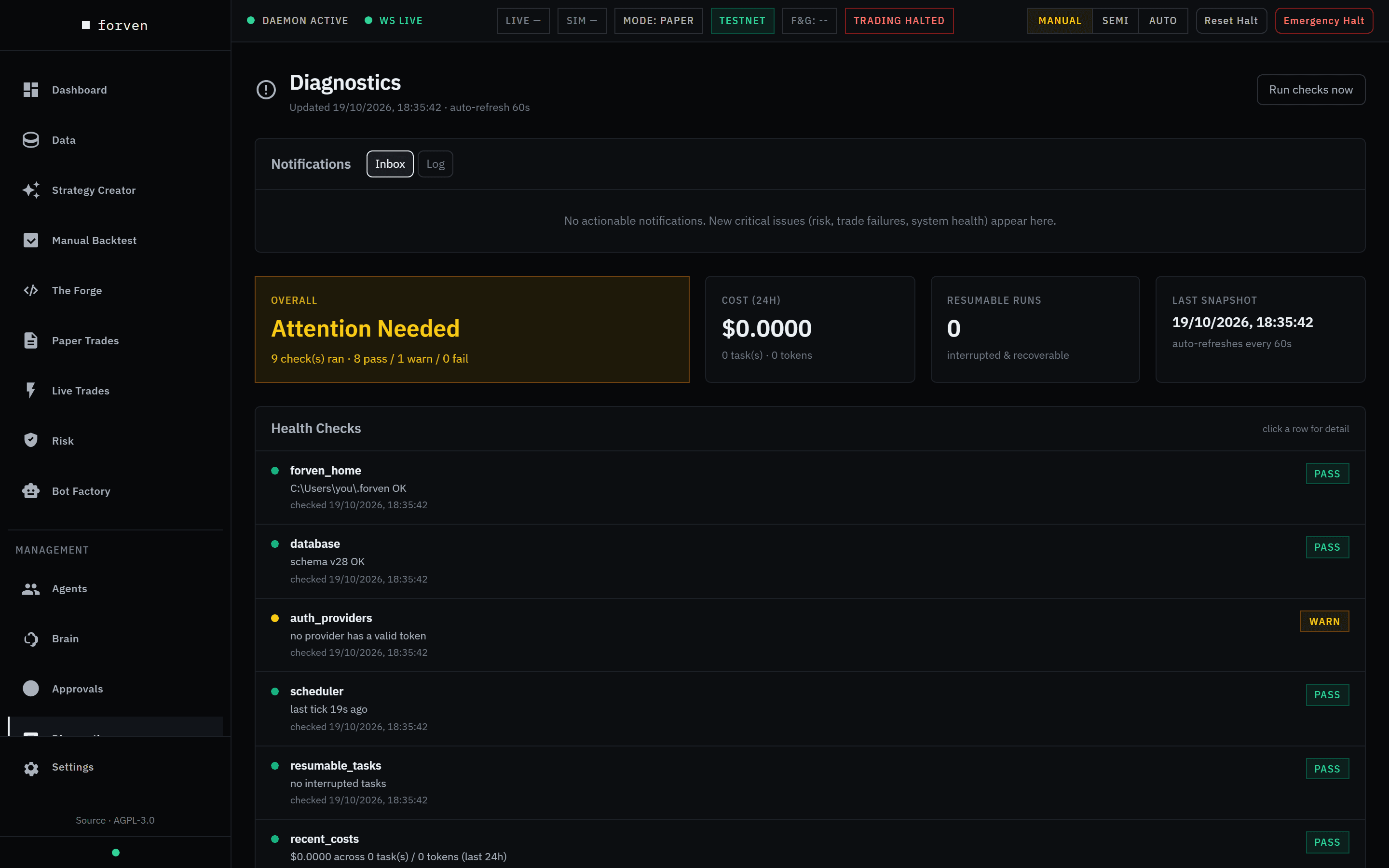 A keyless fresh install: auth_providers warns that no provider has a valid token; every other check passes.
The page refreshes itself every 60 seconds. Run checks now runs every check immediately and shows its progress.
Notifications
The top panel is the in-app inbox — the half of notifications that doesn't need Discord. It's always shown, even when the health checks can't load.
- Inbox lists actionable notifications — risk alerts, trade failures, system health — newest first, each with its severity and source. Ack acknowledges one; Acknowledge all clears the lot. Items you've already seen sit under Seen on an earlier visit.
- Log is the full history.
The Diagnostics badge in the sidebar counts what's new since your last visit.
Summary tiles
| Tile | What it tells you |
|---|---|
| Overall | All Systems Healthy, Attention Needed or Failures Detected, with how many checks passed, warned and failed. |
| Cost (24h) | Model spend over the last 24 hours, with the number of runs and tokens behind it. |
| Resumable Runs | How many interrupted runs can be picked up again (below). |
| Last Snapshot | When the checks last ran. |
Cost is Forven's own estimate from token counts and list prices — your provider's dashboard is the bill. See cost controls.
Health checks
Click a row for its detail. Each check reports pass, warn or fail; a check that breaks internally reports warn or fail, never pass, so a broken probe can't hide a problem.
| Check | What it verifies |
|---|---|
forven_home | Your Forven home folder exists and is writable. |
database | The database is reachable, and its schema version. |
auth_providers | At least one connected model provider has working credentials. Warns on a fresh install until you connect one. |
scheduler | The scheduler's heartbeat is fresh — background jobs are actually being run. |
resumable_tasks | Whether any runs were interrupted and can be resumed. |
recent_costs | Model spend over the last 24 hours. |
tool_truncations | Recent agent tool calls whose output had to be cut short. |
brain_cache_hit_rate · brain_fence_strips | Whether the Brain's prompt caching is working — a low hit rate means it's paying full price for context it already sent. |
MCP servers
Shown only once you've added an external agent tool server under Integrations: each server with its status, disabled ones marked. Click a row to manage it.
Resumable runs
When a run is cut off — the app closed mid-run, a tool never reported back — Forven keeps a checkpoint instead of losing the work or pretending it finished. Resumable Runs lists them with their latest checkpoint. Resume re-queues one and the runner picks it up on its next tick.
Resume (caution)
Runs that act on the outside world — trade_execution and phantom_repair — are never resumed automatically, and show Resume (caution) with a confirmation. Re-running one may repeat what it already did, such as placing an order. Resume only if you're sure it didn't already run; check its Tool Calls on Run Detail first.
From a terminal
python -m forven doctor runs a similar set of checks (add --json for machine-readable output) — useful when the UI won't load. See the CLI reference. Over the API: GET /api/diagnostics/snapshot, GET /api/diagnostics/resumable and POST /api/diagnostics/resumable/<id>/resume.
Steps: triage a problem
Read the inbox and the verdict
Start with the Inbox, then the Overall tile.
Open what's failing
Click any warning or failing check. A stale scheduler heartbeat means background jobs aren't running — see operations. A failing auth_providers means a provider lost its credentials — reconnect it on Agents → Setup → Providers.
Deal with interrupted runs
Resume what you still want from Resumable Runs; leave the rest.
Sanity-check spend and acknowledge
Compare Cost (24h) with what you expect from your throughput preset, then acknowledge what you've handled.
On a healthy install you'll see All Systems Healthy, no resumable runs, a cost figure in line with your preset, and an empty inbox.
Forven is research software. Diagnostics describe the health of your install, not the quality of any strategy, and nothing here is financial advice.
Related
Approvals
The queue where you sign off on what the system wants to do — strategy promotions, code edits, skill and routine proposals — plus who approves what by default, approval modes, and the typed GO LIVE dialog.
Scheduled routines
Give the Brain a prompt and a schedule, and it runs that prompt on its own cadence — optionally posting the result to Discord. Create, run, pause and edit routines on the Routines page.