Bot Factory
Create and operate autonomous LLM trading bots — each a persona plus risk config that reasons over live candles and trades a paper ledger by default, with an explicitly armed, fully gated live mode.
The bot factory is Forven's autonomous LLM trading surface. A bot is not a graduated strategy — it is an LLM agent you configure with a persona and a set of risk limits, which then runs on a timer: each cycle it looks at recent market data, decides to buy, sell, short, cover, hold, or observe, and books the result. By default every bot trades paper in a local ledger. Bots are separate from the gauntlet pipeline — they are a sandbox for watching how a prompt-driven trader behaves. A bot can be explicitly armed for live execution, but only through a typed confirmation and the same gates the live engine uses.
Forven is a research tool. Bots run in paper mode by default: every trade goes into a local paper ledger against live market prices, and nothing reaches an exchange. Live mode exists but, like all live trading in Forven, it is unsupported and entirely at your own risk. This is a highly experimental feature: an LLM making autonomous trade calls is nondeterministic, and any numbers a bot produces are illustrative, not predictive, and never financial advice.
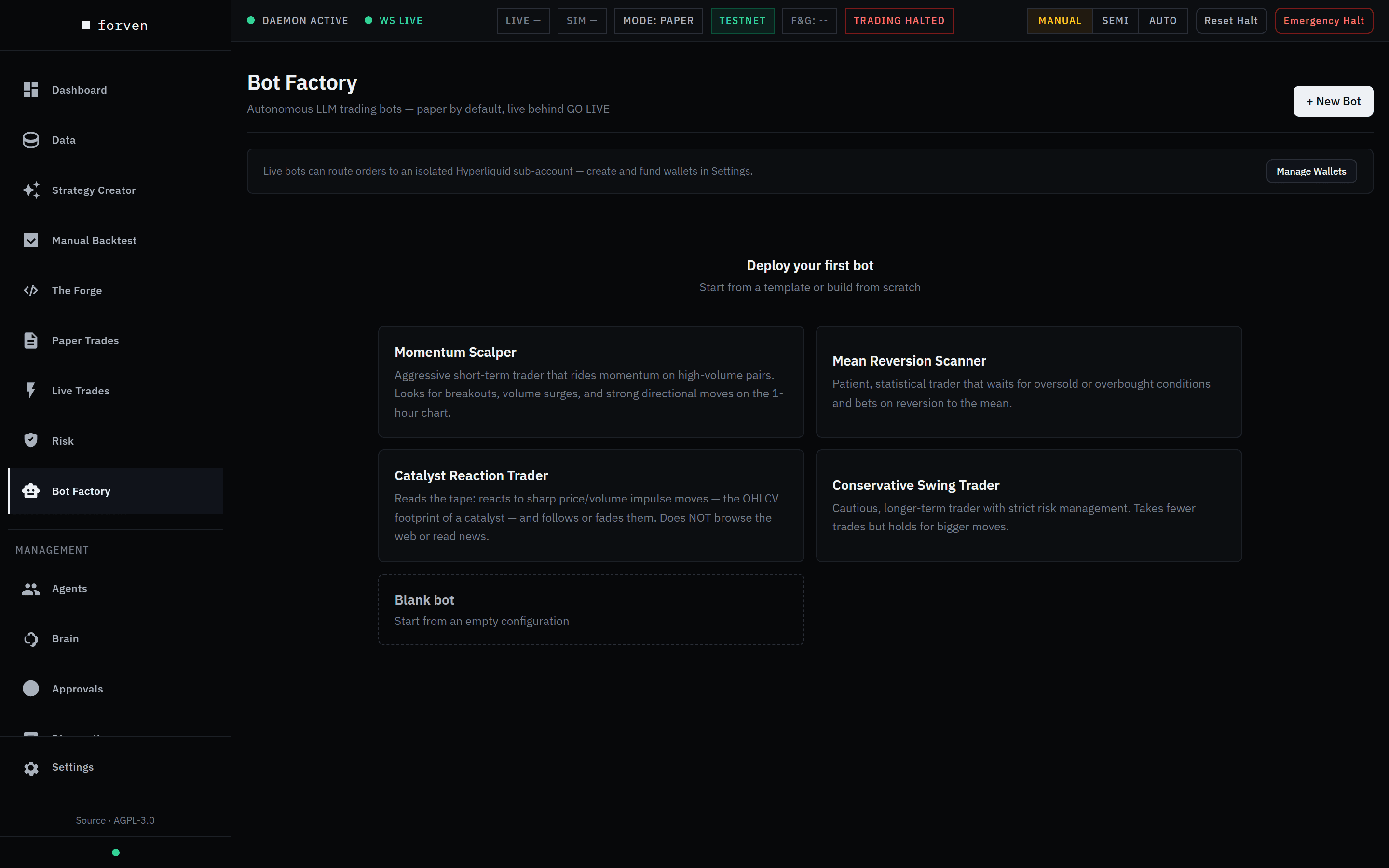 A fresh install, before any bot exists.
Bots need an AI provider. Every decision a bot makes is an LLM call on your own key, so connect a provider in Agents → Setup → Providers first. See models & providers.
What a bot is
A bot is a configured LLM trader that runs as its own background process. You give it a personality and a rulebook in plain language and a set of hard numeric limits; the model supplies the decisions and Forven enforces the limits. A bot's configuration has two halves.
Persona (what the model reads).
- Soul — the bot's temperament and personality.
- Strategy — the approach it should take.
- Context — seed knowledge you want it to start with.
- Guardrails — behavioral rules. These are best-effort and LLM-interpreted, not a hard guarantee — the numeric limits below are what actually enforce safety.
- Model — the LLM it runs on, chosen from the models you have enabled. Leave it blank to inherit your default (bots use the same bring-your-own-key routing and spend rules as the agents).
- Reasoning verbosity —
minimal,standard, orverbose.
Risk and execution (what Forven enforces).
capital_allocation(default100,000) — the bot's starting paper capital.max_position_pct(10) — the largest single position as a share of equity. A hard block.max_concurrent_positions(5) — longs and shorts counted together.max_drawdown_pct(3) — the bot pauses itself if equity falls this far from its peak.stop_loss_pct/take_profit_pct— optional automatic exits.taker_fee_bps,slippage_bps,funding_rate_bps_per_day— the cost model applied to every fill and open position.cooldown_seconds(60, Decision Cadence in the editor) — the delay between decision cycles.session_hours— an optional trading window (supports overnight windows).asset_mode(Free Roam or Locked Pairs) pluslocked_pairs.max_llm_calls_per_day(200) andmax_consecutive_errors(5) — the spend and error circuit breakers.execution_mode—paper(the default) orlive. It can only be changed through the GO LIVE / go paper actions, never by an ordinary config save.live_wallet— for a live bot, the named wallet its orders trade from.
There is no "container image," symbol/timeframe bundle, or strategy to wrap. You create a bot from a template or from scratch.
Where it lives in the UI
The factory is three routes:
/bot-factory— the bot list. A summary strip counts Bots, Running, Live-armed, Open positions and Fleet P&L. Each card shows the bot's status, paper or live, model, pairs, wallet, P&L and LLM-call usage, with Start / Stop, Edit, Clone and Delete. + New Bot opens the editor; Kill All appears only while a bot is running and asks you to confirm./bot-factory/[id]— the detail and monitor page. A stats header (capital, max position, a live drawdown gauge, LLM calls today, consecutive errors) sits above five tabs: Activity (the decision log), Positions, Trades, Memory, and Versions (with a field-by-field version diff)./bot-factory/editor— the create/edit form, opened with?id=,?template=, or?strategy=. It is one page of sections — Identity, Persona & Strategy, Risk & Sizing, Execution, Universe, Schedule and Safety Limits — and ends in a Summary. It owns the paper/live mode with inline GO LIVE arming and a wallet picker, and can Save as Template.
The /api/bot-factory/* endpoints are operator routes. On the default keyless localhost install they are open; once you set FORVEN_API_KEY or FORVEN_OPERATOR_KEY, they need the operator key.
How a bot runs
Once started, a bot spawns a detached OS subprocess that loops on its cooldown. Each cycle it:
- Checks its circuit breakers — consecutive errors, the daily LLM-call cap, and the session-hours window.
- Fetches a market snapshot: the recent 1-hour candles for its watched pairs, from your data lake or, if they aren't stored, from Binance. A bot sees nothing else — no web, no news, no other timeframes.
- Marks its open positions to the live price, accrues funding, and fires any stop-loss / take-profit exits.
- Checks the drawdown gate.
- Recalls its memory, then calls the LLM for a decision.
- Executes the decision — as a paper fill (applying fees and slippage), or, for a live-armed bot, as a real order through the live gates below — then sleeps until the next cycle.
Bots observe live prices only for the pairs they watch. In Free Roam a bot watches the top 6 active perpetuals by 24-hour volume from the research universe's symbol list, re-ranked hourly; if that list is empty it falls back to BTC, ETH and SOL. It is not a market-wide scan. Use Locked Pairs to pin a specific set.
Lifecycle states
A bot is stopped, running, paused, or error. Start spawns the process; Stop kills it. A bot pauses itself — it is not an operator action — when it trips the consecutive-error circuit breaker, hits its daily LLM-call cap, or breaches its max-drawdown limit. It goes to error on process death or a stale heartbeat. The manager auto-recovers running and errored bots when the backend restarts, and a daily-capped bot resumes on its own at UTC midnight when the call budget resets.
Steps: create and run a bot
- Open
/bot-factory. With no bots yet, pick a template card or Blank bot; otherwise click + New Bot (or Clone on an existing bot). - Under Identity, name the bot and choose a model, or leave Default provider (recommended) to use your configured default.
- Under Persona & Strategy, write the soul, strategy, context, and guardrails.
- Under Risk & Sizing, set capital, the position and drawdown limits, and the optional stop-loss / take-profit. A stop-loss is required before the bot can go live.
- Under Execution, set the fee and slippage model, the decision cadence and verbosity, and leave the mode on Paper. Under Universe, choose Free Roam or Locked Pairs; under Schedule, an optional trading window.
- Under Safety Limits, set the daily LLM-call cap and the consecutive-error breaker.
- Click Create Bot to save the configuration.
- Click Start on the new bot to spawn its process; use Stop to halt it.
What you'll see
The new bot appears with its status. Open it to watch the Activity tab stream decisions (trade, observation, pass, error, paused, with BUY/SELL/SHORT/COVER and long/short badges), the Positions tab mark to a live price, and the Trades and Memory tabs fill in as it runs. A paper bot never touches an exchange — treat every figure as illustrative.
Live mode (unsupported, at your own risk)
A bot can be armed live. Nothing about an ordinary edit can do this: live is armed only through GO LIVE — Save + Arm Live in the editor, Go Live… on a stopped paper bot's page (the Arm live execution panel), or POST /api/bot-factory/bots/{id}/go-live — which requires the typed GO LIVE confirmation and a Per-order notional ceiling (USD) for that bot. A live bot with no recorded ceiling is blocked, and arming needs a stop-loss % (a mandatory protective stop). Go Paper (/go-paper) disarms it.
A live bot's orders go through exactly the same gate stack as the pipeline's live path: direction-book routing, can_open (kill-switch, daily-loss halt, margin, one position per asset, cooldown), the live portfolio budget and correlation cap, the bot's notional ceiling, the regime gate, and the liquidity guard — then a market order with a protective stop. Everything fails closed: no equity reading, no ceiling, no stop, or any gate refusal blocks the open. Orders are sized off the real wallet balance, not the paper capital_allocation, and HyperLiquid's ~$10 minimum order size is checked up front.
Wallet isolation. Give a live bot its own named wallet — a HyperLiquid sub-account you register under Settings → HyperLiquid — and every one of its orders trades from that wallet, keeping the bot's capital apart from the strategy pipeline's. The wallet can only be changed while the bot is in paper mode.
Live bots join the live safety net. Unlike paper bots, a live bot's trades are included in the kill-switch flatten, exchange reconciliation, and the live portfolio budget. Stopping a live bot closes its exchange positions with reduce-only market orders; the confirmation says how many.
Long and short
Bots trade both directions. The decision vocabulary is BUY / SELL / SHORT / COVER / HOLD / OBSERVE:
- BUY opens (or adds to) a long; SELL closes the long.
- SHORT opens a short — it profits when price falls; COVER closes the short.
- A bot holds at most one long and one short per ticker, and P&L, stop-loss / take-profit direction, slippage, and funding are all computed direction-aware.
Opens must be priceable from the live snapshot or they are blocked, no single position may exceed max_position_pct of equity (a hard block), and max_concurrent_positions counts longs and shorts together. Aggregate leverage above equity raises a soft warning only — paper leverage is allowed by design.
Accounting is ledger-authoritative
A bot's realized_pnl is derived from its trade ledger, not accumulated in memory:
- On close, gross P&L is computed and both entry and exit fees are subtracted before the bot's realized P&L is credited.
- Funding is booked per cycle — charged to longs, credited to shorts.
- Equity shown to the model is
capital_allocation + realized_pnl, and positions are auto-sized fractionally from that equity — the LLM does not specify a quantity. - A peak-equity watermark is persisted, so pausing and restarting a bot cannot silently reset its max-drawdown gate.
- On startup Forven reconciles each bot's realized P&L from the ledger, so a crash between a close and its equity write self-heals.
Headline win-rate and P&L come from a server-side stat over all of a bot's trades, not a recent slice, and show "—" when there are no closed, decisive trades yet.
Isolation
Isolation is the core of this design, on three axes.
Paper bots never touch live trading. (This part describes paper bots; a live-armed bot deliberately joins the live safety net, as described above.) Every bot trade is tagged source='bot:{id}', and paper bot trades are excluded from the live engine's risk reasoning: it does not appear in the brain's context, the risk audit, strategy analytics, exchange reconciliation, or the global kill-switch flatten. A bot paper position on BTC can never raise a false duplicate against a real HyperLiquid position, and the kill-switch will never force-close it at a live price. Bot safety is entirely self-contained — its own drawdown gate, circuit breaker, daily cap, and stop-loss / take-profit — so the risk page's global controls are neither its safety net nor a threat to it.
Bots are isolated from each other. Each bot runs as a detached subprocess with a minimal, non-inherited environment, its own rotated log file and its own memory collection, which is dropped when the bot is deleted. Stop and kill target the exact process for that bot, never a recycled PID or the parent.
Bots never hold Forven's keys. A bot never receives Forven's master encryption key, so it can't decrypt the stored secrets: provider logins, exchange keys, webhooks. Instead, each start issues the bot a one-off token. The bot uses it to fetch only its own LLM provider's login from a local endpoint in Forven's API, which serves bot processes on this machine only. The token works only while that bot's process runs and is revoked when it stops. There are no Discord secrets in a bot's environment. Live-armed bots are the exception that remains: they still receive their Hyperliquid credentials as environment variables.
The Windows sandbox
On Windows, every bot also starts inside a low-integrity sandbox, the same Windows mechanism browsers use for theirs. It is on by default, with nothing to set up.
| A sandboxed bot | |
|---|---|
Reads and writes Forven's data folder (~\.forven): the database, market data, its memory | Yes |
| Reaches Forven's API and the internet | Yes |
| Changes Forven's code, Python, or anything else in your profile | No |
Reads the master key or .env files | No |
The first time a bot starts after the API starts, Forven labels the folders and runs a short probe in the sandbox. Labelling a large data folder can take a moment, once. If the probe shows a bot couldn't work in the sandbox, or the sandbox can't be created, bots start the way they always have and the activity log says why. The sandbox never stops a bot from starting.
# Prepare the sandbox and run the check now
python -m forven bot-sandbox
Set FORVEN_BOT_SANDBOX=0 in Forven's environment to turn it off. On macOS and Linux bots start without it.
What it doesn't cover: a sandboxed bot can still read most of your profile (not the key or .env files), and it reads and writes the shared database directly.
Honesty
The bot factory is deliberate about not overstating what it knows:
- No fabricated marks. An open position with no live price feed shows a "—" and zero unrealized P&L, never the entry price echoed back as a fake-flat mark. The drawdown gauge on the detail page mirrors exactly what the runner enforces.
- No phantom capabilities. Bots do not browse the web, read news, or see multiple timeframes — the templates say so plainly. The former news-reading template is now the honest tape-reading "Catalyst Reaction Trader," whose own description states it does not browse the web.
- Honest labels. The editor says exactly what Free Roam watches (the top perps by volume, up to 6), guardrails are labeled best-effort, and a failed LLM call is not charged against the daily budget.
Endpoints
Every action is an operator-gated HTTP call against the local API (default 127.0.0.1:8003). The whole router sits behind require_operator_access.
| Method | Path | Purpose |
|---|---|---|
GET POST | /api/bot-factory/bots | List the fleet, or create a bot. |
GET PUT DELETE | /api/bot-factory/bots/{id} | Inspect, update, or delete a bot. |
POST | /api/bot-factory/bots/{id}/start · /stop · /clone | Start, stop, or clone a bot. |
POST | /api/bot-factory/kill-all | Stop every running bot (two-step confirm in the UI). |
POST | /api/bot-factory/bots/{id}/go-live · /go-paper | Arm a bot live (typed confirmation + ceiling), or return it to paper. |
POST | /api/bot-factory/bots/{id}/wallet | Assign the named wallet a live bot trades from (paper mode only). |
GET | /api/bot-factory/bots/{id}/trades · /stats · /positions | Trade ledger, aggregate stats, open positions. |
POST | /api/bot-factory/bots/{id}/positions/{trade_id}/close | Close one position. |
GET | /api/bot-factory/bots/{id}/decisions · /memory | The decision log and the bot's memory. |
GET | /api/bot-factory/bots/{id}/versions · /versions/{v1}/diff/{v2} | Config version history and a version diff. |
GET POST | /api/bot-factory/templates | List or save persona templates. |
GET DELETE | /api/bot-factory/templates/{id} | Read or delete a custom template (built-ins are protected). |
GET | /api/bot-factory/from-strategy/{strategy_id} | Pre-fill a bot from an existing strategy (seeds text only). |
Update hot-reloads certain risk fields into a running bot. Delete stops the subprocess, closes the bot's open paper trades, and drops its memory collection before removing the record. Clone creates a new {name} (copy) bot record immediately rather than only opening the editor.
To list the fleet from PowerShell with an operator key:
$headers = @{ "x-operator-key" = $env:FORVEN_OPERATOR_KEY }
Invoke-RestMethod -Uri "http://127.0.0.1:8003/api/bot-factory/bots" -Headers $headers
Built-in templates
Four personas ship as a starting point: Momentum Scalper, Mean Reversion Scanner, Catalyst Reaction Trader, and Conservative Swing Trader. Each omits an explicit model (so it inherits your default provider) and is scoped to the 1-hour data a bot actually sees. Save your own with Save as Template in the editor.
Caveats
- Highly experimental. Autonomous LLM trading is nondeterministic and unproven. Watch what a bot does; do not walk away and assume it behaves.
- Paper by default. Every fill is simulated in a local ledger unless you arm the bot live — which is unsupported and at your own risk.
- It spends tokens. A running bot calls the LLM every cycle on your own key. The
max_llm_calls_per_daycap is the hard ceiling; see models & providers and cost controls. - A bot sees only 1-hour candles for its watched pairs — no web, no news, no other timeframes. Free Roam means up to 6 of the most-traded perps, not the whole market.
- The sandbox is Windows-only and limited. It keeps a bot away from your code and Forven's keys, not from reading the rest of your profile.
- A paper bot's safety gates are its own. Per-bot drawdown, circuit breaker, daily cap, and stop-loss / take-profit are enforced inside the bot; the global kill-switch deliberately does not touch paper bot trades. A live bot is additionally covered by the live safety net.
Related
- Paper trading — the supported execution mode bots simulate against.
- Models & providers (BYOK) — the LLM routing a bot's model resolves through.
- Cost controls — how LLM spend is bounded.
- HyperLiquid integration — named wallets and sub-accounts for live bots.
- Risk & safety — the live-engine controls, and which bot trades they cover.
Universe books
An experimental, paper-only part of the portfolio layer — one pre-registered trend rule held across 15 coins at once. How to turn it on, the two books, the forward paper book versus the sealed research report, Tick now and Reset.
Agents
Six optional AI co-researchers that write ideas, build and validate strategies, and diagnose failures — managed on the Agents page, running on your own model key, with no way to place a trade.