The Forge
The Forge is the pipeline at a glance — every strategy, where it is, why it's there and what moved — plus each strategy's page, where you run its tests, read its verdict and change its stage.
The Forge (/lab) is where every strategy lives while Forven decides what it's worth. It shows the whole pipeline — Quick screen → Gauntlet → Paper → Live, plus the Graveyard — and each strategy's page (/lab/strategy/<id>) holds its full dossier: verdict, evidence, tests and stage controls.
New here? Follow Run the gauntlet first.
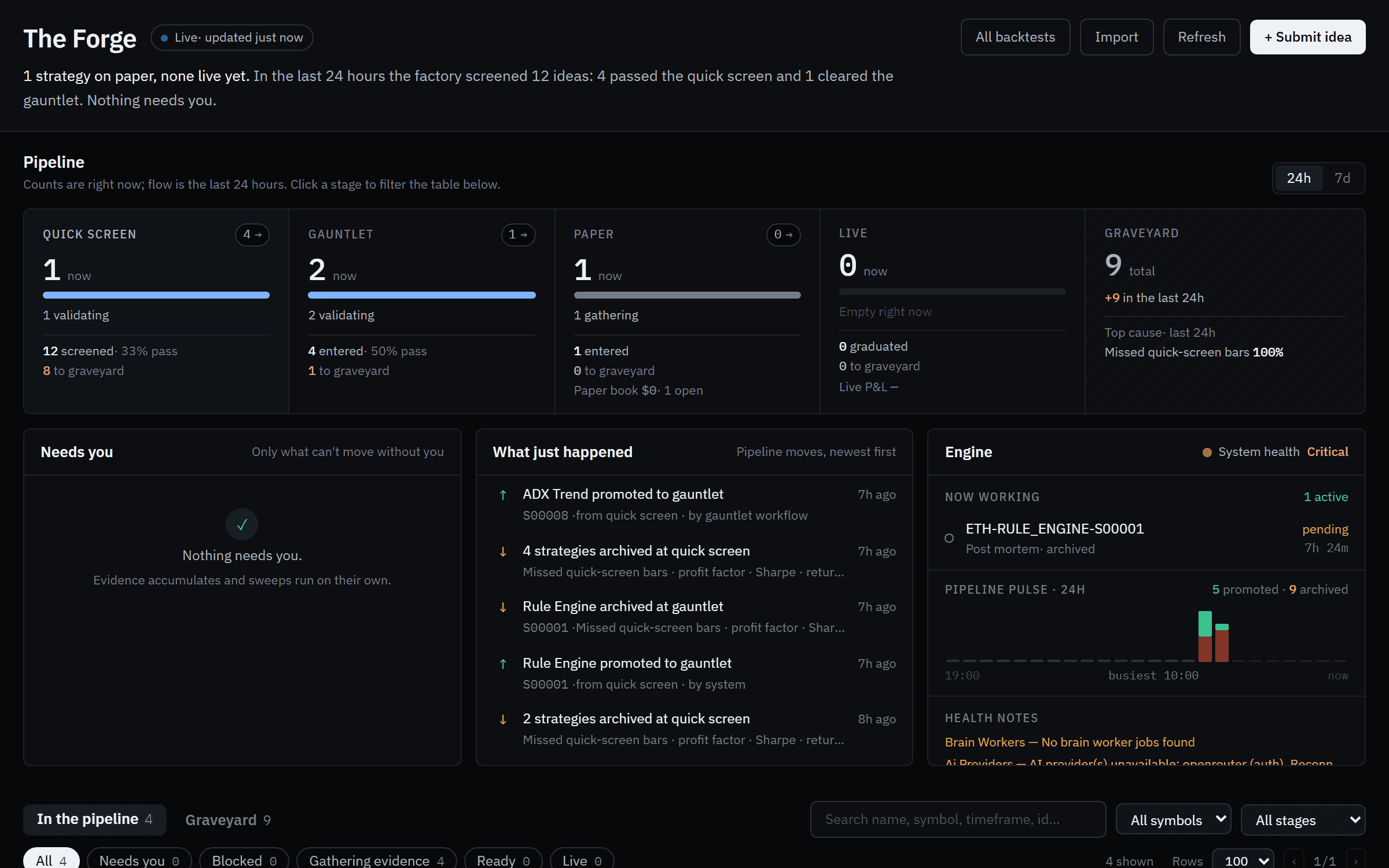 The Forge on a sandbox install a few hours into testing a dozen strategies.
The Forge page
Header
A one-line headline summarizes the state of the factory — what's trading forward, what was screened in the last 24 hours, what needs you. Buttons:
- All backtests — every backtest ever run, searchable and sortable (
/lab/backtests). - Import — drop or paste a Forven strategy export (
.json). It lands in quick screen; exports that carry code import into the locked-down strategy worker. - Refresh.
- + Submit idea — hand an idea to the agents. See Ideas & strategy creation.
Pipeline rail
One column per stage, each with how many strategies are there now, how many entered and passed over the last 24h or 7d, and how many went to the graveyard. The Paper column shows the paper book and the Live column realized live P&L — never added together. The Graveyard column names the top cause of death. Click any column to filter the table.
Needs you · What just happened · Engine
- Needs you lists only what can't move without you — an approval, a blocked strategy that needs a decision.
- What just happened is the feed of pipeline moves, newest first.
- Engine shows what is running now and any health notes.
Strategies table
Two buckets: In the pipeline and Graveyard. Filter by text, symbol and stage, and by status chips — All, Needs you, Blocked, Gathering evidence, Ready, Live.
| Status | Meaning |
|---|---|
| Needs your review | An approval is waiting on you. |
| Blocked on merit | It was measured and missed a bar. Waiting won't fix it — revise, re-optimize or archive. |
| Gathering evidence | Nothing failed; the gate needs more evidence first (paper days, trades, fresh validation). |
| Validating | Tests are running. |
| Ready to promote | Every gate for the next stage passes. |
A strategy that passed the door into paper while the paper pool is full stays in the gauntlet stage until a slot frees; python -m forven.agent paper-pool lists the queue.
Columns pair related numbers: Sharpe | OOS, CAGR | OOS, Max DD | Win, Trades | /mo, PF and DSR | Rob (deflated Sharpe and robustness score). Click a row to peek — where it stands, what's in the way, the paper → live checklist and its evidence — or use the row menu to open its page, export it, move it to another stage, send it to the graveyard or delete it. Select several rows for bulk moves.
The graveyard
Archived, rejected and failed strategies stay here with why they died: Missed quick-screen bars, In/out-of-sample mismatch, Losing edge, Too few trades, Failed validation, Held-back test, Untestable, Code or data error, Archived by you and others. Recover from graveyard sends one back to quick screen. A paper strategy retired by the paper pool is archived with the reason paper_retired:<why>.
The strategy page
Header
The strategy's name and ID, its market, timeframe and direction, an Idea chip if an idea produced it, and the actions: Run backtest, Run robustness suite, the stage control, the Driver run, Deepdive, export, import and TradingView (a Pine v6 port for checking signals). Under it, the lifecycle rail shows the stage and the next gate.
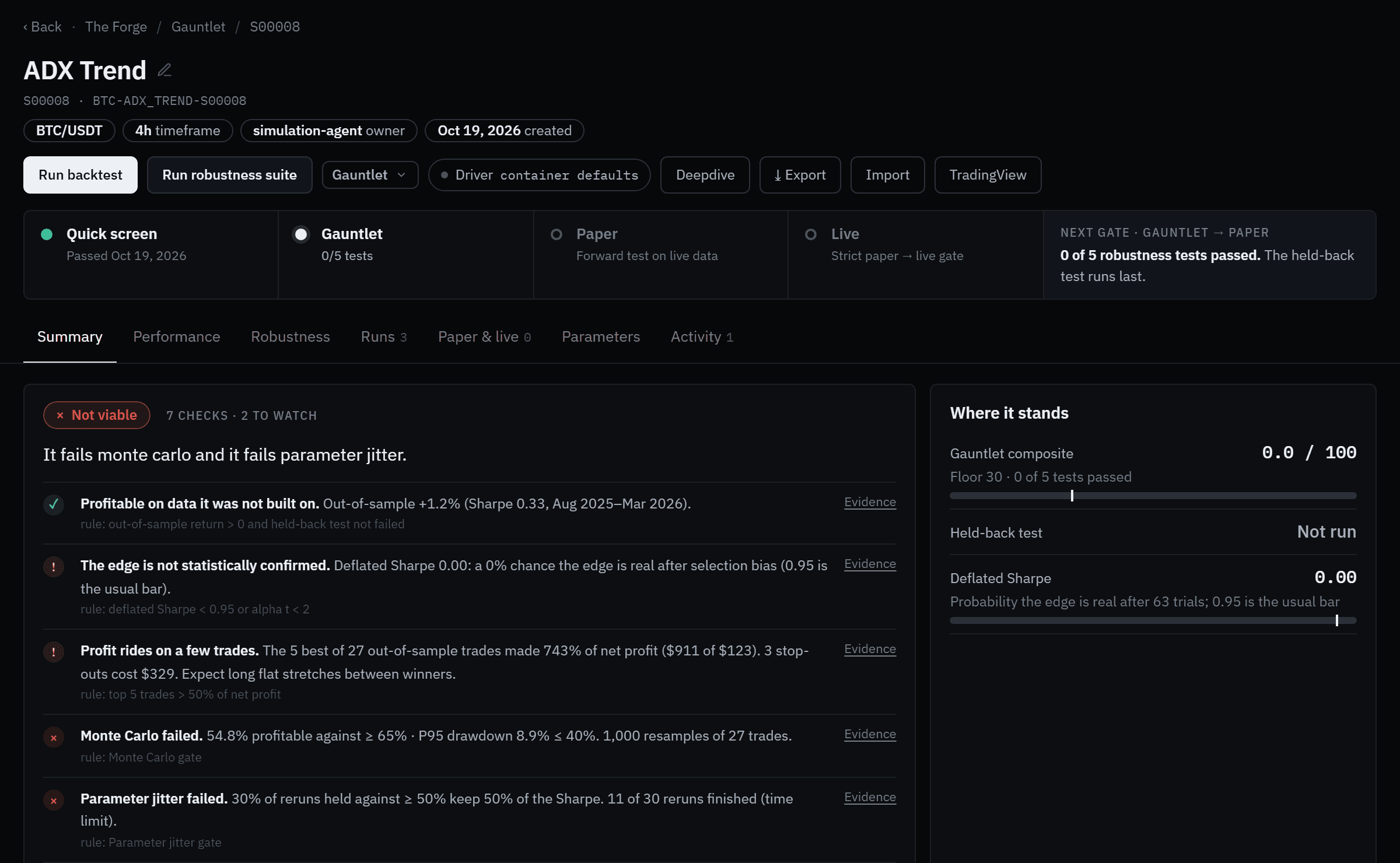 The Summary tab of a strategy that failed out of sample.
Tabs
| Tab | What it holds |
|---|---|
| Summary | The verdict and its findings, Where it stands (gauntlet composite vs floor, held-back test, deflated Sharpe, paper progress), the evidence ladder, growth of $X, attribution, the forward cone for paper, and the gate checklist with promote / archive buttons. |
| Performance | Statistics in-sample vs out-of-sample, trade returns, drawdown periods, monthly returns and every trade. |
| Robustness | The stress matrix, a card per test (walk-forward folds, Monte Carlo, parameter jitter, cost stress, regime split, held-back test, deflated Sharpe, breadth), the test runners with Run Full Suite, and Sensitivity (parameter heatmap, market grid). |
| Runs | Run the gauntlet on a window, edit gauntlet parameters, compare two runs, the gauntlet history (set a run as the Driver), and optimization. |
| Paper & live | Its forward record. |
| Parameters | Strategy parameters, what drives paper and live, the execution profile and contract fields. |
| Activity | Its lifecycle history. |
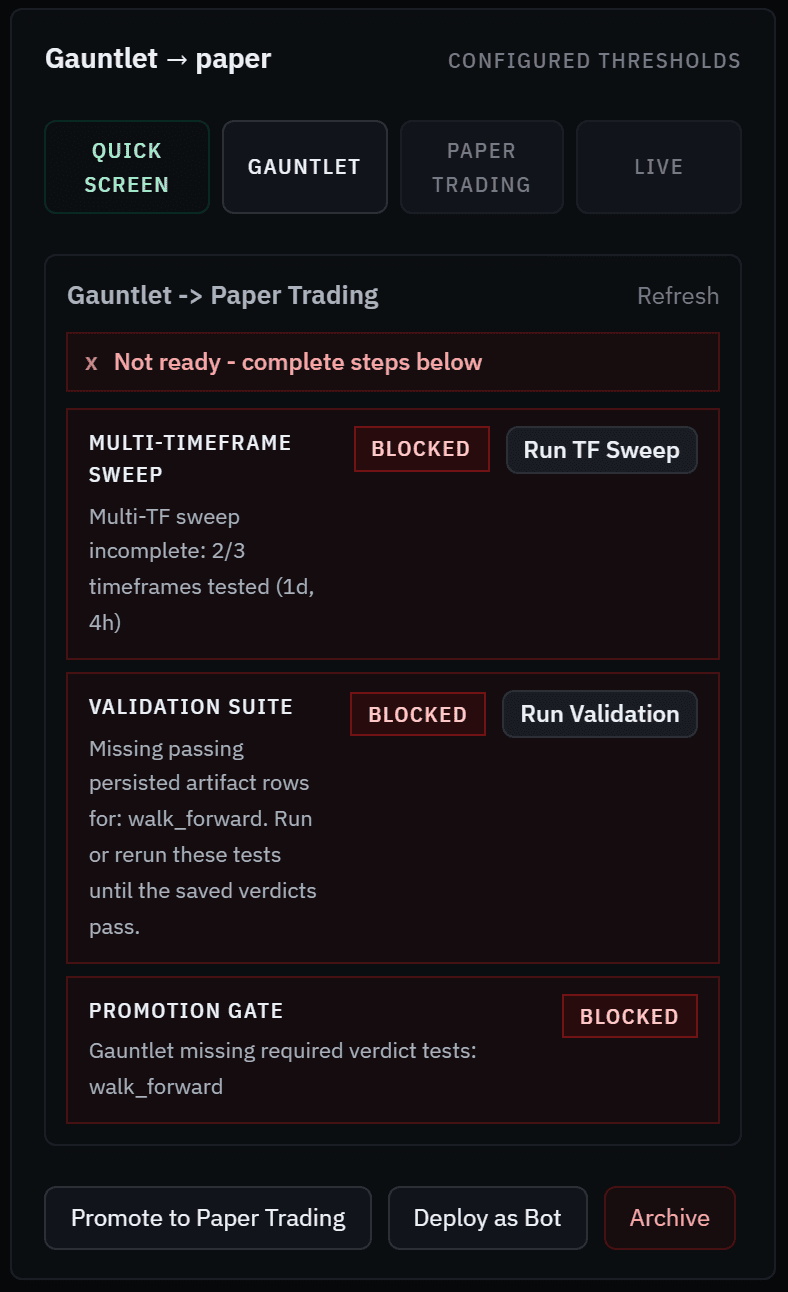 Every check shows the actual value against the requirement.
Changing a stage
Use the stage control in the header (or the gate card's Promote to … button). Pick a stage, add an optional reason and confirm. If a gate refuses a move to paper or live, the panel says why and offers Override gate & promote — logged, and separate from the mainnet hard gate, which nothing overrides. Going live also needs a notional ceiling and a typed GO LIVE; see Live trading.
A strategy holding open live trades can't be moved to a stage that doesn't manage live positions.
Stale results
If you change parameters after tests ran, the page warns that those verdicts describe the old configuration. Re-run to revalidate. PASS* on a walk-forward means it passed only after fold rescue.
Related
- The pipeline — stages and what moves strategies between them
- The gauntlet and promotion gates — every test and threshold
- Metrics — how each number is computed
Backtesting a strategy
Run any built-in or pipeline strategy on any market with Manual Backtest — what each field does when you leave it blank, why windows end at the holdout cutoff, and how to read the out-of-sample result without fooling yourself.
Paper trading
How paper trading works in Forven — strategies trading simulated $10,000 books on the live market feed — and every part of the Paper Trades desk.