Settings
The Settings hub at /settings — Home, Data, Lab, Trading, Portfolio, HyperLiquid, Notifications, System and Danger Zone — plus the save bar, the typed LIVE confirmation, range captions, the setup wizard, factory reset, approval modes and the operator profile.
Settings (/settings) is where you configure how Forven runs. The areas are listed down the left, and Search settings… finds any field in any area. Most changes apply on the engine's next check, usually without a restart.
Agent and model configuration is not here. Providers, keys, models and schedules are on the Agents page, under Setup and Schedules.
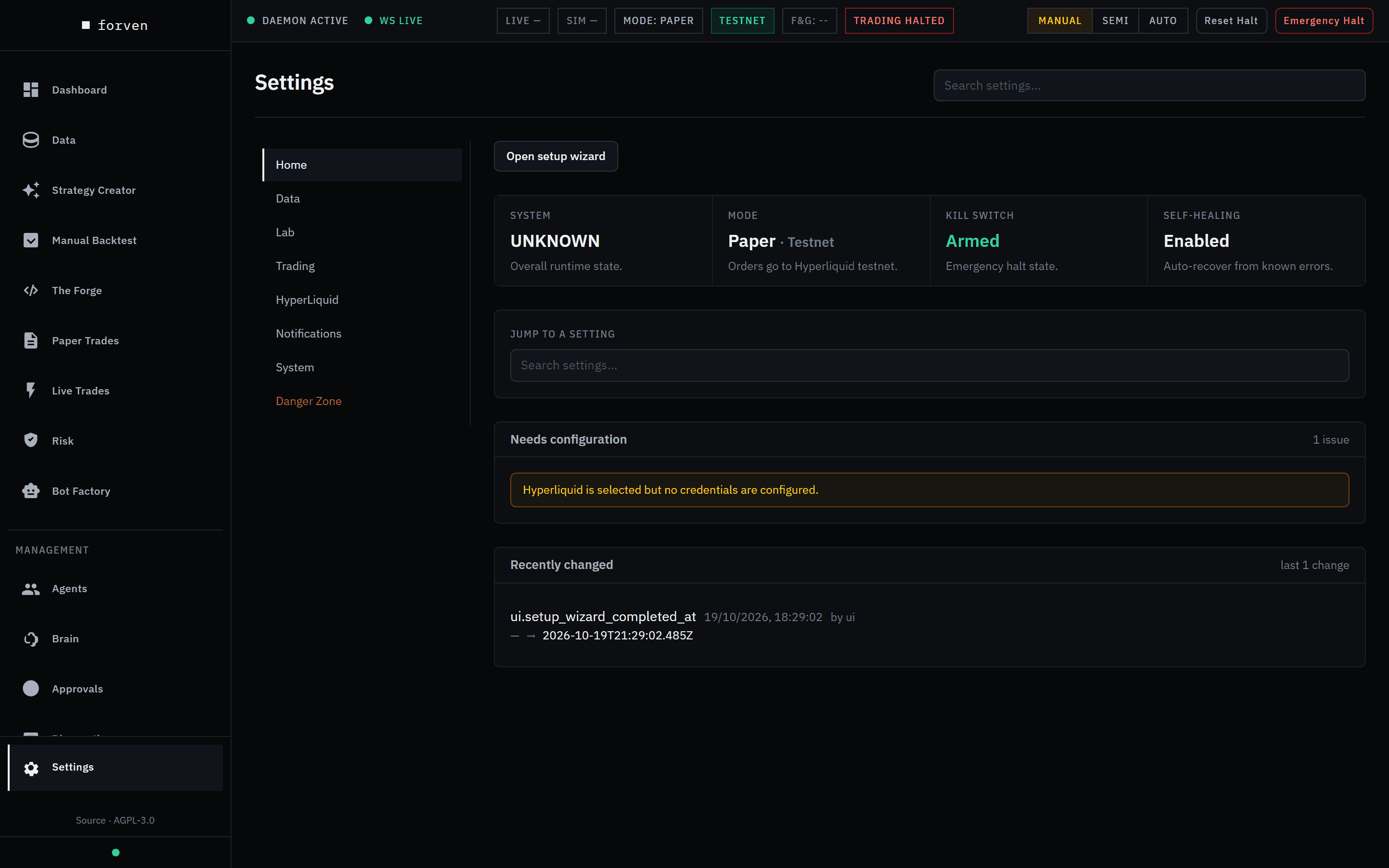 A fresh install. Needs configuration flags the missing Hyperliquid credentials.
Forven is research software. Settings tune how the lab runs and how trades are simulated; they don't predict outcomes, and nothing here is financial advice. The defaults are deliberately conservative. Change them with intent.
How Settings works
- Links to any field. Each area has an anchor (
/settings#trading), and#area/fieldIdscrolls to one field and focuses it, for example/settings#trading/risk.regime_gate_mode. - Every field explains itself. Under each field is its description and a caption with its Default, its Range for numbers, and its Setting ID. Type a value outside the range and an amber Must be … warning appears. Where the backend enforces the range, it adds The save will not keep this value.
- In force. When the engine uses a different value from the one you saved, for example because mainnet locks a limit tighter, a yellow In force line under the field shows the value actually used and why.
- Advanced sections are collapsed until you open them.
- Validated writes. The backend refuses unknown keys and out-of-range values with a clear error instead of dropping them silently.
The save bar
Edits are staged, not saved as you type. A bar at the bottom shows N unsaved changes with Revert all and Save all. Pending edits survive moving between areas, so you can stage changes across several areas and save once.
If you try to leave with unsaved edits, Forven asks Discard unsaved changes?: Stay on page or Discard & leave. Your browser also warns before a reload or close.
The notification switches and sidebar badges are the exception. They save as you click them.
Changes that affect real money
Three changes need a typed confirmation when you save:
- setting Trading mode to Live;
- turning Hyperliquid testnet off, so orders go to mainnet;
- turning on Allow automatic go-live, so strategies can go live without your typed GO LIVE.
The dialog Save changes that affect real money? lists every pending change and asks you to type LIVE before Save changes.
The setup wizard
On a fresh install the setup wizard opens by itself: Welcome, Trading basics, AI providers, Notifications, Done. Until it is finished, Settings shows Wizard incomplete with Complete onboarding. Reopen it any time with Open setup wizard on the Home area. See First launch & setup.
The areas
Home
Daily controls, search and recent changes.
- Tiles: System; Mode, for example Paper · Testnet with Orders go to Hyperliquid testnet., or on mainnet whether mainnet orders are armed; Kill switch, Armed or TRIPPED, which opens Risk; and Self-healing.
- Jump to a setting: the same search, in the page.
- Needs configuration: anything missing, for example Hyperliquid is selected but no credentials are configured.
- Recently changed: the last few setting changes, with who changed them.
Data
The data engine, freshness, collection, storage and the research universe. This is the configuration side of the Data page.
| Section | What it sets |
|---|---|
| Data Engine | The local data engine. It is on by default. |
| Freshness SLAs | How current each tier's series must be: missed bars and a floor, per tier. |
| Collection | The automatic collector's budget: how often it runs and how many requests per venue. |
| Storage | Trash retention (7 days), the Free-disk floor below which downloads stop (5 GB), and how long to keep the revision log (180 days). |
| Research universe | Which perps get deep history, and how many at each depth. Downloads never start on their own; the Data page has the button. |
Lab
How strategies are judged and researched:
| Section | What it sets |
|---|---|
| Pipeline stance | The stance preset that sets every gate in one move. Editing a knob below flips you to Custom. |
| Door into paper | Which checks keep a strategy out of paper. Research door (default) admits a strategy that isn't broken or clearly losing and records the selection-bias checks for the live gate; Strict paper enforces all of them before paper. Also where the held-back test runs (Paper to live by default). See Promotion gates. |
| Paper pool | How many strategies paper-trade at once (40; 3 per coin, 10 per family) and when a losing paper strategy is retired automatically. |
| Quick Screen (Step 1) | The first-pass screen before the gauntlet: the Quick-screen rule (Fair sample by default, or Strict quick screen), the widest window it may grow to (1,460 days) and its floors. |
| Robustness Gauntlet (Step 2) | Robustness, trade-count and Sharpe thresholds for the gauntlet. |
| Paper to Live gates | What a paper strategy must prove to go live: the Live gate evidence rule (Sequential test by default — at least 20 closed trades and 30 days in paper, then forward must back the backtest — or the older Fixed floors), whether the breadth test is required (on), and Multi-coin paper strategies (on, up to 6 coins). |
| Safety floors | Absolute rails clamped onto the gates. The live_* floors guard real money. |
| Pipeline capacity | Caps on how many strategies the unattended promotion lanes hold. |
| Live graduated | Controls for live strategies: Live decay kill switch (30%) and the Live-graduation recommender (off). |
| Pipeline testing mode | Bypasses gates for end-to-end testing (advanced). |
| Research | Idea sources, candidate screening and the research holdout behind the held-back test (one quarter by default). |
| Gauntlet defaults | The default backtest window (730 days) and the default symbol, timeframe, fees, slippage and funding for ad-hoc runs. |
| Per-stage backtest windows | A lookback per automated stage; 0 inherits the default window. |
| Walk-forward defaults | Fold count and train ratio. |
Trading
Mode, capital, risk and regime gating. Set the limits here; watch them on Risk. See risk controls for what each one does.
| Section | Key fields (defaults) |
|---|---|
| Exchange connection | Active exchange: Hyperliquid, the only venue for orders. |
| Mode & capital | Trading mode (Paper; choosing Live is refused by this build) and Initial capital (10,000). |
| Position sizing | Max risk per trade (10%), Max concurrent positions (live) (5), Max leverage (mainnet) (3×; it can only be lowered), and liquidation-distance warnings. |
| Loss limits | Max daily loss (2%), Max drawdown (30%), the cooldown after a loss, the live portfolio budget (Live max total open risk, 5%), exposure caps, Live max per-wallet margin (80%), the liquidity guard, and the advanced Allow automatic go-live (dangerous) (off). |
| Regime gating | Direction×regime gate mode (Observe), the regimes it blocks, and the separate Strict regime gating with its own minimum confidence. See the regime gate. |
| Risk advanced | Rarely changed overrides (advanced). |
When the network is mainnet, a banner explains that some limits are locked tighter for real money, and the affected fields show an In force line.
Portfolio
Only shown while the experimental portfolio layer is on (System → Experimental features → Portfolio layer). This is the book above the individual strategies, and everything here proves itself on paper before it touches live sizing.
- Measured-risk allocator: per-strategy risk multipliers from realized volatility and correlations, optional book volatility targeting, and a separate arm before it scales live sizing. Paper books are never scaled.
- Universe books: Universe paper books runs the universe books as forward paper books. Paper only.
- Funding-carry basket: a forward-marked paper basket. Paper only; there is no live basket execution.
HyperLiquid
All Hyperliquid setup in one place. See HyperLiquid integration.
- Wallets & sub-accounts: the master wallet's perp and spot balances, moves between spot and perp, and named sub-accounts. You can create one, register an existing one, fund or withdraw, or remove it. Every money move asks you to confirm and, on mainnet, says This moves real funds on Hyperliquid mainnet.
- Credentials & network: Hyperliquid wallet address, Hyperliquid API address, Hyperliquid API secret, Hyperliquid testnet (on) and Use cross margin (live). Secrets are encrypted at rest.
- Direction books (long/short sub-accounts): route live longs and shorts to separate sub-accounts (off).
Notifications
- Where notifications go: a Pop-up and a Discord switch for each kind of event, with Send a test and Reset to defaults.
- Sidebar badges: which sidebar pages show a count.
- Discord transport: Discord bot token and Discord webhook URL.
- Delivery policy: Discord delivery, On or Off.
See Notifications.
System
| Section | What it sets |
|---|---|
| Software updates | Check for updates and Update & restart. See updating Forven. |
| Experimental features | Features that are off by default. Turning one on reveals its pages, settings and jobs. Portfolio layer adds the Portfolio area and the Universe page. |
| Data source API keys | The Polygon.io key. |
| Remote engine | Offload backtests to a remote engine process. |
| Throughput | One dial, Trickle / Conserve / Balanced / Max, over agent cadences and how many strategy-creation tasks run per day (4, 12, 40 and 120). Balanced is the default; Conserve is the fix for provider rate limits. Also the Daily agent registration cap (120 strategies a day; 0 = no cap). See cost controls. Advanced. |
| Resource tuning | Worker counts, claim limits and other backpressure knobs (advanced). |
| Assistant | Limits for the in-app chat assistant, such as tool rounds per reply. |
| Health & telemetry | Health checks, alert thresholds and regime detection. |
| Database maintenance | Retention windows and the optional daily VACUUM. See maintenance. |
Danger Zone
Factory reset wipes the data categories you don't keep. Tick Keep … for each one to keep: Pipeline & Strategies, Agent Tasks & Audit, Trade History, Activity Log, AI Memory, Scheduler State, Settings, API Keys & Credentials, and Workspace Documents. Only API Keys & Credentials is kept by default. The page lists what it will wipe as you choose.
Wipe & factory reset… opens Confirm factory reset. Type FACTORY RESET exactly, in capitals, and click Wipe everything.
Irreversible
A factory reset can't be undone. Back up your Forven home folder (FORVEN_HOME, default ~/.forven) first.
Approval modes (/settings/approvals)
The policy for which actions need your sign-off has its own page, reached from Approvals → Configure approval modes. Set a Default mode, a Default deadline (hours) and an Escalation owner, then add Per-category overrides. Each mode is one of:
- manual: you always review;
- smart: an auxiliary model auto-approves only what it classifies as safe with high confidence;
- off: auto-approve. Only allowed for low-stakes categories.
The Off allowlist is enforced by the server, so the page can't switch off a gate the backend refuses to switch off. Whatever these modes say, going live still needs your typed GO LIVE, unless you turn on Allow automatic go-live under Trading.
Operator profile (/settings/profile)
Your operator profile gives the Brain your context at every chat: identity and time zone, starting capital, risk per trade, exchange and asset universe, risk appetite (Conservative, Balanced, Aggressive), response style, quiet hours, and Rules, invariants such as no live without a backtest. Your first save creates USER.md in the workspace folder of your Forven home.
Nothing in the app links to this page; open /settings/profile directly.
Change a setting safely
Find the field
Open /settings and pick an area, or search for the field by name.
Edit and review
Check each field's range and default as you go. The save bar counts the pending changes. Review anything under Trading, Safety floors or HyperLiquid twice.
Save
Save all. If the backend refuses a value, the save bar says why and nothing is written. Real-money changes ask you to type LIVE first.
Check the effect
Look where the setting shows up: Risk for limits, the pipeline board for gates. Look for an In force line under the field.
Settings, config.json and the control strip
- Settings is the everyday editor for the local settings store.
- config.json holds lower-level configuration; environment variables override both. See environment variables.
- The control strip at the top of every page holds what you flip often: the system mode, Reset Halt and Emergency Halt. See operations.
Caveats
- Nothing applies until you save, except the notification switches.
- Live limits are real-money limits. Paper is the supported mode, but the values under Trading and the
live_*safety floors are what a live account obeys. - Danger Zone actions are irreversible. Back up first.
Related
- Agents: providers, models and schedules
- Promotion gates: what the Lab settings control
- Risk controls: what the Trading settings control
- Notifications: the notification switches in detail
- Configuration reference:
config.json, precedence and key groups
AI Drop Zone
Integrations → AI Clients: connect Claude Code, Cursor, Codex or any MCP or HTTP client so it can drive the lab, then watch its work live — grouped into automatic sessions (ADZ-####) you can review afterwards.
The research daemon
The autonomous background loop: the strategy-creation loop writes ideas and builds strategies, the pipeline jobs drive them through the gauntlet into paper, and the process daemon keeps prices and risk live underneath.